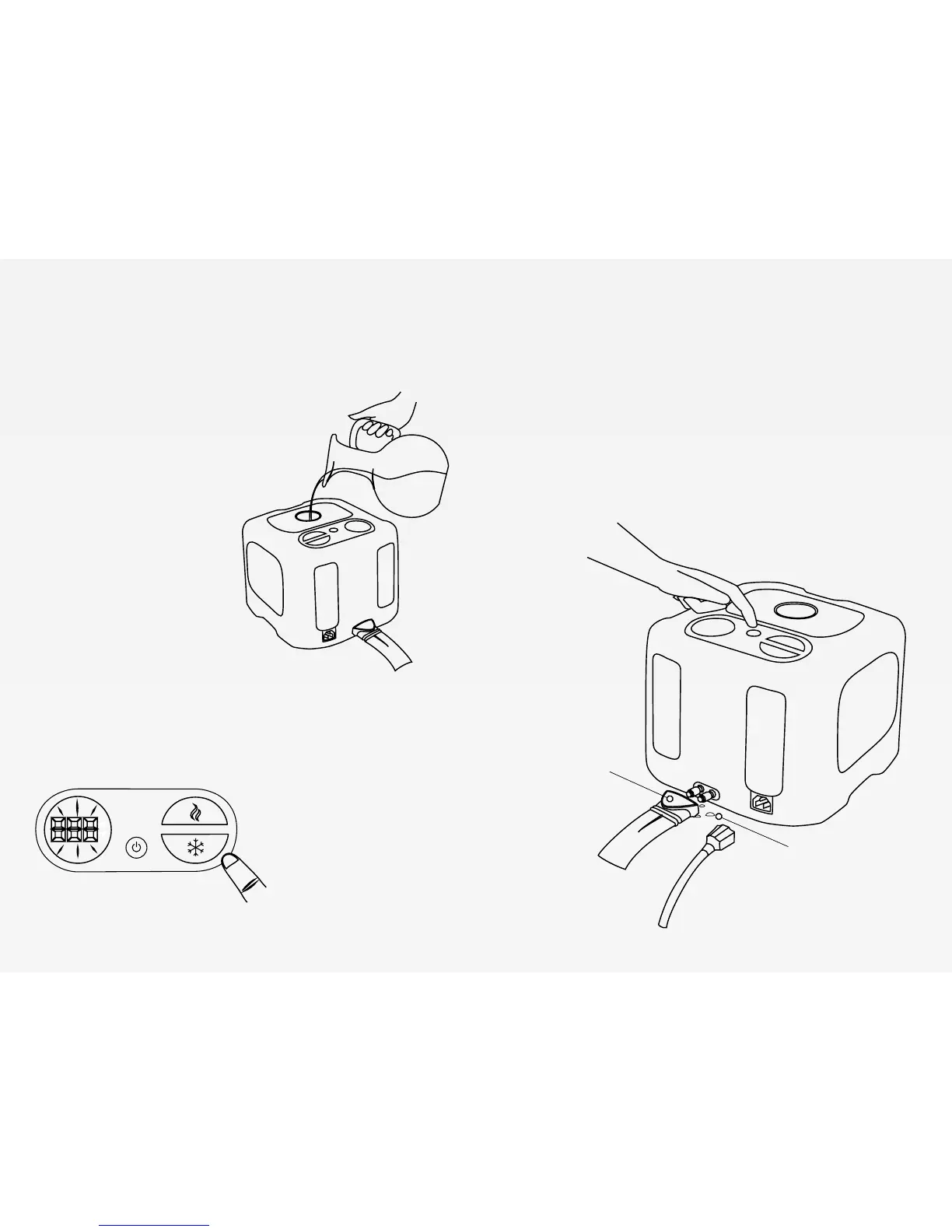
3. Fill Your Cube
4. Control Your Bed
5. Power it On/Off
Before turning your cube on,
unscrew the top cap and ll
with distilled cwater until full.
Touch the power button
to turn it on. You will hear
beeping and the pump will
start to ll the pad.
Slowly add water until the
cube is full and the add wa-
ter indicator light turns o.
Replace cap.
Press the cooler button to
lower the set temperature,
and you will see the num-
bers lowering.
Press the warmer button to
raise set temperature.
The numbers will blink 3
times to show temperature
adjustment success.
To turn the cube o, touch the power button. The display
should turn o, but the fans may remain running for a
short bit after powering o the cube.
Unplug the cube if you will not be using it for 24 hours.
Blue Release
Button
A few water drops are
to be expected when
connecting and dis-
connecting.


 To Next Page