Chord Electronics
Mojo 2 | User manual
17
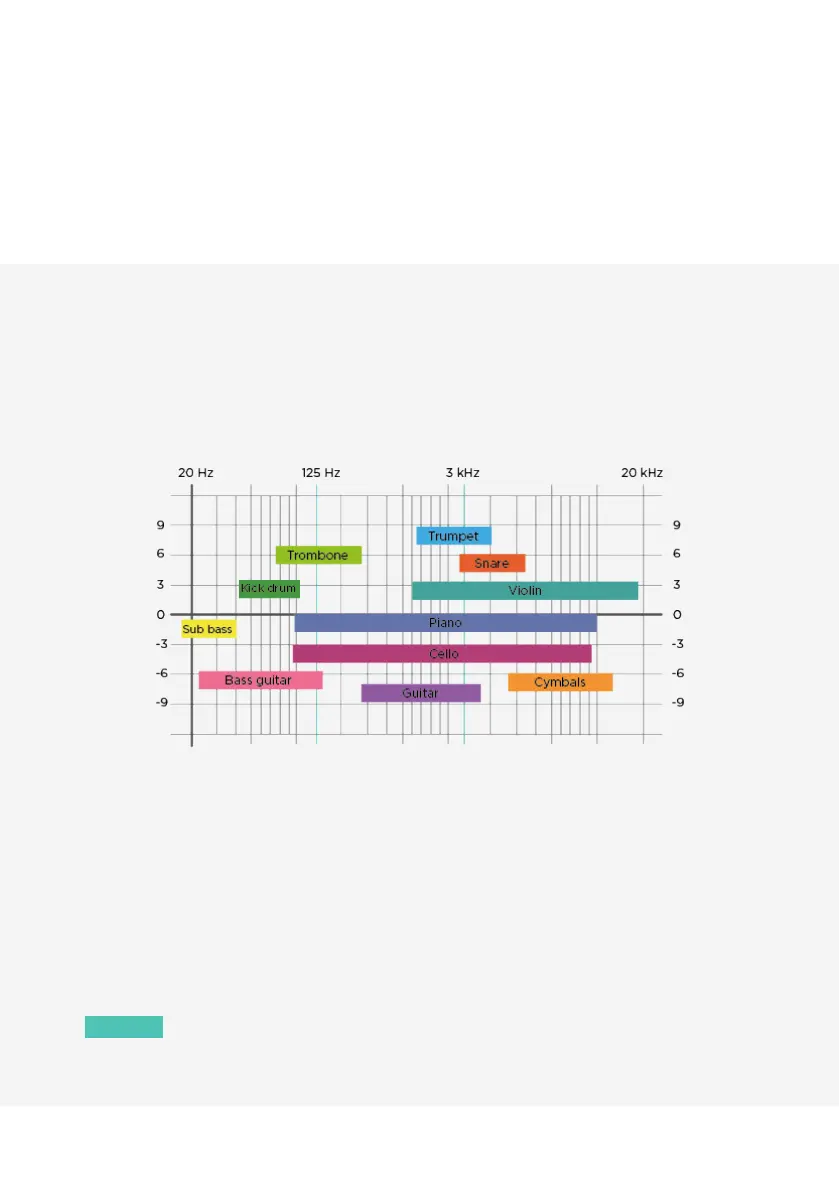
Graph 3 overlays common musical instruments on the frequency spectrum, in a very broad sense,
demonstrating how the prominence of instruments might be aected when making adjustments using the
DSP tone controls. It is not definitive and is a guide for experimentation only.
Graph 3
7.5 Menu: crossfeed
Mojo 2 oers three levels of crossfeed to improve spatial eects for a more ‘speaker-like’ sound-stage when
using headphones. Press menu once (menu button will show blue), then press the volume up ‘+’ button to
cycle between the four available options: red: minimum; green: moderate; blue: maximum; unlit (crossfeed o).
Once chosen, the selection will be remembered and Mojo 2 will automatically exit the menu setting in
approximately 10 seconds. Alternatively, press and hold menu to exit the menu immediately.
NOTE
When changing crossfeed, the ‘-’ button also illuminates to show the button brightness level
(white: normal; unlit: low) as per section 6.7.


 To Next Page