Operation
4-29
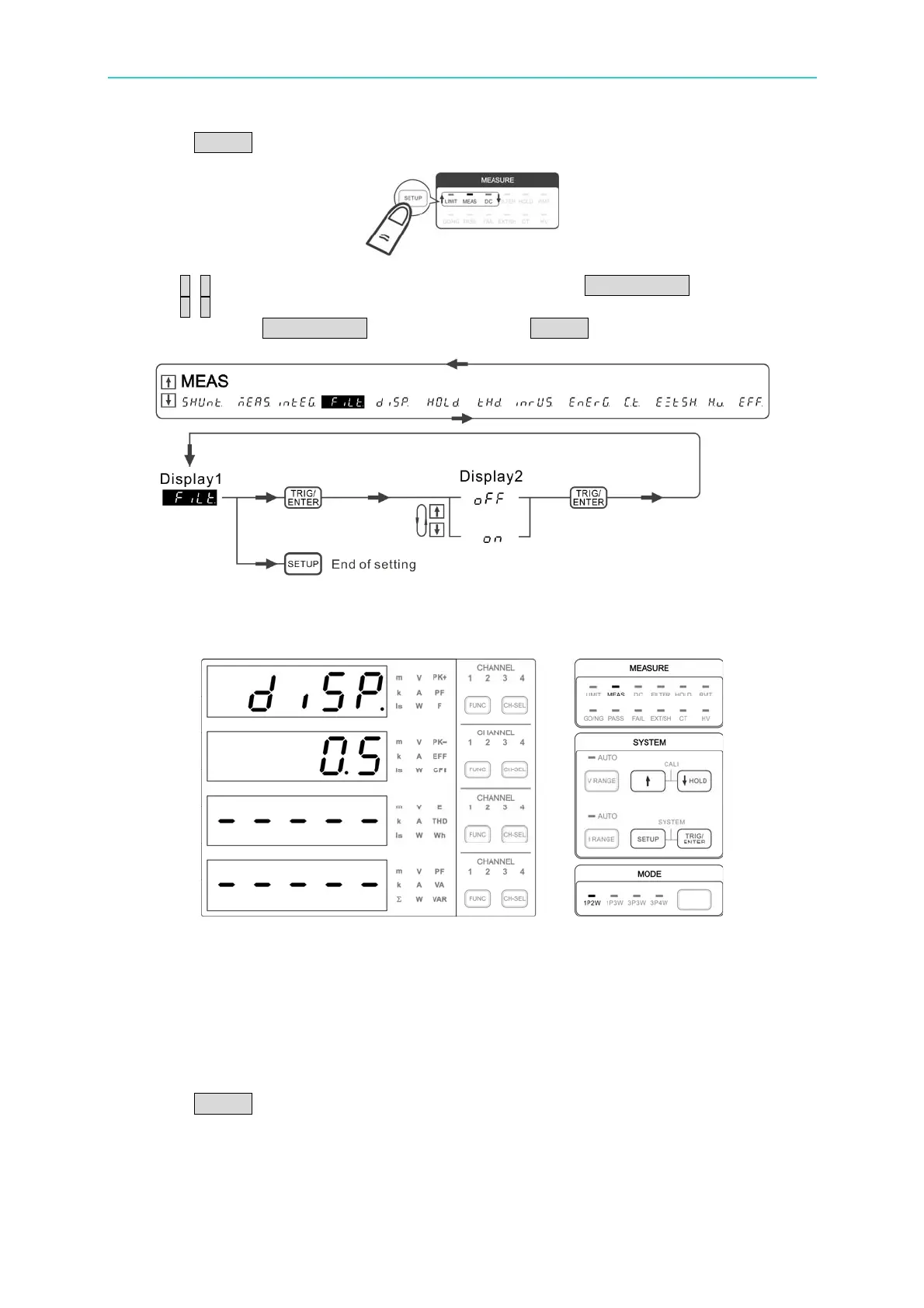
1. Press SETUP to select Meas. The Meas indicator is on indicating it is in Meas menu.
2. Use ↑, ↓ to select FiLt in the 1
st
display window and press TRIG/ENTER to confirm it.
3. Use ↑, ↓ to select ON or OFF in the 2
nd
display window to enable or disable the digital
filter and press TRIG/ENTER to confirm it. Press SETUP to return to the main menu.
Figure 4-44 Process for Setting FILTER
DISP
Figure 4-45 DISPLAY Refresh Rate Setup Screen
The 66203/66204 Digital Power Meter is able to adjust the display refresh rate for the
measured value. The rates for adjustment are 0.25, 0.5, 1.0 and 2.0 (unit: second). The
default setting is 0.5 second. The display refresh rate can be increased if the signal under
test turns faster.
Following is the procedure to set the parameter:
1. Press SETUP to select Meas. The Meas indicator is on indicating it is in Meas menu.



 To Next Page