Digital Power Meter 66203/66204 User’s Manual
4-30
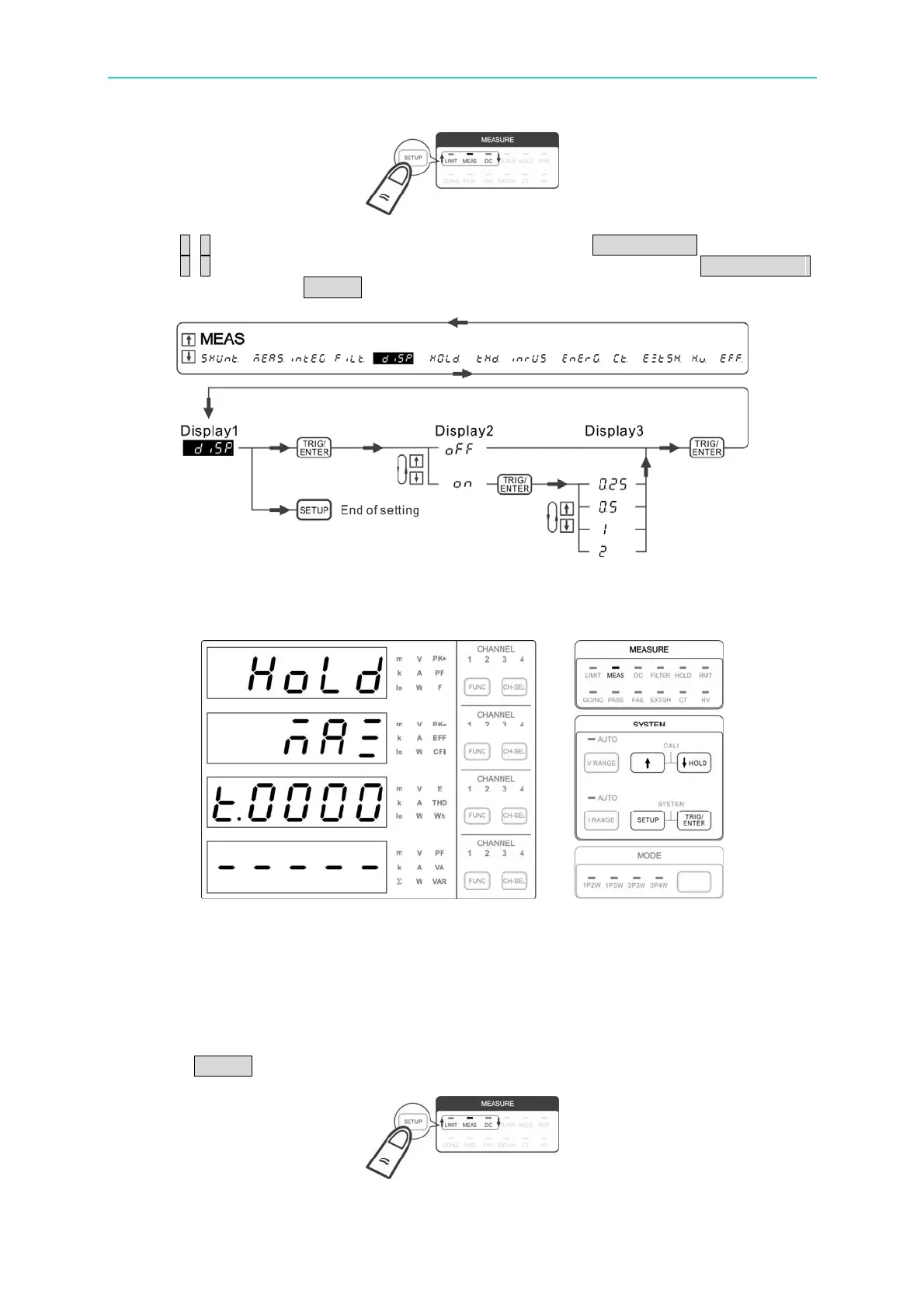
2. Use ↑, ↓ to select diSP in the 1
st
display window and press TRIG/ENTER to confirm it.
3. Use ↑, ↓ to select the rate for refresh in the 2
nd
display window and press TRIG/ENTER
to confirm it. Press SETUP to return to the main menu.
Figure 4-46 Process for Setting DISPLAY Refresh Rate
HOLD
Figure 4-47 HOLD Setup Screen
The 66203/66204 Digital Power Meter has hold function that is triggered by Stop, Max and
Min three kinds of conditions. The measured values can be hold are V, Vpk+, Vpk-, A,
Apk+, Apk-, W, VA, VAR, PF, F, Cfi, VTHD, ATHD, EFF, Vdc, Idc and Pdc.
Following is the procedure to the parameter:
1. Press SETUP to select Meas. The Meas indicator is on indicating it is in Meas menu.



 To Next Page