Digital Power Meter 66203/66204 User’s Manual
4-34
5. Last, the 2
nd
display window shows level, use ↑, ↓ to set the trigger level in the 3
rd
display window with the level unit of Ampere and press TRIG/ENTER to return to the
main menu of 1
st
display window.
6. Press SETUP to return to the main menu.
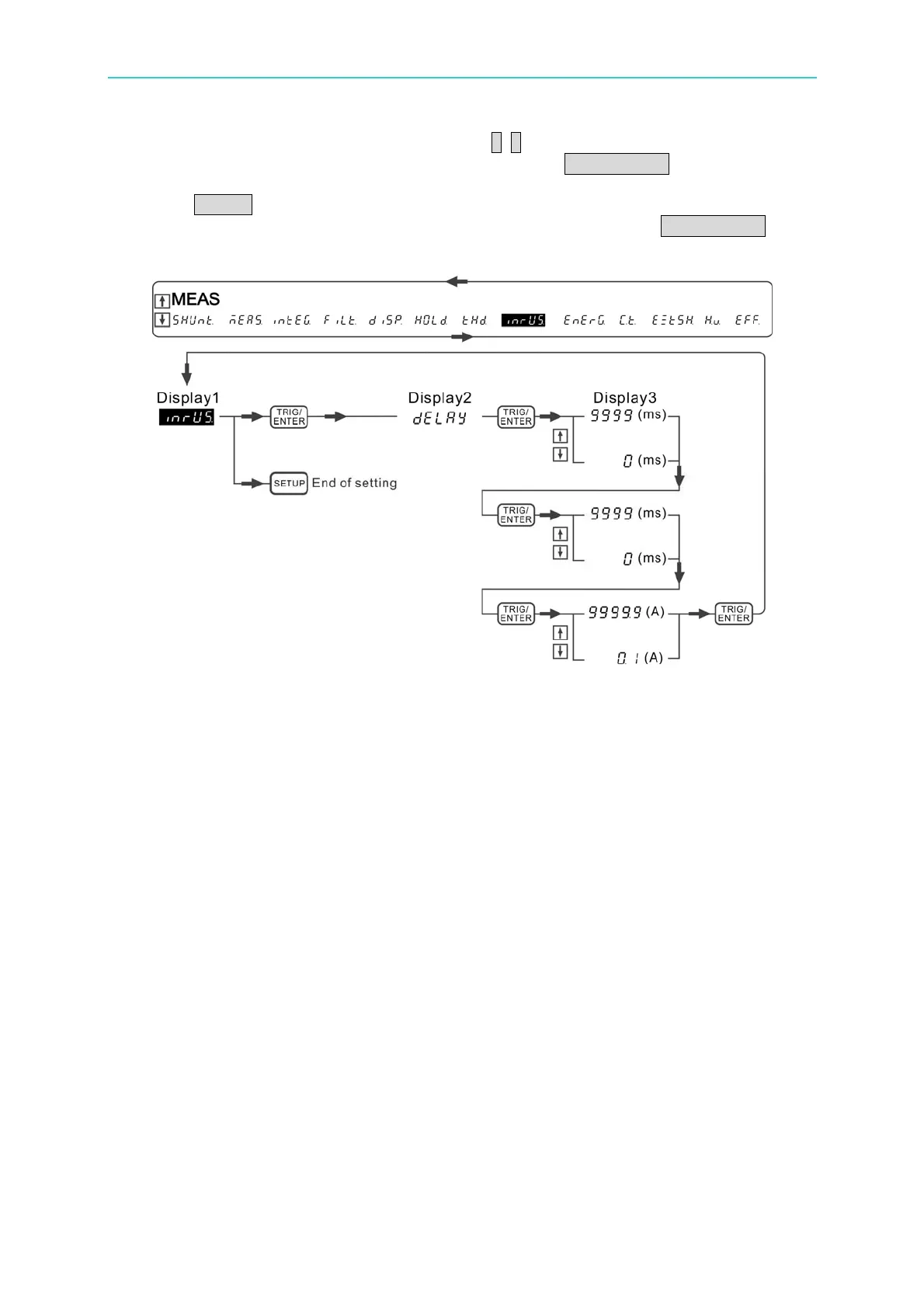
7. Select any Is indicator within the basic function indicators and press TRIG/ENTER to
start measuring the inrush current.
Figure 4-52 Process for Setting INRUSH CURRENT
Example:
Assuming the inrush current parameters are set as below:
(Trigger) Level: 1A
(Measurement) Delay: 0 ms
(Measurement) Time: 10 ms
It can see from the figure below that after the current exceeded the triggered current for 1A,
the power meter starts to measure the inrush current for 10ms as the delay time was set to 0
second. The measured maximum inrush current is about 7A.



 To Next Page