Enabling And Disabling ParkSense
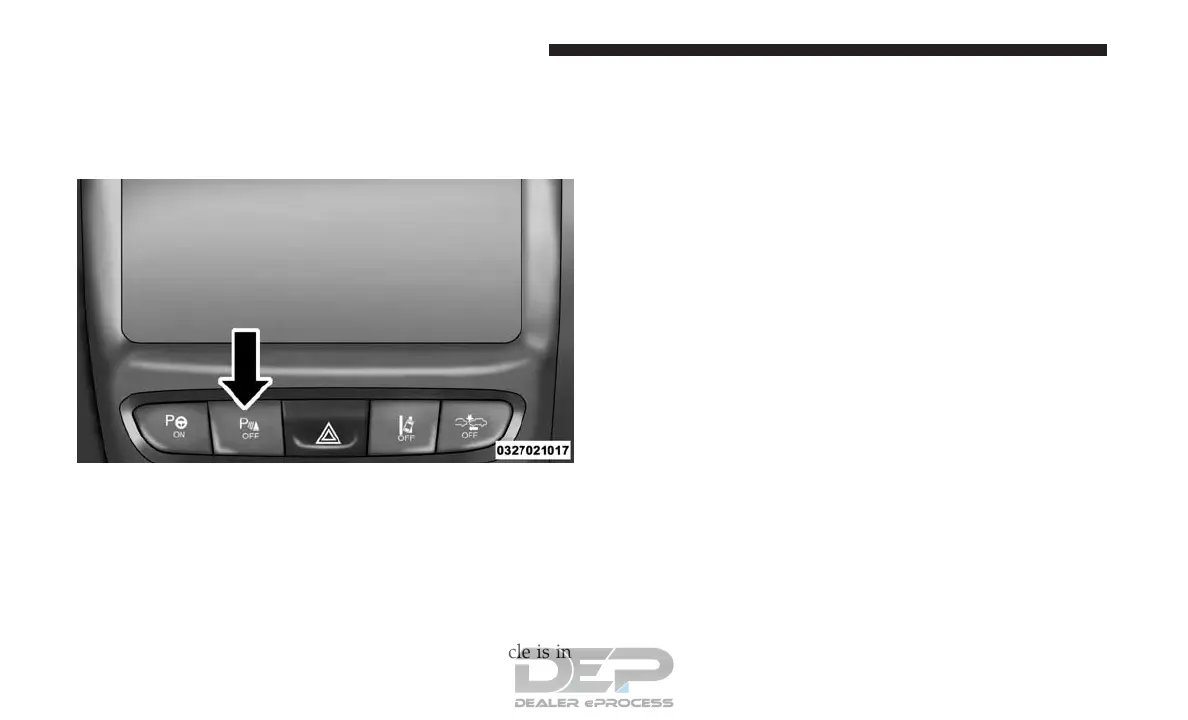
ParkSense can be enabled and disabled with the ParkSense
switch, located on the switch panel below the Uconnect
display.
When the ParkSense switch is pushed to disable the system,
the instrument cluster will display the “PARKSENSE OFF”
message for approximately five seconds. Refer to “Instru-
ment Cluster Display” for further information. When the
gear selector is moved to REVERSE and the system is
disabled, the instrument cluster display will display the
“PARKSENSE OFF” message for as long as the vehicle is in
REVERSE.
The ParkSense switch LED will be on when ParkSense is
disabled or requires service. The ParkSense switch LED
will be off when the system is enabled. If the ParkSense
switch is pushed, and requires service, the ParkSense
switch LED will blink momentarily, and then the LED will
be on.
Service The ParkSense Rear Park Assist System
During vehicle start up, when the ParkSense Rear Park
Assist System has detected a faulted condition, the instru-
ment cluster display will actuate a single chime, once per
ignition cycle, and it will display the “PARKSENSE UN-
AVAILABLE WIPE REAR SENSORS” or the “PARKSENSE
UNAVAILABLE SERVICE REQUIRED” message. Refer to
“Instrument Cluster Display”. When the gear selector is
moved to REVERSE and the system has detected a faulted
condition, the instrument cluster display will show the
⬙PARKSENSE UNAVAILABLE WIPE REAR SENSORS⬙ or
⬙PARKSENSE UNAVAILABLE SERVICE REQUIRED⬙ mes-
sage for as long as the vehicle is in REVERSE. Under this
condition, ParkSense will not operate.
If “PARKSENSE UNAVAILABLE WIPE REAR SENSORS”
appears in the instrument cluster display make sure the
outer surface and the underside of the rear fascia/bumper
ParkSense Switch
178 UNDERSTANDING THE FEATURES OF YOUR VEHICLE















 To Next Page