Network Setup
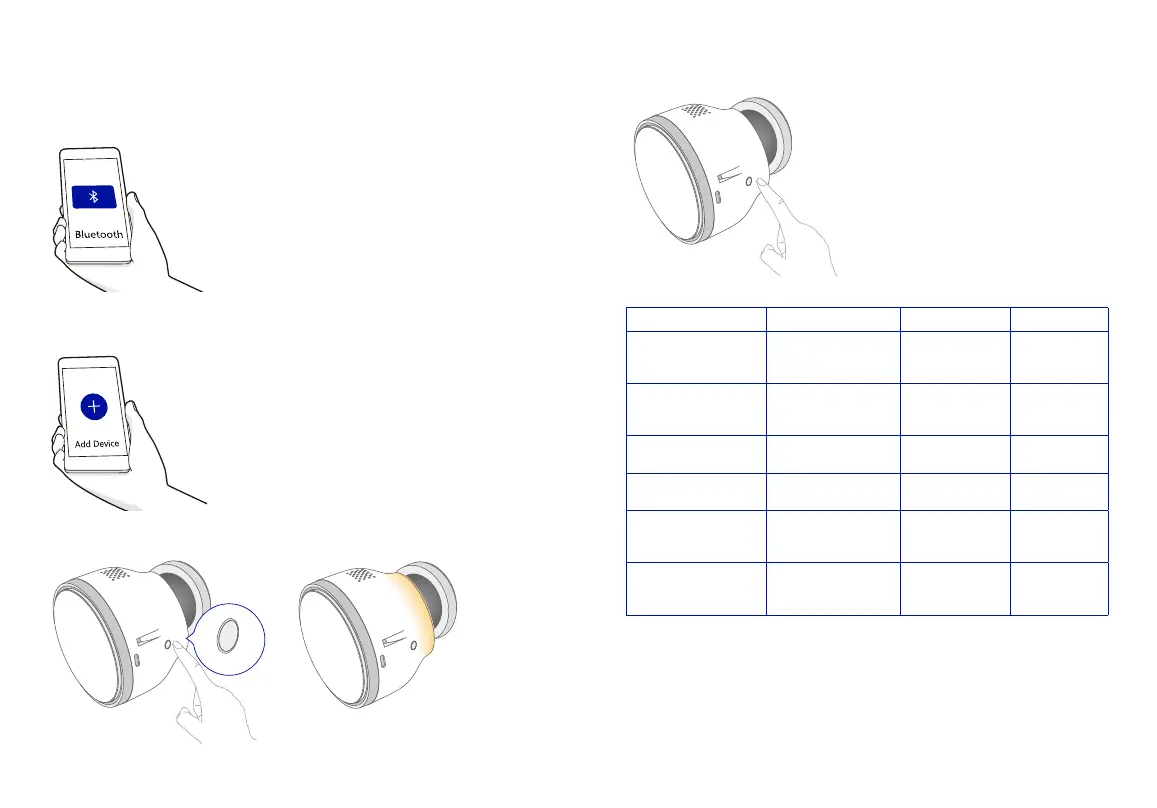
Bluetooth: Select Bluetooth toggle to turn it on, it will automatically search for the device.
Tap to add it to your home Wi-Fi network.
Magnet base
Charging port
Light
Loudspeaker
Wi-Fi AP mode: Tap Add Device or “+”in the upper right corner, then select DML-100 under
“Security” .
Magnet base
Charging port
Light
Loudspeaker
Press and hold the Conguration Button for 3 seconds to power on the device, wait for the
device to complete a 40-seconds self-test until the indicator light gradient ashes.
Magnet base
Charging port
Light
Loudspeaker
Magnet base
Charging port
Light
Loudspeaker
Short press the Conguration Button 3 times, the device will enter the WiFi conguration
state. The breathing light goes off to indicate the conguration is successful.
Magnet base
Charging port
Light
Loudspeaker
Operation Light Status Meaning Prompt Tone
Press and hold the
conguration button for
3 seconds
On
Sensor is powered
on
Power on tone
Press and hold the
conguration button for
3 seconds
Off
Sensor is powered
off
Power off tone
/
Flash on and off for 40
seconds
Device self-test /
Press the conguration
button 3 times
Gradient ashing
Device is under
conguration state
Beep once
/ Gradient ashing off
Successfully
connected to the
network
Beep twice
Press the conguration
button 5 times
On for 1 second then
gradient ashes
(conguration mode)
Device reset Long beep once
Note: Deleting the sensor on the APP while it's online will also reset it.


 To Next Page