3 4
Remote Control
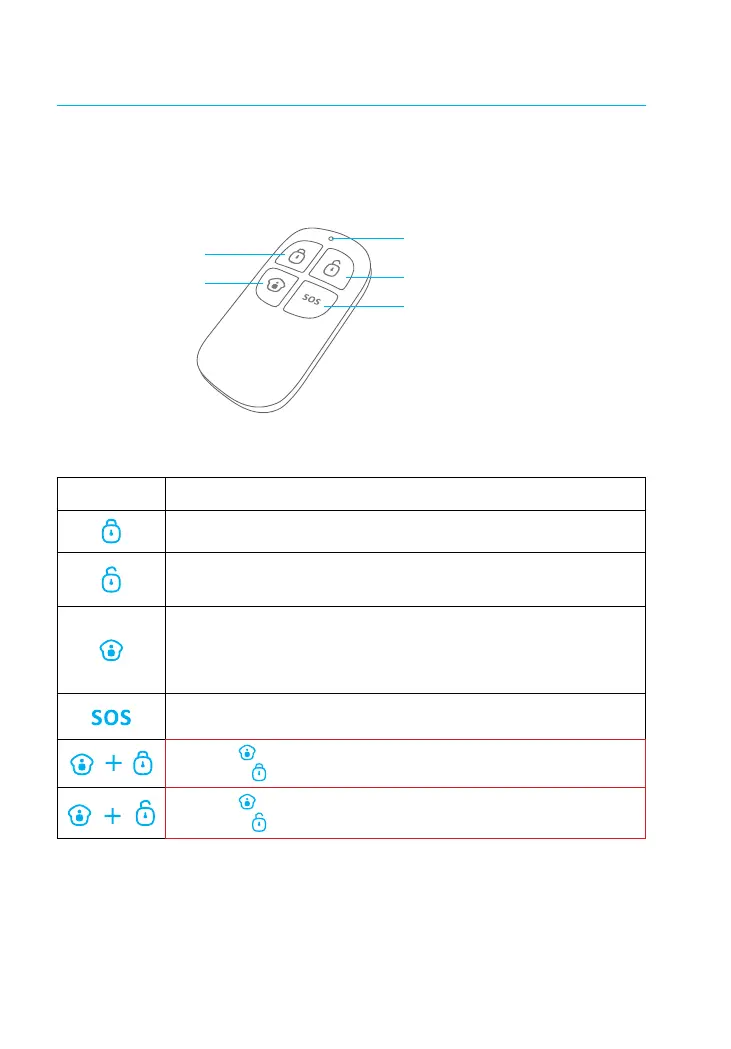
The remote control can be used to Arm (Away Mode), Home Arm, and Disarm the
system. It can also be used to trigger an emergency alarm (SOS) manually.
Disarm
Home Arm
(Part Arm)
SOS Button
Arm (Away Mode)
Status Indicator
Disarm
SOS Button
Home Arm
(Part Arm)
Button System Status
Sets the system to Arm (Away mode). Set to this mode when the property is
unoccupied.
Sets the system to Disarm mode. No sensors will trigger the alarm.
Note: When system is set to ‘Disarm’, all re, smoke, and gas leakage sensors (purchased
separately) will remain active as they are factory set to 24-Hour Zone
Sets the system to Home mode. Sensors that are set to the Disarmed Zone
will not be Armed while all the others will be Armed. This mode allows a
select set of sensors (for example, door/window contacts) to be Armed,
allowing the occupier freedom of movement within the property.
The SOS Button will trigger the alarm and send an alert notication to
registered users regardless of the hub mode.
Press the [ ] button. After the indicator on the remote control blinks
once, press [ ] button within 3 seconds to mutely arm the system.
Press the [ ] button. After the indicator on the Remote Control blinks
once, press [ ] button within 3 seconds to mutely disarm the system.



 To Next Page