KR series(6-10kVA)user’s manual
- 20 -
◆ If UPS are placed at location under 0℃ too long, please turn on the UPS before temperature above 0℃ for more
than 2 Hours.
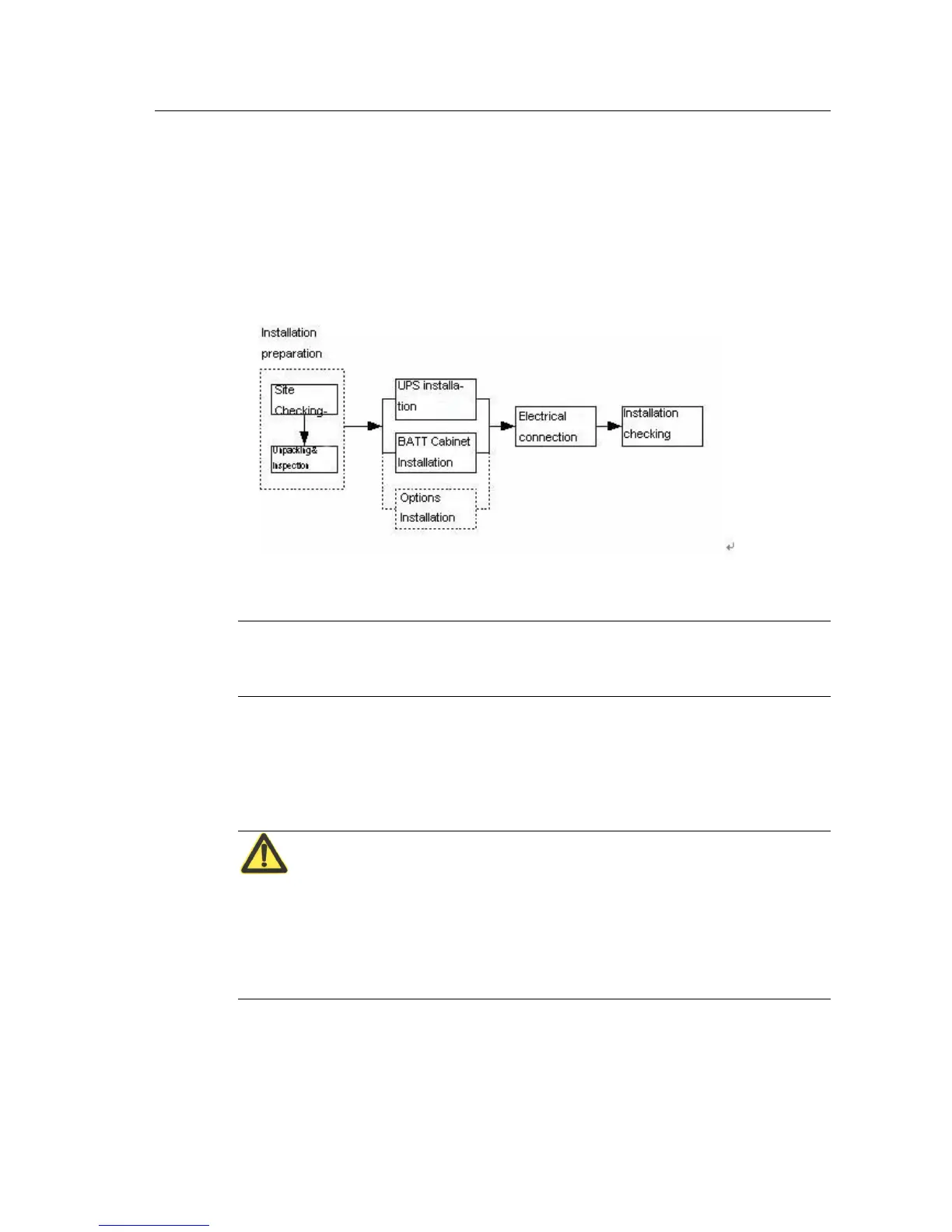
4.2 Installation process
Installation process for KR Series (6&10kVA),please see Fig.4.2-1
Fig.4.2-1 installation chart for UPS system
Note:
Tested and installed only by manufacturers or authorized engineers.
4.3 Installation preparation
4.3.1 Checking the installation site
Attention:
Before installing UPS, please ensure sites and environment meet basic conditions prescribed in
this chapter to ensure UPS running safely and normally. If sites not reach basic conditions,
please reconstruct accordingly. Only after site meet basic requirements that UPS can be
installed.
4.3.1.1 Environment Requirement
Ambient temperature
Relative humidity: 0%RH~95%RH, no condensation;
Cooling mode: air cooling;


 To Next Page