EasyManua.ls Logo

Chuphotic KR6000 - 4.9.2 Wire Connection of Parallel System

Chuphotic KR6000
47 pages
Print Icon
To Next Page IconTo Next Page
To Previous Page IconTo Previous Page
Loading...
KR series6-10kVAusers manual
- 27 -
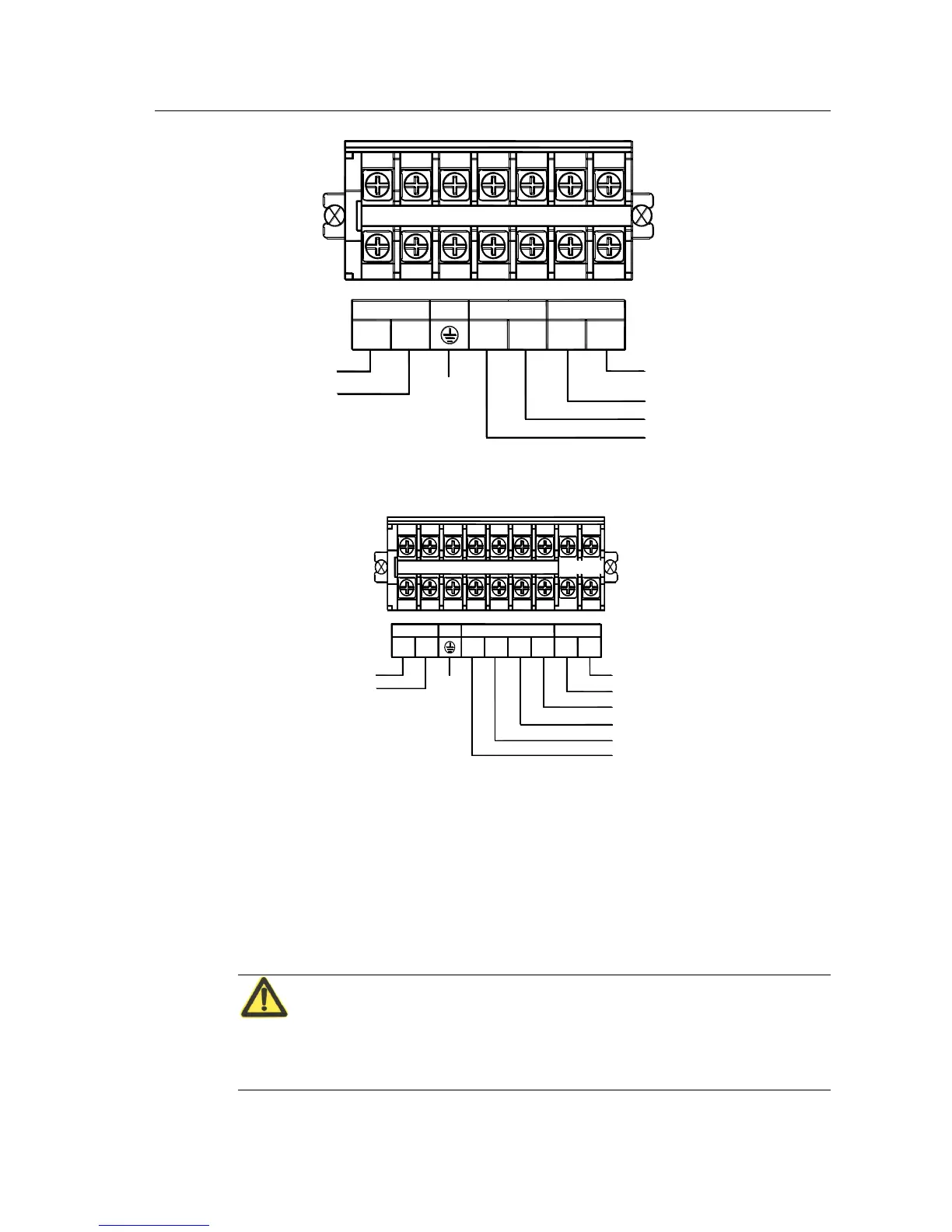
INPUT
OUTPUT
L
N N
L
PE
BATTERY
+
-
Grounding
AC Input "L"
AC Input "N"
192VDC
AC Output "L"
AC Output "N"
DC input("-")
DC input("+")
Fig 4.9-1 KR6000(L) KR(/B)1110(S) Connection methods of line bar
PE
U
NN
L
OUTPUT
INPUT
BATTERY
+
-
V W
Grounding
-
+
(240VDC)
AC Input "V"
AC Input "W"
AC Input "U"
AC Input "N"
AC Output "L"
AC Output "N"
Fig. 4.9-1 KR/B3110SConnection methods of line Bar
4.9.2 Wire Connection of Parallel system
1. As per the installation process described above, install each battery and host UPS separately.
Connect the AC output of parallel cells to the output jack box of parallel system. (Details as
below , wire connecting method charts for each model).
CAUTION
The AC input connection and phases sequences for each cell of parallel system should be
strictly consistent, ensuring a same phase for bypass power of parallel system.

Table of Contents

Related product manuals