EasyManua.ls Logo

Chuphotic KR6000 - Parallel Connection Procedures

Chuphotic KR6000
47 pages
Print Icon
To Next Page IconTo Next Page
To Previous Page IconTo Previous Page
Loading...
KR series6-10kVAusers manual
- 28 -
2. Connect all the system cells’ parallel connecters with Shielded communication cables, then
lock RS232 Ports screws.
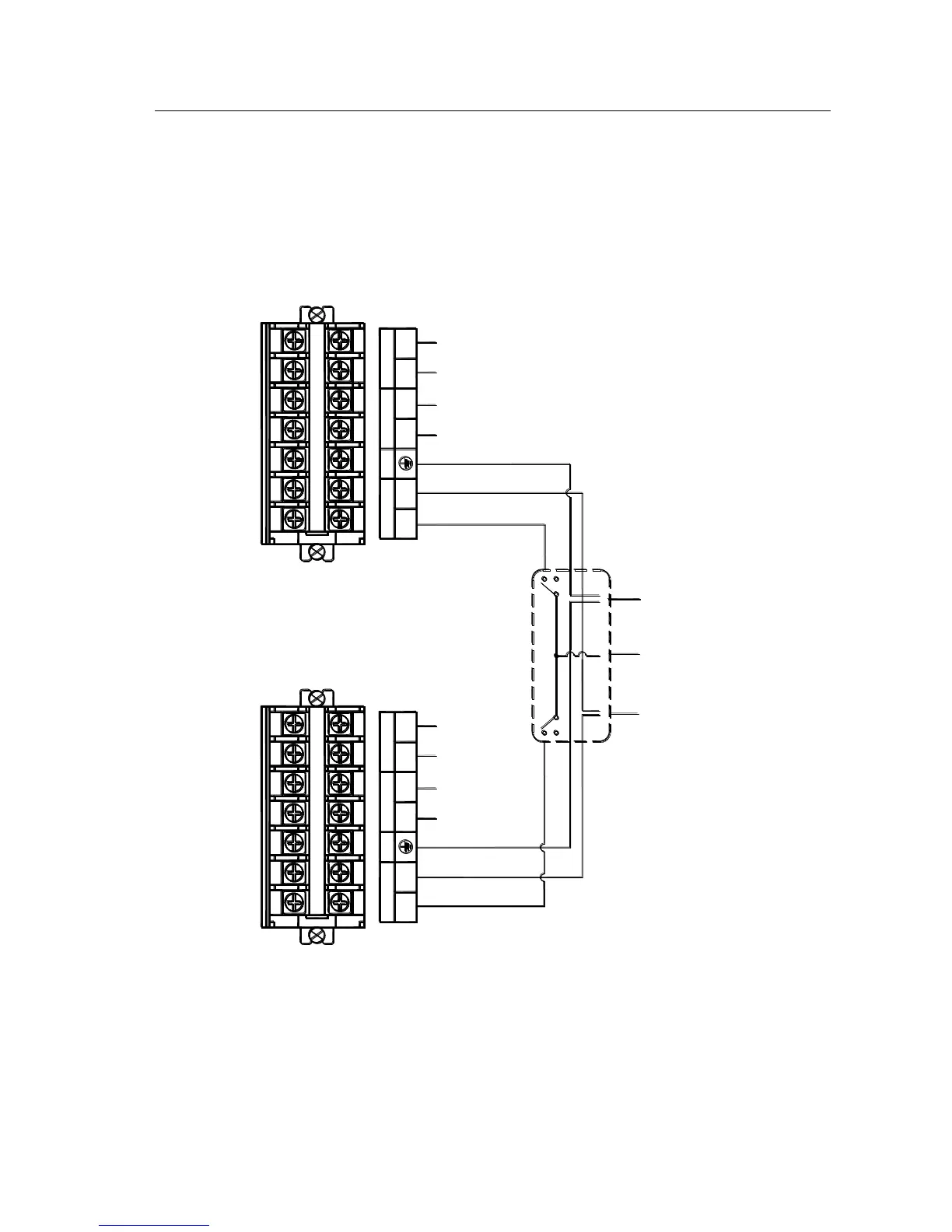
3. Parallel Connection for KR/B 1110(S) is demonstrated as in below figure 4.9-3.
4. Parallel Connection for KR/B 3110(S) is demonstrated as in below figure 4.9-4.

-
+
BATTERY
PE
L
NN
L
OUTPUT
INPUT INPUT
OUTPUT
L
N N
L
PE
BATTERY
+
-
N L
GND
UPS1L
UPS2L
AC Input "N"
AC Input "L"
BATTERY-
BATTERY+
BATTERY-
BATTERY+
AC Input "L"
AC Input "N"
Power Distribution Box
GND
AC OUTPUT "L"
AC OUTPUT "N"
Fig 4.9-2 Parallel connection procedures for KR/B1110S

Table of Contents

Related product manuals