5.6 - Control point
The control point represents the water temperature that the unit
must produce. The heat exchanger entering water temperature
is controlled by default, but the heat exchanger leaving water
temperature can also be controlled (requires a Service congu
-
ration modication).
Control point = active setpoint + reset
5.6.1 - Activ
e setpoint
Two setpoints can be selected as active in cooling mode and
two in heating mode. Usually, the second setpoint is used for
unoccupied periods.
Depending on the current operating type, the active setpoint
can be selected:
• by choosing the item in the GENUNIT menu,
• via the user’s volt-free contacts,
• via network commands,
• via the setpoint timer program (schedule 2).
The following tables summarise the possible selections de-
pending on the control types (local, remote or network) and the
following parameters:
• Setpoint select in local control: item LSP_SEL in the
GENUNIT menu permits selection of the active set-point, if
the unit is in local operating type.
• Heating/cooling operating mode.
• Setpoint selection contacts: setpoint selection contact status.
• Schedule 2 status: schedule for setpoint selection.
LOCAL OPERATING MODE
PARAMETER STATUS
Heating/cooling
operating mode
Local setpoint
selection
Time schedule 2
status
Active
setpoint
Cooling sp 1 - Cooling setpoint 1
Cooling sp 2 - Cooling setpoint 2
Cooling auto occupied Cooling setpoint 1
Cooling auto unoccupied Cooling setpoint 2
Heating sp1 - Heating setpoint 1
Heating sp 2 - Heating setpoint 2
Heating auto occupied Heating setpoint 1
Heating auto unoccupied Heating setpoint 2
REMOTE OPERATING MODE
PARAMETER STATUS
Heating/cooling
operating mode
Setpoint selection
contact
Active setpoint
Cooling sp 1 (open) Cooling setpoint 1
Cooling sp 2 (closed) Cooling setpoint 2
Heating sp 1 (open) Heating setpoint 1
Heating sp 2 (closed) Heating setpoint 2
5.6.2 - Reset
Reset means that the active setpoint is modied so that less
machine capacity is required (in cooling mode, the setpoint is
increased, in heating mode it is decreased). This modication
is in general a reaction to a drop in the load. For the Pro-Dialog
control system, the source of the reset can be congured in the
HCCONFIG conguration: it can be provided either by the out
-
door temperature (that gives a measure of the load trends for
the
building) or by the return water temperature (heat exchanger
delta T, gives an average building load).
In response to a drop in the outdoor temperature or to a drop in
delta T, the cooling setpoint is normally reset upwards in order
to optimise unit performance:
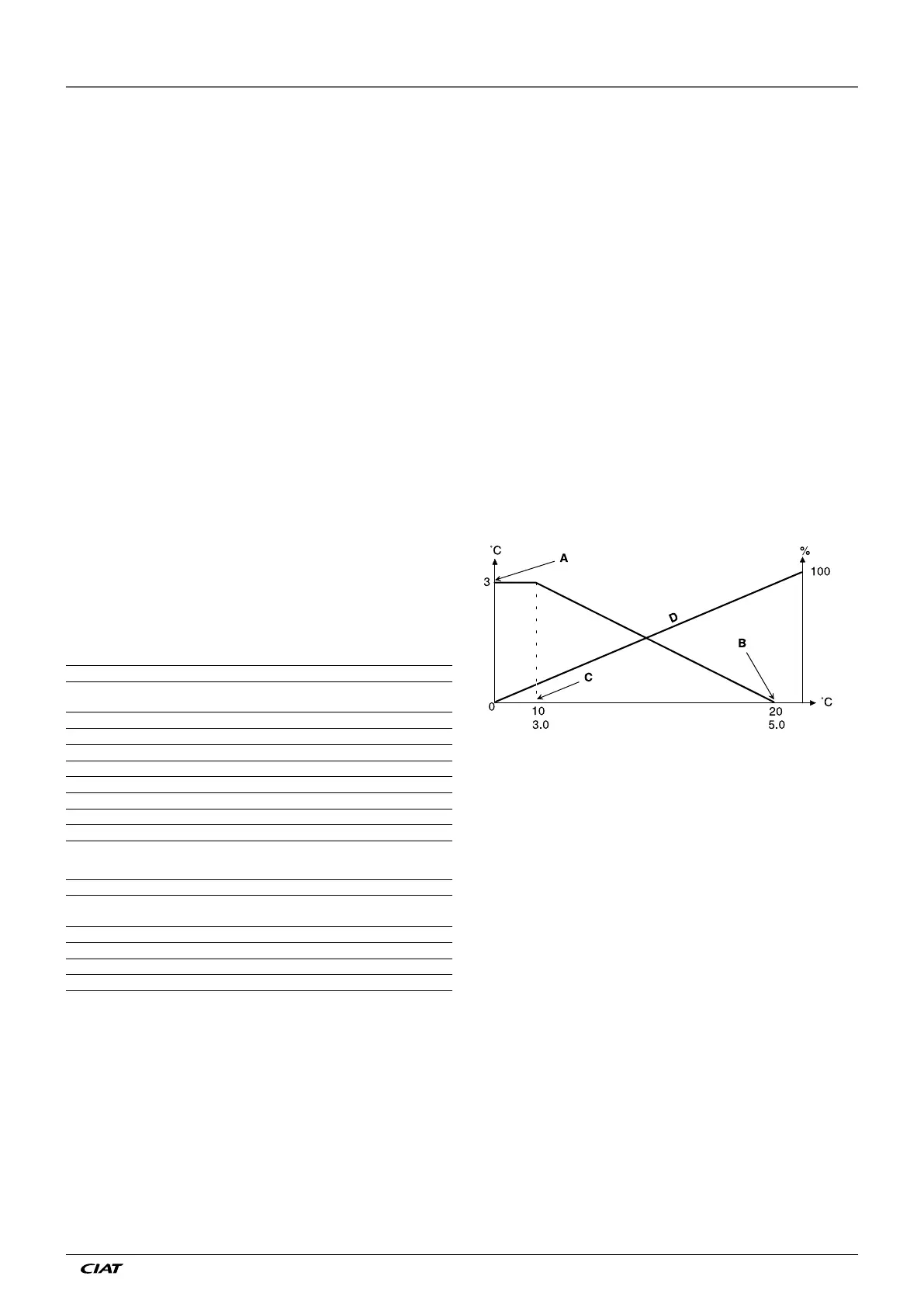
In both cases the reset parameters, i.e. slope, source and maximum
value, are congurable in the RESETCFG menu (see section
4.3.8). Reset is a linear function based on three parameters.
• A reference at which reset is zero (outdoor temperature
or delta T - no reset value).
• A reference at which reset is maximum (outdoor
temperature or delta T - full reset value).
• The maximum reset value.
Reset example in cooling mode based on the outside temperature
Legend
A Maximum reset value
B OAT or delta T for no reset
C OAT or delta T for full reset
D Building Load
5.7 - Demand limit
The demand limit is used to restrict the unit power consump-
tion. The Pro-Dialog control system allows limitation of the unit
capacity
, using user-controlled volt-free contacts.
The unit capacity can never exceed the limit setpoint activated
by these contacts. The limit setpoints can be modied in the
SETPOINT menu.
5.8 - Night mode
The night period is dened (see GENUNIT conguration) by a
start time and an end time that are the same for each day of
the week. During the night period, the number of fans operating
can be reduced, and the unit capacity may be limited.
Reset value
Outdoor temperature (OAT)
Heat exchanger delta T
% Building load
5 - PRO-DIALOG+ CONTROL OPERATION
EN - 19 EREBA ACCESS



 To Next Page