65
GB
4. INSTRUCTIONS FOR THE END USER
The instructions contained in this section are for unqualified personnel.
4.1 INITIAL OPERATION
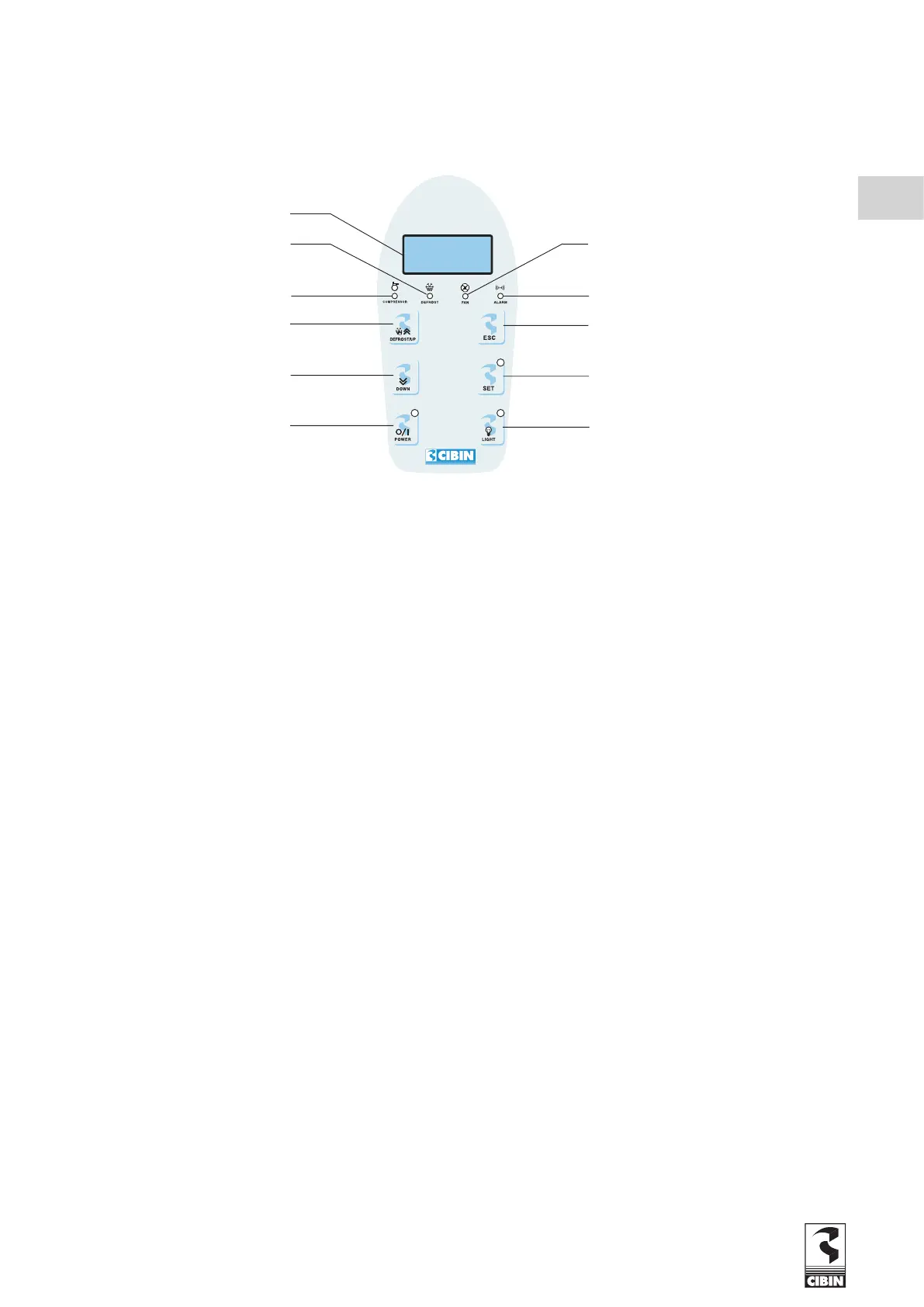
4.1.1 DESCRIPTION OF THE ELECTRONIC CONTROL PANEL
DISPLAY Display parameters values, breakdowns codes and temperature
DEFROST On for ongoing defrost / blinking for manual activation
COMPRESSOR Lighted for active cold / blinking for delay, protection or activation blocked
DEFROST/UP Activate defrost / go through the menu voices, increase the values
DOWN Go through the menu voices, decreases the values
POWER Turns ON / turns OFF
FAN Lighted for evaporator fans in function
ALARM Lighted for active alarm / blinking for tacit alarm
ESC Exit function
SET Machine status menu (short pressure), parameter programming menu ( extended pressure )
LIGHT Turns ON and OFF cold room light
4.1.2 STARTING THE MACHINE
Press for more than 5 seconds the POWER button. A few minutes after the switch-on the compressor will begin to operate.
4.1.3 TEMPERATURE SETTING
The machine operation is fully automatic in that the manufacturer has already set the “set point” temperature (cold room tempe-
rature). To change this setting, proceed as follows:
1) PRESS two times the SET button: the current setting for the “set point” temperature will then be displayed.
2) SELECT the desired temperature setting for the cold room from within the limits pre-defined by the manufacturer.
3) CHANGE the set point setting by pressing the UP button to increase the value and the DOWN button to decrease it.
Once the setting has been changed press the SET button once more.
PATENTED Cod.30635


 To Next Page