Easy-Touch Pro Getting Started Guide 7
Fixturing
Easy-Touch Pro testers use interchangeable adapters as the interface for
connecting the tester to the Device Under Test (DUT). Standard adapters are
available with a wide variety of connector types (a complete list can be found on
the Cirris web site). However, if the DUT includes connectors that have no direct
adapter mates, test cables can be used to connect the connector on a standard
Cirris adapter to the DUT connector. Your Cirris sales representative can also
provide pricing for custom adapters.
Adapters are available in three sizes. Single-high adapters plug into one
receptacle on the tester (e.g. J1). Double-high adapters plug into two vertically-
adjacent receptacles (e.g. J1 & J2). Quad-high adapters plug into all four
receptacles on the tester base or on an expansion scanner.
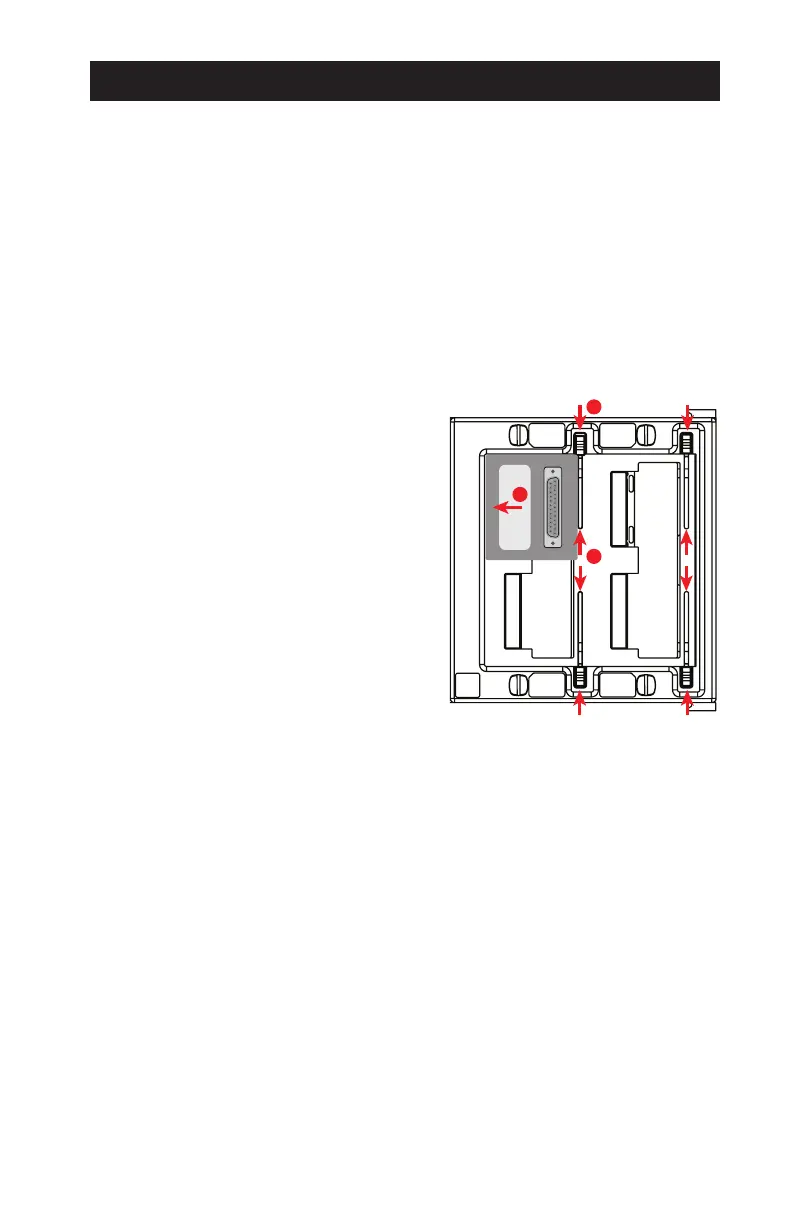
Adapter Installation
1. Push the slidelocks to the outward
positions.
2. Set an adapter in one or more of
the J1-J4 slots. Align the adapter
properly to avoid damage and push
it to the left (toward the tester’s
screen) with steady, even pressure.
3. The adapter is fully seated when the
slidelocks can be moved inward to
hold the adapter in place.
Adapter Maintenance
● Premium gold plating provides 500 or more mating cycles. A very low
contact resistance of 10mΩ will likely be maintained during this time. Con-
tact resistance gradually increases with additional cycles, therefore, appli-
cation requirements will determine when adapters should be replaced.
● Always use slidelocks to reduce the stress on the adapter pins and on the
tester’s receptacles increasing the lifespan of both.
● Visually inspect right-angle adapter pins before each use. Bent pins can
damage the tester’s receptacles.
● Never straighten pins using serrated pliers as this produces a saw-like
profile that will damage the tester receptacles.
● Store adapters properly to reduce the possibility of damage. Cirris oers
ARAC-SS and ARAC-SD adapter trays for this purpose.
J2
J1
J4
J3
2
1



 To Next Page