Cirris8
Create a New Test Program
Before a device can be tested, a test program must be created. This is most
often accomplished by using the tester’s capability to “learn” a sample product.
Once a test program has been created, it can be saved and then loaded as
needed to test subsequent batches of the same product.
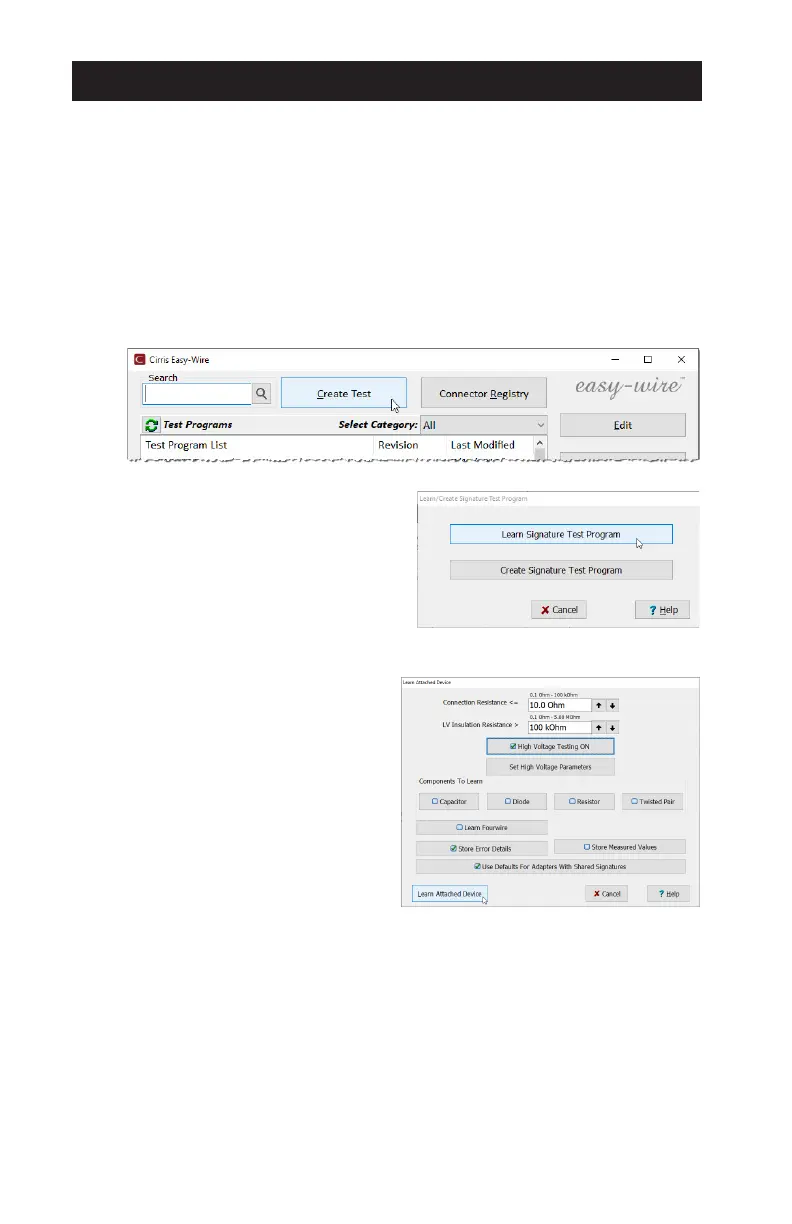
To create a test program using the Learn feature:
1. Install the appropriate adapters.
2. Connect the sample product to the tester.
3. From the Main Menu > Create Test.
4. On the window that opens, select
Learn Signature Test Program.
5. Set the learn parameters.
● Set the maximum acceptable
Connection Resistance and
the minimum acceptable
LV (low voltage) Insulation
Resistance.
● Check High Voltage Testing
ON to include it in the
resulting program (high
voltage is not used during the
learn process). Click Set High
Voltage Parameters to edit
the test criteria.
● Check any components included in the product.
● Click/tap Learn Attached Device to begin the learn process.



 To Next Page