CISBO RADER SYSTEM USER’S MANUAL
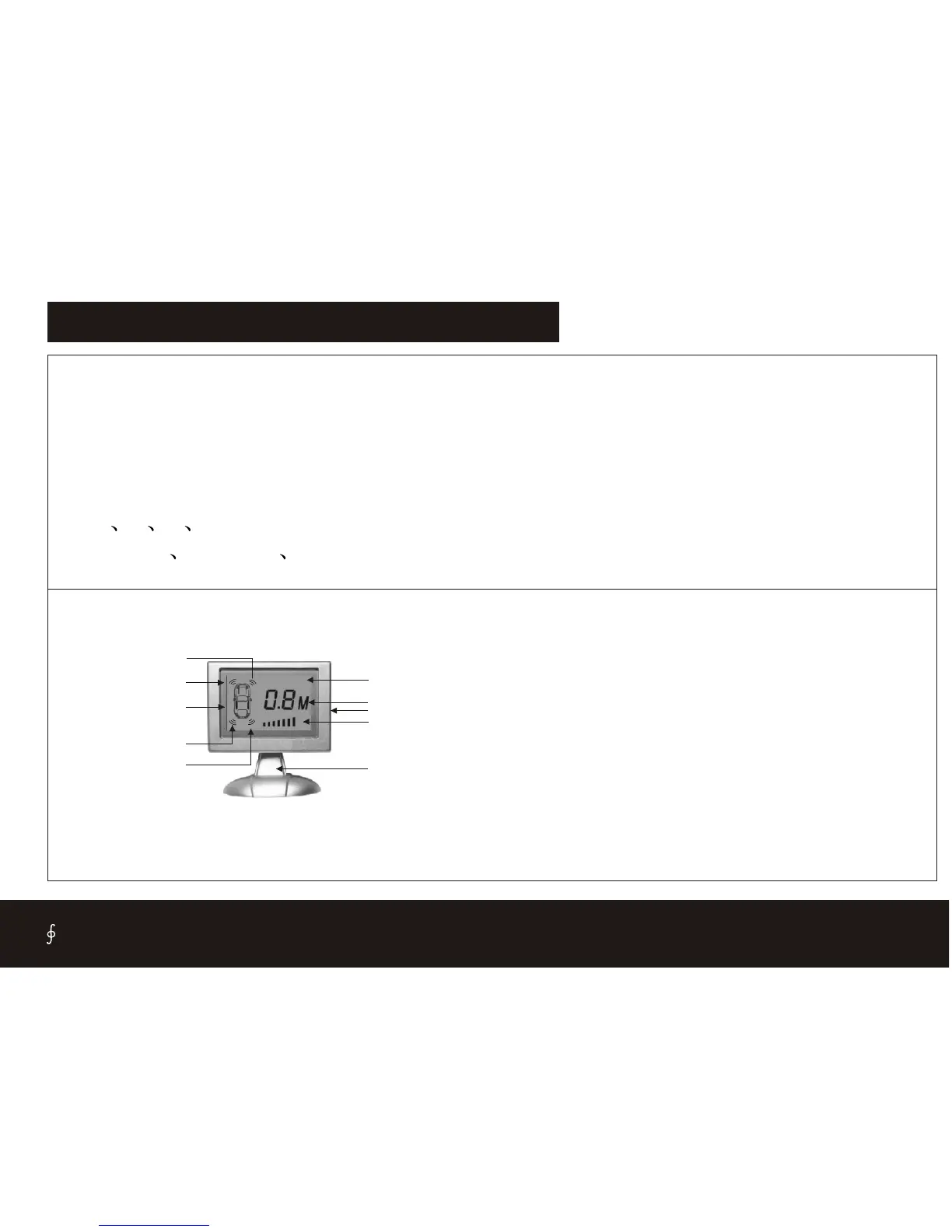
FUNCTIONS FOR LCD DISPLAY SERIES
1. L CD display :It is for model such as: SB308(F) ,SB309(F)
2.
3.
Digital LCD showing obstacle distance
Alarm by three step Bi-Bi sound
4. Colourized LCD screen or blue colour background
5. The simulative vehicle is displayed in the colourized screen
6. 2 4 6 8 sensors are available.
7. Insert in Stick on illuminate sensors are available.
2.Indicate back-left
1. Indicate back-right
4.Indicate front-left
5.Indicate front-right
3.Simulate car
7.Simulate bar
6.Bracket
9.Distance
10.Background
8.Voice switch
1.Indicate back right- When the back right sensor detect the obstacle, it
will glitter.
2.Indicate back left- When the back left sensor detect the obstacle, it will
glitter.
3.Simulate car-When reversing the car, it will show on the screen.
4.Indicate front left- When the front left sensor detect the obstacle, it will
glitter.
5.Indicate front right- When the front right sensor detect the obstacle, it
will glitter.
6.Bracket-You can turn over the screen .
7. Simulate bar- When the obstacle is closer, the bar will more and more.
8.Voice switch- Turn on/off the voice.
9. Distance-Display the latest the distance for all sensors.
10. Background- Blue background.
14


 To Next Page