4
Connect Cables
M
O
D
E
M
O
D
E
M
O
D
E
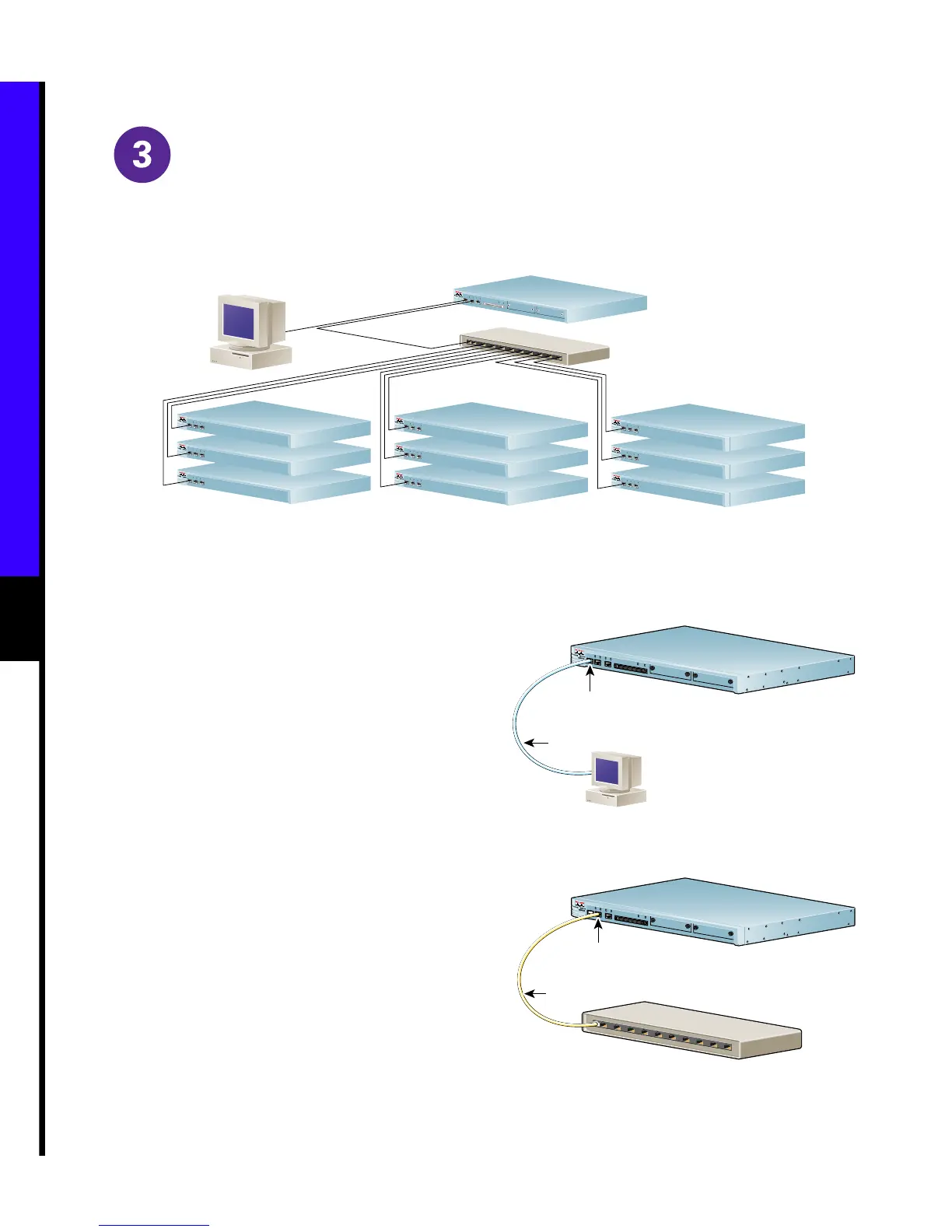
Cisco Intelligence Engine 2100 Series
Routers
Routers
Routers
Console
Hub
53002
D
R
I
V
E
0
D
R
IV
E
1
M
O
D
E
M
O
D
E
M
O
D
E
M
O
D
E
M
O
D
E
M
O
D
E
M
O
D
E
Connecting the Ethernet and
Console Cables
Use the console cable in the accessory kit to connect
the IE2100 Series console port (CONS) to a console or
computer that is running a console program.
Use the CAT 5 UTP cable in the accessory kit to
connect the IE2100 Series to your network.
Cisco Intelligence Engine 2100 Series
Console cable
Console
Cons Port (RJ-45)
53006
Intelligence Engine 2100 Series
L
I
N
K
C
O
N
S
E
T
H
E
R
N
E
T
0
E
T
H
E
R
N
E
T
1
1
0
0
M
b
p
s
L
I
N
K
1
0
0
M
b
p
s
D
R
IV
E
0
D
R
I
V
E
1
M
O
D
E
Cisco Intelligence Engine 2100 Series
Ethernet Hub
(sold separately)
CAT 5 UTP cable
Ethernet 10/100BaseTX
port (RJ-45)
53005
Intelligence Engine 2100 Series
L
I
N
K
C
O
N
S
E
T
H
E
R
N
E
T
0
E
T
H
E
R
N
E
T
1
1
0
0
M
b
p
s
L
IN
K
1
0
0
M
b
p
s
D
R
I
V
E
0
D
R
IV
E
1
M
O
D
E



 To Next Page
 Loading...