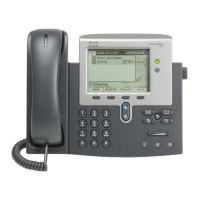
List of Soft Keys
Note: Soft keys change as users place and proceed through calls.
Soft Key Description
<< or >> Navigates to edit characters. Use the
backspace soft key to erase digits that
were entered incorrectly.
Accept Accepts the current edits. For instance,
adding an entry to your personal
directory.
Add Adds an entry to the personal directory.
Alpha Toggles character input mode from
numeric to alphanumeric.
Answer Answers and incoming call.
Callback Notifies callers that the called line is free.
Cancel Cancels the last selection.
CFwdALL Forwards all calls.
Clear Clears directory history.
Confirm Connects callers to a conference call.
DelAll Deletes all entries in the personal
directory.
Delete Deletes selected item.
Dial Dials the displayed number.
Directories Provides access to phone directories.
DND Enables and disables the Do-Not-Disturb
feature.
Down Decreases the LCD screen contrast.
Edit Selects a number and activates the
cursor for editing.
EditDial Selects a number and activates the
cursor for editing.
EndCall Ends the current call.
Exit Exits from the current selection or
screen.
GPickUp Selectively picks up calls to a phone
number that is member
Hold Places an active call on hold. Resumes
a held call.
Soft Key Description
Message Dials the local voice-mail system.
Monitor Enables the user to switch from the
handset to the speaker to listen to a call
hands-free.
Monoff Enables the user to switch from the
speaker to the handset and continue
talking on the call.
More Scrolls through additional soft key
options (for example, use the more soft
key to locate the Number soft key).
Mute Toggles muting on and off.
NewCall Opens a new line on the speakerphone
to place a call.
Number Toggles character input mode from
alphanumeric to numeric.
Ok Confirms the selection.
Park Forwards calls to a location from which
the call can be retrieved by anyone in the
system.
PickUp Selectively picks up calls to another
extension.
Play Plays the ring sound sample.
Redial Redials the last number dialed.
Reorder Reorder the entries in the Personal
Directory.
Resume Returns to an active call.
Save Saves the last change.
Search Initiates a search in the local directory.
Select Selects the highlighted option.
Settings Provides access to phone settings such
as display contrast, ring volume and ring
type.
Trnsfer Transfers selected calls to an alternate
number.
Up Increases the LCD screen contrast.





 To Previous Page