EasyManua.ls Logo

Cisco ASA 5508-X - User Manual

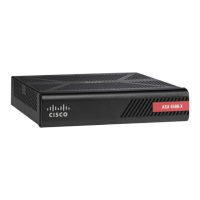
Cisco ASA 5508-X
14 pages
Print Icon
To Next Page IconTo Next Page
Loading...
Overview
About the ASA 5508-X and 5516-X, on page 1
Package Contents, on page 2
Front Panel, on page 3
Rear Panel, on page 3
LEDs, on page 4
Network Ports, on page 6
Console Ports, on page 6
Internal and External Flash Storage, on page 6
Solid State Drive, on page 7
Power Supply Modules, on page 7
Hardware Specifications, on page 7
Power Cord Specifications, on page 8
About the ASA 5508-X and 5516-X
The Cisco ASA 5508-X and the ASA 5516-X adaptive security appliances are part of the ASA 5500-X of
next-generation mid-range ASAs, and are built on the same security platform as the rest of the ASA family.
Your ASA 5508-X and ASA 5516-X ship with either ASA or Firepower Threat Defense software preinstalled.
To reimage your device, see Reimage the Cisco ASA or Firepower Threat Defense Device.
Note
This next-generation ASA delivers unprecedented levels of defense against threats to the network with deeper
web inspection and flow-specific analysis, improved secure connectivity via end-point security posture
validation, and voice and video over VPN support. It also provides enhanced support for intelligent information
networks through improved network integration, resiliency, and scalability.
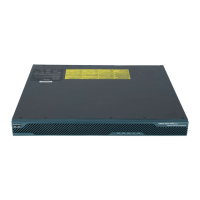
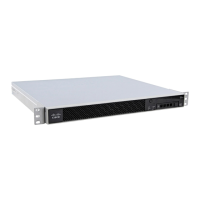
The ASA 5508-X and the ASA 5516-X are a standard 1 RU chassis. To compare the performance metrics
and capabilities of the 5500-X ASAs, see Cisco ASA 5500-X Series Next-Generation Firewalls.
The ASA 5508-X and 5516-X have been validated for the following security standards certifications:
Federal Information Processing Standards (FIPS) 140-2 for FTD 6.4.x and ASA 9.12.x
Overview
1

Other manuals for Cisco ASA 5508-X

Question and Answer IconNeed help?

Do you have a question about the Cisco ASA 5508-X and is the answer not in the manual?

Summary

About the ASA 5508-X and 5516-X

Package Contents

Front Panel

Rear Panel

LEDs

Network Port Status

Details status indicators for Gigabit Ethernet network ports and the management port on the rear panel.

Network Ports

Console Ports

Internal and External Flash Storage

Solid State Drive

Power Supply Modules

Hardware Specifications

Power Cord Specifications

Overview

The Cisco ASA 5508-X and ASA 5516-X are adaptive security appliances designed to provide robust network defense. These devices are part of the ASA 5500-X series of next-generation mid-range ASAs, built on a common security platform shared across the ASA family. They are engineered to deliver advanced protection against network threats, offering deeper web inspection and flow-specific analysis.

Function Description

The primary function of the ASA 5508-X and ASA 5516-X is to act as a security appliance, safeguarding networks from various threats. They achieve this through several key capabilities:

  • Threat Defense: The devices offer unprecedented levels of defense against network threats, utilizing advanced techniques like deeper web inspection and flow-specific analysis to identify and mitigate malicious activities.
  • Secure Connectivity: They provide improved secure connectivity through end-point security posture validation, ensuring that only trusted devices can access the network.
  • VPN Support: The ASAs support voice and video over VPN, enabling secure communication for multimedia applications across virtual private networks.
  • Network Integration: These devices are designed for enhanced integration with intelligent information networks, promoting improved network integration, resiliency, and scalability.
  • Management Access: The ASAs offer multiple options for management access, including console ports (RJ-45 and Mini USB Type B) and a dedicated Gigabit Ethernet management port. This allows administrators to configure and monitor the device using a command-line interface (CLI) via a terminal server or emulation program.
  • Storage Support: Both models come with an installed Solid State Drive (SSD) for storage, which is field-replaceable. Additionally, a standard USB Type A port allows for the attachment of external data-storage devices, expanding storage capabilities.

Usage Features

The ASA 5508-X and ASA 5516-X are designed for ease of use and flexibility in deployment:

  • Form Factor: Both models are standard 1 RU (rack unit) chassis, making them suitable for rack mounting in data centers or network closets. Side-mount "ear" brackets are included for this purpose.
  • Pre-installed Software: The devices ship with either ASA or Firepower Threat Defense software pre-installed, offering immediate functionality upon deployment. Users can reimage the device if needed.
  • Front Panel: The front panel features four LEDs that provide visual status indicators for various device functions.
  • Rear Panel: The rear panel houses essential connectivity and status indicators:
    • Power Switch: A standard rocker-type switch for powering the device on and off.
    • Power Cord Socket: For connecting the internal 100-240 V AC power supply.
    • Status LEDs: These LEDs indicate the overall system operating status (Green for normal, Amber for critical alarms).
    • Network Data Ports: Eight Gigabit Ethernet RJ-45 (8P8C) network I/O interfaces, numbered 1 through 8. Each port has a pair of LEDs to indicate link status (L) and connection-speed status (S).
    • Management Port: A dedicated Gigabit Ethernet interface (RJ-45) for network management access only.
    • Console Ports: Two serial ports, a mini USB Type B and a standard RJ-45 (8P8C), for management access via an external system. Only one console port can be active at a time.
    • USB Port: A standard USB Type A port for attaching external mass storage devices.
    • Reset Button: A small recessed button that, when pressed for longer than three seconds, resets the ASA to its factory default "as-shipped" state after the next reboot. Configuration variables are reset, but flash contents are not erased. This button can be disabled via the service sw-reset-button command.
    • SSD LED: Indicates the status of the installed solid-state drive.
    • SSD Bay: A covered slot where the SSD is installed, allowing for replacement if needed.
  • Console Port Functionality: The console ports (RJ-45 and Mini USB Type B) allow for command-line interface (CLI) configuration. The Mini USB Type B port does not require special drivers for Linux and Macintosh systems, but Windows systems need a specific USB driver. Baud rates for the USB console port are configurable.
  • Flash Storage: The device includes an internal USB flash drive (identified as disk0) and supports external USB drives (identified as disk1) via the USB Type A port. Both internal and external drives must be FAT-32 formatted. The external USB port can supply 5 volts up to 500 mA.

Maintenance Features

The ASA 5508-X and ASA 5516-X are designed with maintenance in mind, offering features that facilitate troubleshooting and component replacement:

  • LED Indicators: Comprehensive LED indicators on both the front and rear panels provide immediate visual feedback on the device's operational status, power supply status, failover pair status, high-availability (HA) pair status, standalone device role, SSD status, network port link status, and connection speed. These indicators are crucial for quick diagnosis of issues.
    • Power LED: Unlit for power off, Green for power on.
    • Status LED: Green for normal system function, Amber for critical alarms (hardware/software failure, over-temperature, out-of-tolerance power voltage).
    • Active LED: Indicates status of failover pair (Green for normal, Unlit for not operational), high-availability pair (Green for active, Amber for standby), or standalone device (Green for active).
    • SSD LED: Unlit for no SSD or no activity, Green for SSD installed or activity.
    • Network Port Link Status (L): Unlit for no link/port not in use, Green for link established, Green flashing for link activity.
    • Network Port Connection-Speed Status (S): One blink for 10 Mbps, two rapid blinks for 100 Mbps, three rapid blinks for 1000 Mbps.
  • Field-Replaceable SSD: The Solid State Drive (SSD) is field-replaceable, allowing for easy replacement in case of failure. Instructions for removal and replacement are provided in the manual.
  • Reset Button: The reset button provides a mechanism to revert the device to its factory default configuration, which can be useful for troubleshooting or reconfiguring the device from a known state.
  • Power Supply: The devices ship with an internal power supply, simplifying power management.
  • Regulatory Compliance: The devices have been validated for various security standards certifications, including Federal Information Processing Standards (FIPS) 140-2 and Common Criteria (CC) certifications, ensuring adherence to recognized security benchmarks.
  • Documentation: The manual provides detailed information on package contents, front and rear panel descriptions, LED meanings, console port usage, flash storage details, power supply information, and hardware specifications, aiding in maintenance and troubleshooting.
  • Safety Information: The manual emphasizes the importance of reading the Regulatory Compliance and Safety Information document and following proper safety procedures before performing any operations.

Cisco ASA 5508-X Specifications

General IconGeneral
Maximum VPN Sessions250
Power SupplyInternal
IPsec VPN Throughput250 Mbps
USB 2.01
Memory4 GB
Flash Memory8 GB
AC Input100-240 VAC
VPN Throughput250 Mbps
Maximum VLANs100
Operating Temperature32 to 104°F (0 to 40°C)
Storage Temperature-13 to 158°F (-25 to 70°C)
Ports8 x 1GE
Security Contexts2
New Connections per Second20, 000
Management Interface1 x GE
Frequency50-60 Hz
New Sessions per Second20, 000
Humidity5% to 95% non-condensing

Related product manuals