About the ASA 5500-X
ASA Chassis Panels
Cisco ASA 5512-X, ASA 5515-X, ASA 5525-X, ASA 5545-X, and ASA 5555-X Hardware Installation Guide
14
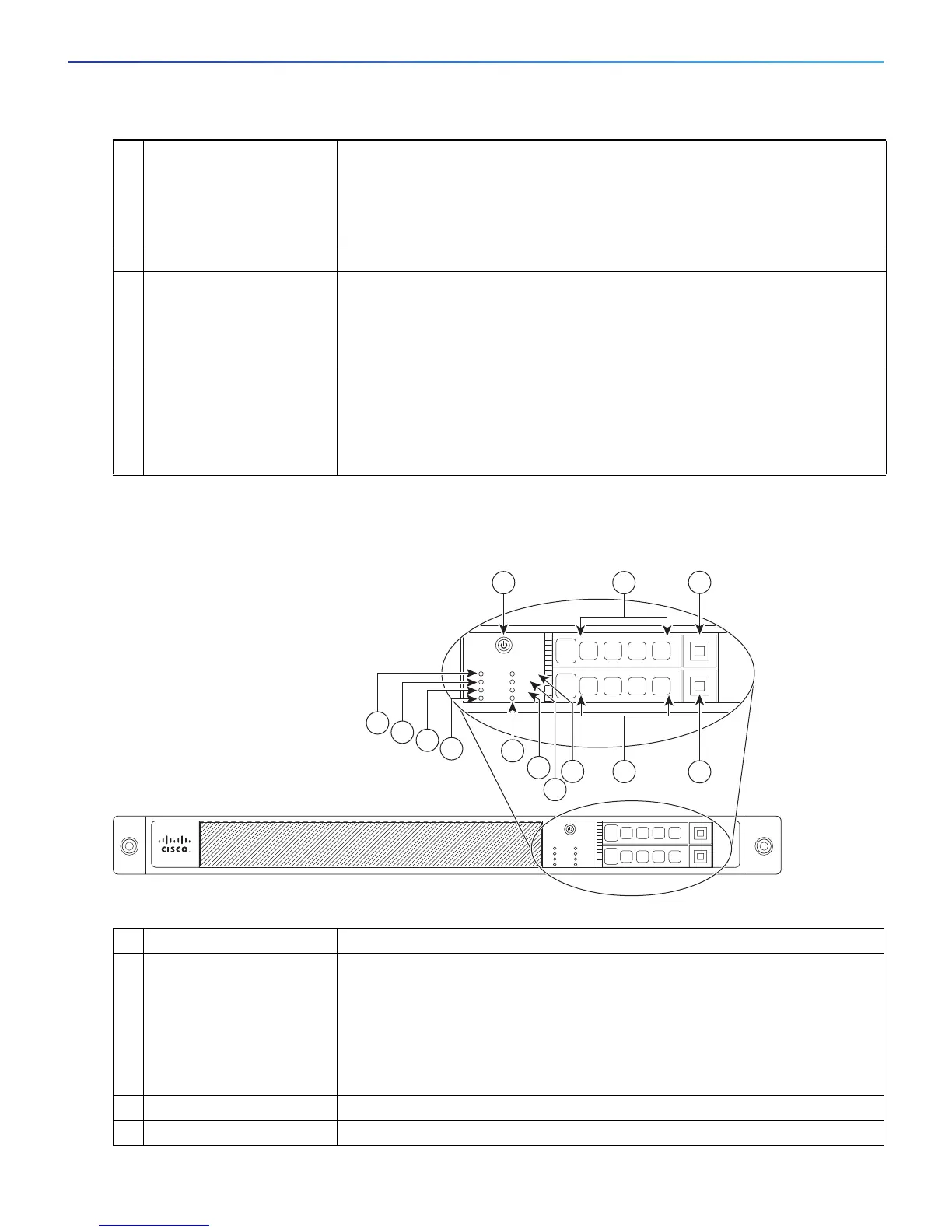
Figure 2 shows the front panel LEDs for the ASA 5545-X and ASA 5555-X models.
Figure 2 Front Panel LEDs for Cisco ASA 5545-X and ASA 5555-X
5 HD Hard Disk Drive status:
Flashing green—Proportioned to read/write activity.
Solid amber—Hard-disk drive failure.
Off—No hard-disk drive present.
6 PS Power supply status
7 Active Status of the failover pair:
Solid green—Failover pair is operating normally.
Off—Failover is not operational or this is the secondary unit in the failover
pair.
8 Boot Power-up diagnostics:
Flashing green—Power-up diagnostics are running, or system is booting.
Solid green—System has passed power-up diagnostics.
Off—Power-up diagnostics are not operational.
LED Description
1 Power button A soft switch that turns the system on and off. Once pressed, the button stays
in the “on” position:
On—The power symbol on the button is lit.
Off—The power symbol on the button is dark.
For information about the power state, see Power Supply Considerations,
page 31.
2 Hard-disk slot Indicates the slot for hard-disk 1.
3 Hard-disk release button Releases hard-disk 1 from the device.
Cisco ASA 5545
Adapative Security Appliance
BOOT
ACTIVE
PS1
PS0
ALARM
VPN
HD1
HD0
1
0
Cisco ASA 5545
Adapative Security Appliance
BOOT
ACTIVE
PS1
PS0
ALARM
VPN
HD1
HD0
1
0
282359
1
3
4
9
2
13
12
11
10
5
6
7
8



 To Next Page
 Loading...