The ATA network port performs autonegotiation for duplex and speed. It supports speeds of 10/100 Mbps
and full-duplex.
Note
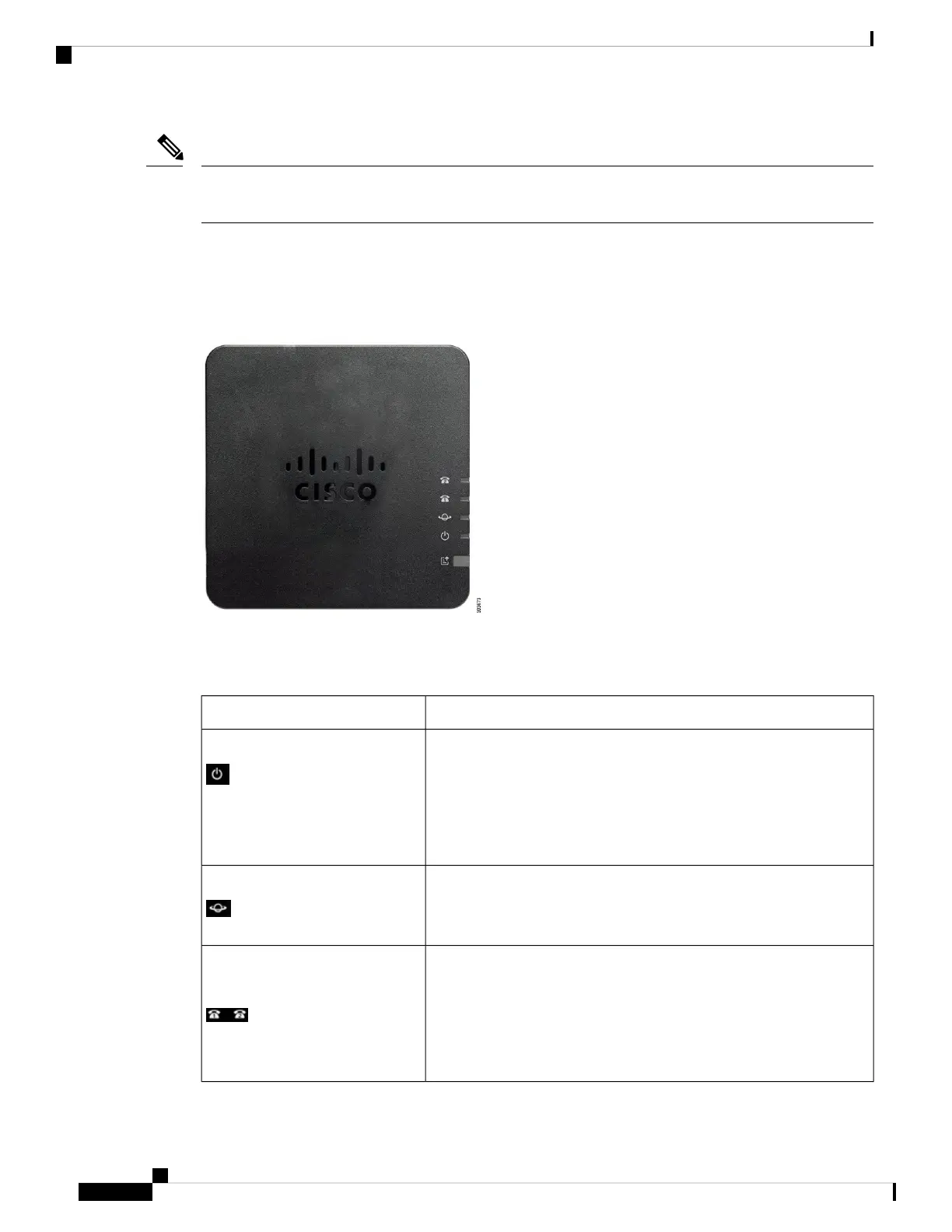
ATA 191 Top Panel
The top panel of your ATA has several LEDs that are used to show the device's status.
Figure 1: ATA 191 Top Panel
The following table describes the LEDs located on your ATA.
Table 1: ATA 191 Top Panel Items
DescriptionItem
Steady green: System booted up successfully and is ready for use.
Slow flashing green: System is booting up.
Fast flashing green three times, then repeats: System failed to boot
up.
Off: Power is off.
Power LED
Flashing green: Data transmission or reception is in progress through
the WAN port.
Off: No link.
Network LED
Steady green: On hook.
Slow flashing green: Off hook.
Fast flashing green three times, then repeats: The analog device failed
to register.
Off: The port is not configured.
Phone 1 LED
Phone 2 LED
Get Started with Your New ATA
2
Get Started with Your New ATA
ATA 191 Top Panel









 To Next Page