EasyManua.ls Logo

Cisco ATA 190 - User Manual

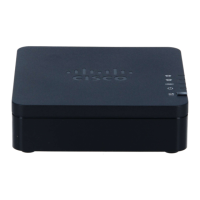
Cisco ATA 190
78 pages
Print Icon
To Next Page IconTo Next Page
Loading...
Americas Headquarters
Cisco Systems, Inc.
170 West Tasman Drive
San Jose, CA 95134-1706
USA
http://www.cisco.com
Tel: 408 526-4000
800 553-NETS (6387)
Fax: 408 527-0883
Cisco ATA 190 Analog Telephone Adapter
Administration Guide for SIP
Version 1.0
Text Part Number: OL-31821-01 Text Part Number: OL-31821-01

Table of Contents

Questions and Answers

  • S
    Sue WrightAug 18, 2025
    What to do if Cisco Adapter ATA 190 does not register with Cisco Unified Communications Manager?
    • S
      slyonsAug 18, 2025
      If your Cisco Adapter ATA 190 doesn't register with Cisco Unified Communications Manager, first ensure that the adapter is connected to the Ethernet network and that the network is running. Also, check if the Cisco Unified Communications Manager or TFTP services are running, as all devices relying on it will be affected if it's down. Lastly, verify that the phone is receiving power.
  • S
    stephengonzalezAug 21, 2025
    Why does my Cisco Adapter ATA 190 reset unexpectedly?
    • E
      Ethan FergusonAug 21, 2025
      If your Cisco Adapter ATA 190 resets unexpectedly, verify that the Ethernet connection is active. Intermittent network outages may also be the cause. Check if the phone is properly configured to use DHCP and that the DHCP server has been set up correctly. Cisco recommends a DHCP lease duration of 8 days.
  • J
    Joseph HernandezAug 25, 2025
    How to fix phone call cannot be established problem on Cisco ATA 190?
    • W
      Wendy WrightAug 25, 2025
      A phone call cannot be established because the phone does not have a DHCP IP address and is unable to register with Cisco Unified Communications Manager. To solve this problem, verify that the Ethernet cable is attached, the Cisco CallManager service is running on the Cisco Unified Communications Manager server, and both phones are registered to the same Cisco Unified Communications Manager.
  • N
    Nicole WrightAug 28, 2025
    How to fix a Cisco Adapter ATA 190 that does not go through its normal startup process?
    • C
      carrbenjaminAug 28, 2025
      If your Cisco Adapter ATA 190 isn't starting up as expected, it could be due to faulty cables, bad connections, network outages, or a lack of power. Verify that the network port is functional and that the phone is receiving power. If the phone still does not start up properly, perform a factory reset of the phone.
  • J
    john21Aug 31, 2025
    What to do if the Cisco Adapter ATA 190 is unable to obtain an IP address?
    • A
      Amanda GregoryAug 31, 2025
      If your Cisco Adapter ATA 190 can't get an IP address, the phone may not be on the same network or VLAN as the DHCP server, or the switch port to which the phone is connected may be disabled. Make sure that the network or VLAN to which the phone is connected has access to the DHCP server, and make sure that the switch port is enabled.
  • V
    Vanessa Pitts MDSep 3, 2025
    Why is my Cisco Adapter ATA 190 not registering with Cisco Unified Communications Manager?
    • K
      Karen GainesSep 4, 2025
      If your Cisco Adapter ATA 190 is failing to register with Cisco Unified Communications Manager, ensure that the network is currently running. Verify Cisco Unified Communications Manager Settings. Also, ensure that both the Cisco Unified Communications Manager and TFTP Services are running.
  • B
    bgomezSep 6, 2025
    How to troubleshoot Cisco Adapter ATA 190 when it does not go through its normal startup process?
    • D
      David WallaceSep 6, 2025
      If your Cisco Adapter ATA 190 isn't starting up normally, try these steps: * Exchange the Ethernet cables with functional ones. * Test the network port by connecting a working phone to it. * Connect the non-starting phone to a known good network port. * Bypass the patch panel by connecting the phone directly to the switch. * If using external power, ensure the outlet is working and try a different power supply. * As a last resort, perform a factory reset of the phone.
  • R
    Ryan ThomasSep 10, 2025
    What to do if Cisco Adapter ATA 190 is unable to obtain IP address?
    • R
      Robert TaylorSep 10, 2025
      If your Cisco Adapter ATA 190 can't obtain an IP address, it might be on a different network or VLAN than the DHCP server; ensure the phone's network or VLAN can access the DHCP server. Also, the switch port the phone is connected to might be disabled, so make sure that the switch port is enabled.
  • W
    William JonesNov 13, 2025
    What to do if my Cisco Adapter ATA 190 resets unexpectedly?
    • K
      Kathryn NicholsNov 13, 2025
      If your Cisco Adapter ATA 190 resets unexpectedly, it could be due to several reasons. First, verify that the Ethernet connection to which the ATA 190 is connected is active. If the phone has been experiencing intermittent outages, investigate whether an existing problem is simply being exposed. Verify that the DHCP server has been set up properly. If the DHCP server expects messages with request type 150, the lease will be denied, forcing the ATA 190 to restart and request a new IP address from the DHCP server. Isolating the phones on a separate auxiliary VLAN increases the quality of the voice traffic. Use the IVR to reset phone settings to their default values. On the Cisco Unified Communications Manager server, verify that the local host files have the correct Cisco Unified Communicati...

Summary

Cisco ATA 190 Analog Telephone Adapter Overview

Session Initiation Protocol Overview

Overview of Session Initiation Protocol (SIP) for real-time calls and conferencing over IP.

Hardware Overview

Description of the ATA 190's physical connectors and indicators.

Software Features

Overview of supported protocols, services, and methods for the ATA 190.

Installation and Configuration Overview

Steps for installing and configuring the ATA 190 for operational use.

Preparing to Install the ATA 190 on Your Network

Understanding Interactions with Other Cisco Unified IP Communications Products

How the ATA 190 interacts with other Cisco Unified IP communication products.

Providing Power to the ATA 190

Details on powering the ATA 190 using external power supplies.

Understanding Phone Configuration Files

Explanation of configuration files for phone setup and parameters.

Understanding the ATA 190 Startup Process

Step-by-step process for the ATA 190's initialization.

Adding the ATA 190 to the Cisco Unified Communications Manager Database

Methods for registering the ATA 190 with Cisco Unified Communications Manager.

Determining the MAC Address of an ATA 190

Procedures to find the MAC address of the ATA 190 device.

Installing the ATA 190

What the ATA 190 Package Includes

Lists the items included in the ATA 190 package.

Installing the ATA 190

Step-by-step instructions for physically installing the ATA 190 device.

Attaching a Phone to the ATA 190

How to connect analog phones or fax machines to the ATA 190 ports.

Verifying the ATA 190 Startup Process

Steps to verify the ATA 190 has completed its startup sequence.

Configuring Startup Network Settings

Recommendations for configuring network settings, preferably using DHCP.

Configuring Security on the ATA 190

Information on protecting the phone's identity and data via security features.

Configuring the ATA 190

Telephony Features Available for the ATA 190

Details on telephony features configurable via CUCM.

Configuring Product Specific Configuration Parameters

Setting specific configuration parameters for the ATA 190 using CUCM Administration.

Adding Users to Cisco Unified Communications Manager

How to add users to CUCM for ATA 190 management.

Configuring Fax Services

Using Fax Mode

Choosing between fax pass-through and T.38 fax relay modes.

Fax Modem Standards

Supported fax modem standards for the ATA 190.

Fax Modem Speeds

Supported transmission speeds for fax modem communication.

Using SIP Supplementary Services

Common Supplementary Services

Overview of supplementary services like call forward, redial, and conference calling.

ATA 190 Specifications

Physical Specifications

Details on dimensions, unit weight, and operating environment.

Electrical Specifications

Details on power consumption, input voltage, and power adapter specs.

Environmental Specifications

Operating and storage conditions, and relative humidity guidelines.

Physical Interfaces

Description of Ethernet, phone ports, power, and switch interfaces.

Ringing Characteristics

Specifications for ring voltage, frequency, waveform, load, and impedance.

Software Specifications

Details on call progress tones, DTMF, fax, echo cancellation, and codecs.

SIP Compliance Reference Information

Information on ATA 190 compliance with IETF SIP RFC 2543.

Voice Menu Codes

Accessing the IVR and Configuring Your Phone Setting

Steps to access the Interactive Voice Response (IVR) for phone settings.

Recommended ATA 190 Tone Parameter Values by Country

Australia

Recommended tone parameters for Australia.

Germany

Recommended tone parameters for Germany.

Italy

Recommended tone parameters for Italy.

New Zealand

Recommended tone parameters for New Zealand.

United States

Recommended tone parameters for the United States.

Troubleshooting and Maintenance

Resolving Startup Problems

Steps to resolve issues when the ATA 190 fails to start up properly.

ATA 190 Resets Unexpectedly

Diagnosing and resolving issues causing the ATA 190 to reset during calls or idle.

Troubleshooting ATA 190 Security

Troubleshooting common security feature issues on the ATA 190.

General Troubleshooting Tips

General advice and common issues for troubleshooting the ATA 190.

Where to Go for More Troubleshooting Information

Resources for additional troubleshooting assistance on Cisco.com.

Cleaning the ATA 190

Instructions on how to clean and maintain the ATA 190 device.

Cisco ATA 190 Specifications

General IconGeneral
Ports2 FXS ports
Operating Temperature32 to 104°F (0 to 40°C)
Network Interface10/100BASE-T Ethernet
Protocol SupportSIP
Power Supply5V DC
Voice CodecsG.711a, G.711u, G.729a, G.729ab
Relative Humidity10 to 90% noncondensing

Related product manuals