EasyManua.ls Logo

Cisco Linksys PLEK400 - User Manual

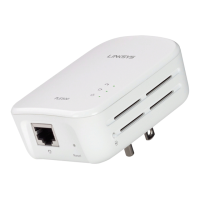
Cisco Linksys PLEK400
120 pages
Go to English
Print Icon
To Next Page IconTo Next Page
Loading...
Brugervejledning
Linksys PLEK400/PLSK400 Powerline-netvƦrksadapter

Table of Contents

Questions and Answers

  • J
    jesuswilsonJul 29, 2025
    What to do if no LEDs turn on after installing Cisco Powerline Adapter?
    • J
      Jonathan NguyenJul 29, 2025
      If none of the LEDs light up after installing your Cisco Powerline Adapter, try the following: 1. Disconnect the adapter from the power outlet. 2. Disconnect the Ethernet network cable from the adapter. 3. Wait five seconds. 4. Reconnect the Ethernet network cable to the adapter. 5. Reconnect the adapter to the power outlet. 6. If it still doesn't work, verify that the electrical outlet is functioning by plugging in another device.
  • K
    Kimberly AndersonAug 8, 2025
    What to do if the Ethernet LED doesn't light up on Cisco Linksys PLEK400?
    • N
      Nathan GutierrezAug 8, 2025
      If the Ethernet LED on your Cisco Powerline Adapter isn't lighting up, ensure the following: * The Ethernet network cable is securely connected to the adapter. * The Ethernet network cable is securely connected to the computer or other network device. * The Ethernet adapter on your computer is working correctly. Consult Windows Help for further assistance.
  • J
    James MooreAug 19, 2025
    Why can't I connect to the internet using my Cisco Linksys PLEK400 Adapter?
    • J
      Joseph HamptonAug 19, 2025
      If you're unable to connect to the internet using your Cisco Powerline Adapter, try these steps: 1. Locate the Powerline adapter connected to the computer that cannot connect. 2. Reset the adapter to its factory default settings by pressing and holding the Standby/Reset button for at least ten seconds. 3. Ensure all adapters on the Powerline network have been configured with the same network password, as they must be identical to communicate. 4. If adding a new adapter to an existing Powerline network with a unique password, follow the instructions in 'Advanced Configuration'.

Summary

Overview

Features

Details the product's features, including kit contents and connection requirements.

How Powerline Networking Works

Example Installation

Illustrates a typical home Powerline network setup connecting a router and devices.

Installing the Powerline Network

Installation Overview

Steps to prepare for setting up the Powerline network, including prerequisites.

Tips

Recommendations for optimal Powerline adapter installation, like direct wall outlet connection.

Sharing Internet Access

Steps to connect your router to the Powerline network to share Internet access.

Adding Adapters

Instructions for connecting additional adapters to the network for expansion.

Setting up Advanced Security

Advanced Configuration

Troubleshooting

LED Behavior Guide

Explains the meaning of different LED indicator states for troubleshooting.

Specifications

Cisco Linksys PLEK400 Specifications

General IconGeneral
BrandCisco
ModelLinksys PLEK400
CategoryAdapter
LanguageEnglish

Related product manuals