4 Cisco SPA100 Series Analog Telephone Adapters
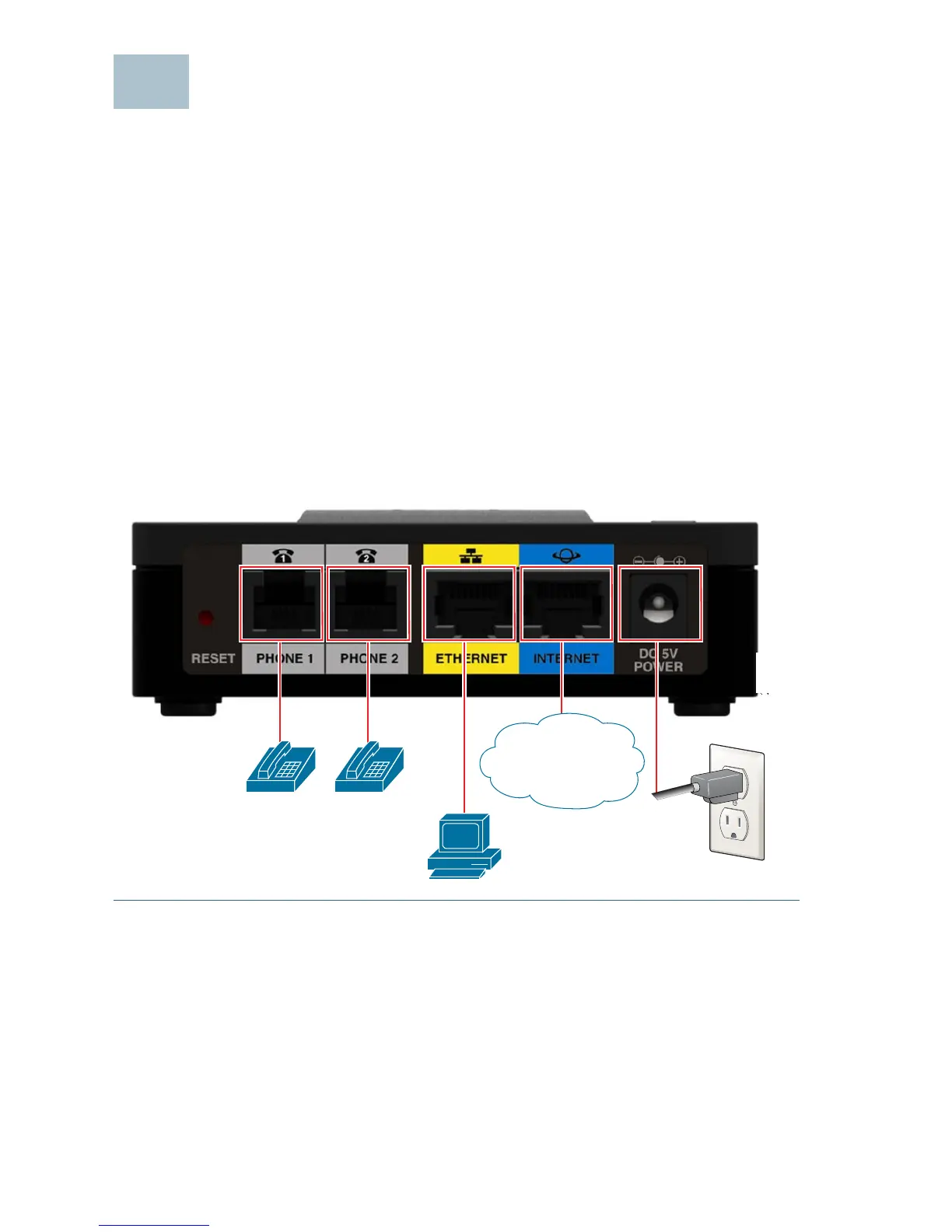
Connecting the Equipment
NOTE For wall-mounting instructions, see Mounting the ATA, page 9.
STEP 1 Connect one end of the provided Ethernet cable to the Internet
(Blue) port. Connect the other end directly to your broadband
network deviceConnect one end of a phone cable to the Phone 1
(Gray) port. Connect the other end to your analog phone or fax
machine.
STEP 2 Connect one end of another phone cable to another analog phone
or fax machine. Connect the other end to the Phone 2 (Gray) port.
STEP 3 SPA122 Only: Optionally, connect one end of an Ethernet network
cable to the ETHERNET (Yellow) port of the ATA. Connect the other
end to a device on your network, such as a computer.
STEP 4 Connect the provided power adapter to the Power port.



 To Next Page