29
6. Accessories
The Z70 is Bluetooth compatible, we strongly recommend only using approved Bluetooth devices
with your Z70.
6.1 Firey
6.1.1 Setting up your Firey set
1) Unpack your Firey Master and Firey Remote from their boxes.
2) Make sure to plug both units in a power source.
3) Turn both Master and Remote over.
4) Find a paperclip or a tack.
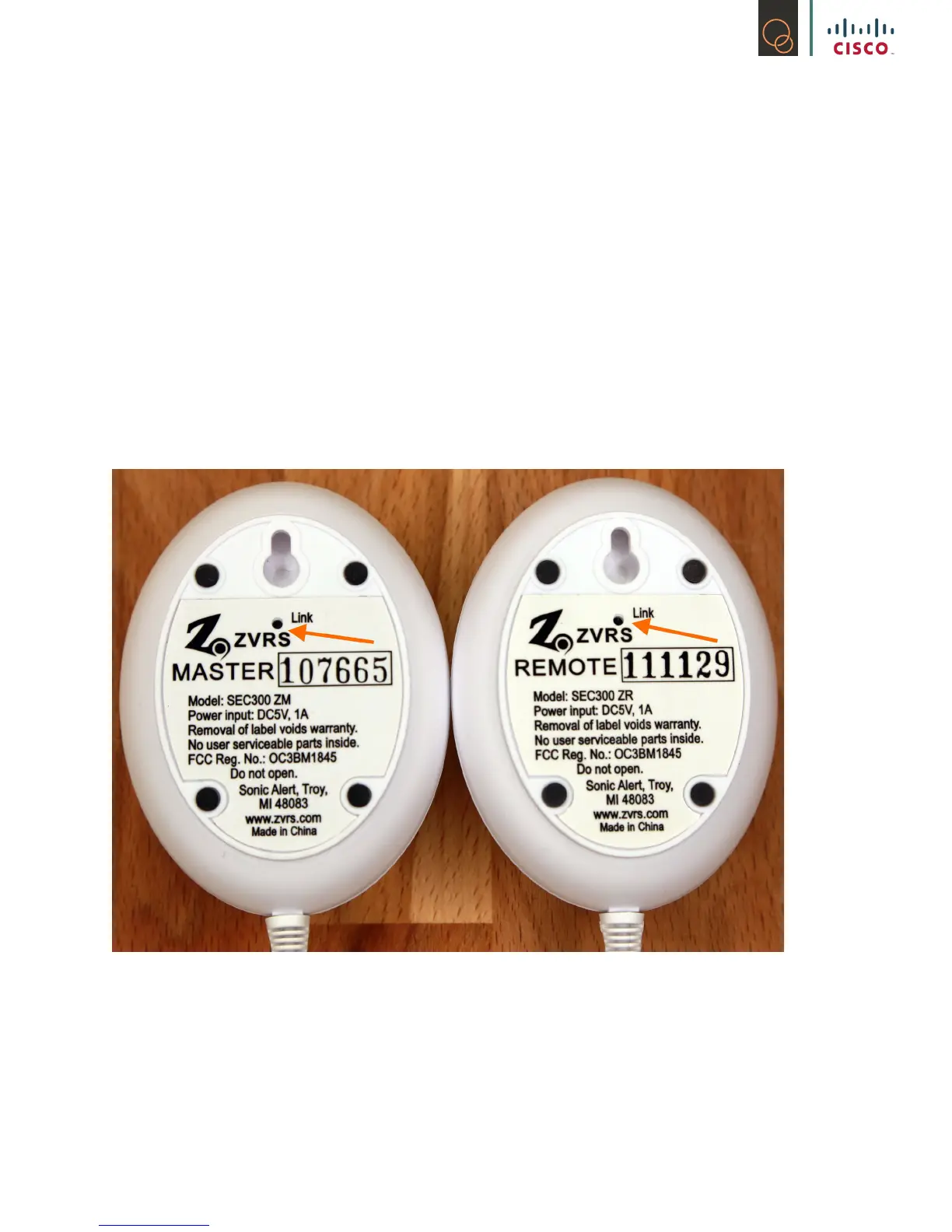
5) Find the holes on the Master and Remote as shown here:
6) Format both Firey units by pressing the link button until light disappears.
7) To pair both Firey units together, press Link button and wait until blue light on both units
blink.
8) Unplug the power until the green light goes off then plug it back in.
9) The Remote should blink quickly for 3-5 seconds then disappear.
10) Your Firey units are now paired to each other!
11) You are now ready to start pairing it to your Z70!



 To Next Page