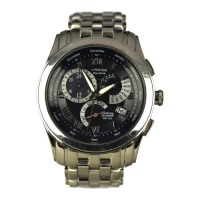
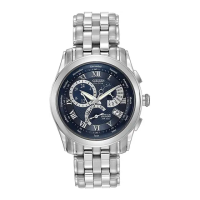
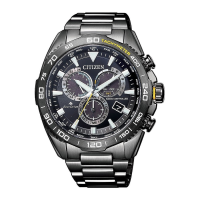
This document provides comprehensive instructions for setting and maintaining a Citizen Eco-Drive perpetual calendar watch, specifically for movement calibers E760, E761, and E76x.
Function Description
The Citizen Eco-Drive watch is a solar-powered timepiece equipped with a solar cell on its face that converts light energy into electrical energy to drive the watch. It features a perpetual calendar that automatically adjusts the year, month, and day, including leap years, until February 28, 2100. The watch also includes a time difference correction function, allowing for easy time zone changes without stopping the watch, and a power save function that reduces current consumption when the solar cell is not exposed to light.
Usage Features
Before Using:
It is crucial to fully charge the watch by exposing it to light before initial use and setting. If the watch stops due to insufficient charge, expose it to intense light, such as direct sunlight, to recharge it. The watch uses an Eco-Drive rechargeable battery (manganese titanium), a clean energy battery free of mercury or other toxic substances. Once fully charged, the watch can keep time for approximately two years with the power save function operating, without additional charging. There is no risk of overcharging due to an overcharging prevention function. Daily recharging is recommended for optimal use.
Setting the Time and Date:
For watches with a screw-lock crown, loosen the screw before operating the crown and retighten it securely afterward.
-
Setting the Time:
- Pull the crown out to the second click (time setting position). The second hand will rapidly advance to the 0 seconds position and stop.
- Turn the crown to set the time. Turning right moves the hour and minute hands forward (clockwise), while turning left moves them backward by one minute (counter-clockwise). Continuous turning causes rapid advancement of the hands; turn the crown left or right to stop them.
- When correcting in the forward direction, the date changes when the hour and minute hands indicate 12:00 AM. If hands are in "rapid advance" mode, they "pause" at 12:00 AM before resuming rapid advancement. When correcting backward, the date does not change even if hands pass 12:00 AM.
- Return the crown to the normal position, synchronizing with a telephone time signal or other time service.
-
Setting the Date (Perpetual Calendar):
The watch has a perpetual calendar. Once set, the year, month, and date automatically adjust, including leap years.
- Pull the crown out to the first click (calendar correction position). The second hand moves to the stored year and month position and stops.
- Turn the crown to set the date. Turning right sets the second hand to the position corresponding to the year (number of years elapsed since the most recent leap year) and month. Continuous turning causes rapid advancement. For example, December in a leap year aligns the second hand at '0' seconds. April in a year three years after a leap year aligns the second hand at 23 seconds (between 4:00 and 5:00).
- Turning the crown to the left advances the date by one day. Continuous turning causes rapid date advancement; turn the crown left or right to stop it.
- Return the crown to the normal position after setting the date. The second hand will advance to the current second, and the hands will move normally.
- To set the date by continuously turning the crown, stop advancing rapidly two to three days before the correct date, then advance one day at a time.
- If the date is set to a non-existent date (e.g., February 30), it will automatically change to the first day of the following month when the crown is returned to the normal position.
- If the date has shifted out of the calendar window, pull the crown to the 1st position, then turn it to the right while pressing button (A) until the date appears in the center of the calendar window. Return the crown to the normal position.
-
Correcting the Time Difference:
Time difference can be corrected in 1-hour increments by pressing button (A) and continuously turning the crown. This correction is possible for 30 seconds after pressing button (A) or after a time difference correction (once hands finish moving).
- Put the crown in the normal position.
- Press button A; the second hand will perform a demonstration movement (forward -> backward -> forward rotation).
- Correct the time difference by turning the crown right or left. Turning right moves the hour hand forward by one hour (clockwise). Turning left moves the hour hand backward by one hour (counter-clockwise).
- If corrected forward, the date after hands finish moving is corrected by +1 day when hour and minute hands pass 12:00 AM. Pay attention to AM/PM.
- To return to the original setting, move the hour hand in the opposite direction. If corrected backward, the date after hands finish moving is corrected by -1 day when hour and minute hands pass 12:00 AM (this takes about two minutes).
Functions Unique to Solar-Powered Watches:
The watch has warning functions to indicate insufficient charge:
- Insufficient Charging Warning Function: The second hand moves at two-second intervals. The watch will operate normally for about two days in this state before stopping. Expose the watch to light to return to one-second interval movement.
- Time Setting Warning Function: If the watch stops and is then exposed to light, the second hand will move irregularly at two-second intervals, indicating incorrect time. Reset the time after the watch is sufficiently charged.
- Overcharging Prevention Function: This function activates when the rechargeable battery is fully charged, preventing further charging.
- Power Save 1: If the solar cell is not continuously exposed to light, the second hand stops, and the watch enters Power Save 1 to reduce battery consumption. The minute and hour hands continue to keep time, and calendar operation is linked to their movement.
- Power Save 2: If Power Save 1 continues for about three days, the watch automatically switches to Power Save 2. Movement of hour and minute hands, as well as calendar operation, stops to further reduce battery consumption. The power save function is not activated if the battery is fully charged and the overcharging prevention function is active, even if light is not shining on the solar cell.
- Canceling Power Save: Exposing the solar cell to light resumes power generation, canceling power save. The hands rapidly advance to the current time and begin moving.
General Reference for Charging Times:
Charging times vary by model (dial color, etc.) and are provided as a reference for continuous exposure to light.
- From Indoor Light Source (500 lux, office):
- One day use: 2 hours
- One second step: 27 hours
- Full charge: 22 days
- From Fluorescent at 6" Distance (3000 lux):
- One day use: 19 minutes
- One second step: 10 hours
- Full charge: 82 hours
- From Outdoor Cloudy (10,000 lux):
- One day use: 6 minutes
- One second step: 2 hours
- Full charge: 26 hours
- From Outdoor Bright Sun (100,000 lux):
- One day use: 1.5 minutes
- One second step: 1 hour
- Full charge: 7 hours
Notes Regarding Use:
Keep the watch charged at all times. Long sleeves can conceal the watch, preventing sufficient charging. When not wearing the watch, place it in a bright location to ensure it keeps correct time.
Maintenance Features
All-Reset:
If the watch display is incorrect due to static electricity or strong impact, perform an all-reset followed by a reference position alignment.
- Pull the crown out to the second click (time setting position). The second hand moves to the 0-position and stops.
- Continuously press button (A) for at least 1 second. The hour and minute hands perform a demonstration movement (forward -> backward -> forward), and the second hand makes one complete clockwise revolution.
- This completes the all-reset. Always perform the reference position alignment afterward.
- Demonstration movement is not performed if the watch is insufficiently charged. Ensure the watch is sufficiently charged before performing an all-reset.
- Do not perform all-reset while the date is changing, as this can shift the date position. If the date position shifts, pull the crown to the first click after all-reset, and turn the crown to the left while pressing button (A) to set the date.
Reference Position Alignment:
After an all-reset, align the hands and date to their reference positions.
- Align the hour and minute hands at the 12:00 position by pulling the crown out to the second click. Turning the crown right moves them forward; turning left moves them backward. Continuous turning causes rapid advancement; turn left or right to stop them.
- Align the second hand at the 12:00 position and the date at '1' by pulling the crown out to the first click. Turning the crown right moves the second hand forward by 1 second. Turning the crown left moves the date forward by one day. Continuous turning left causes rapid date advancement; turn left or right to stop it.
- Once all hands are aligned at 12:00 and the date at '1', return the crown to the closed position.
- It takes about 1 second for the watch to store the reference position. If the crown is operated before the irregular two-second-interval movement starts, the reference position may not be stored. The second hand will remain stopped if the crown is returned to normal position without performing alignment.
- After alignment, properly reset the time and date. The watch will show 12:00 AM. Refer to "Setting the Time and Date" section, paying attention to AM/PM.
Care of Your Timepiece:
- Temperature Care: Avoid extreme temperatures (hot tubs, dashboards, extreme cold) as they can cause malfunction, shorten battery life, or damage components.
- Shock-Resistant: The watch can be worn during golf or other activities, but avoid severe shocks.
- Magnetic-Resistant: No issues with ordinary household electric appliances. Keep away from magnets.
- Chemical/Gas Resistant: Do not expose the watch to chemicals or gases for long periods.
- Watch Cleaning: Remove stains, waterspots, and accumulated dirt from the case, crystal, or band with a soft cloth to prevent damage and premature wear.
- Handling of Water-Resistant Watches:
- Do not operate the crown or push-button in water or when wet. Tighten screw-lock crowns completely.
- If immersed in water, dry immediately. If in contact with saltwater, rinse thoroughly with warm fresh water.
- Never store a wet watch in a closed container. Dry immediately or take to a watchmaker if moisture is inside the case.
- Gaskets, crowns, and other materials deteriorate over time. Replace them every one to two years to maintain water resistance.
- Care for Metal Bracelets:
- Dust and perspiration accumulate on the bracelet, especially inner parts of links or mesh.
- Soil and rust can cause staining of cuffs and skin irritation.
- Wipe off heavy perspiration with a soft dry cloth.
- Clean occasionally with an old toothbrush and warm soapy water, then rinse thoroughly with clear water and dry completely. Do not do this if the watch is not water-resistant; consult a jeweler.
- Care for Straps (Leather):
- Heavy perspiration can wash out natural oils, causing leather to dry and deteriorate. Blot moisture with a soft dry cloth or paper towel and allow to dry naturally.
- Remove salt residue and soil with a dampened soft cloth and mild soap or saddle soap.
- Occasionally clean the inside surface with a soft cloth dampened with alcohol.
- Wear the strap loosely (one finger space) to allow air circulation and prevent moisture buildup.
- Care for Straps (Rubber):
- Wash frequently with mild soap and warm water using a soft brush.
- Thorough cleaning is especially important after use in saltwater.
- Solvents, oils, perspiration, tanning lotion, and salt can cause rubber to deteriorate.
Water Resistance:
Water resistance varies by model. It is measured at a static state. Movement in water (e.g., swimming) adds pressure. Always allow a margin of safety when exposing the watch to moisture. Periodic maintenance is needed to maintain water resistance. Gaskets dry and become brittle over time; replace them every 18 to 24 months (yearly if frequently exposed to chlorinated pools, saltwater, soaps). Condensation that appears and then disappears quickly is normal due to sudden temperature changes. If moisture does not clear, send the timepiece to an Authorized Service Center. Ensure the crown is completely pushed in before contact with moisture. If equipped with a screw-down crown, ensure it is properly seated. Do not operate the crown or push-buttons when wet.
- No indication of water resistance: Non-water-resistant model, not designed for moisture contact. Avoid contact with moisture (e.g., hand washing, rainstorm).
- "Water Resist": Designed to withstand accidental splashing (hand washing, rain). Submersion in water may cause moisture entry.
- "Water Resist 10BAR" or "W.R. 10BAR", Dial marked "WR100": Withstands water pressure up to 333 feet. Includes accidental splashing, rain, showering, swimming, and snorkeling. Rinse with fresh water after exposure to chlorinated pools, saltwater, or soaps, then dry with a soft cloth.
- "Water Resist 20BAR" or "W.R. 20BAR", Dial marked "WR200": Withstands water pressure up to 666 feet. Includes all exposure up to and including recreational SCUBA diving. Rinse with fresh water after exposure to chlorinated pools, saltwater, or soaps, then dry with a soft cloth.
- Special Note about Jacuzzis and Hot Tubs: Remove the watch before entering a hot tub or Jacuzzi. High temperatures cause components to expand at different rates, leading to loss of gasket sealing capabilities and potential deformation of materials, causing mechanical failures.
Replacing the Eco-Drive Rechargeable Battery:
The rechargeable battery does not need periodic replacement like ordinary batteries as it can be charged and discharged repeatedly. It is not user-replaceable.


 To Next Page
 General