H24*
Abbreviated instruction
Continued on the next page
12月
1月
2月
3月
4月
5月
6月
7月
8月
9月
10月
11月
Dec.
Jan.
Feb.
Mar.
Apr.
May
Jun.
Jul.
Aug.
Sep.
Oct.
Nov.
Leap year
April
1st year since
leap year
2nd year since
leap year
3rd year since
leap year
Setting the time zone
A time zone can be set within the range of -11 hours to +12 hours
(standard time) based on UTC (Coordinated Universal Time) in 1
hour increment.
1. Pull the crown out to position
1
.
e second hand indicates the current time zone setting.
2. Rotate the crown to choose a time zone.
3. Push the crown in to position
0
to finish the procedure.
• Set the time zone before setting summer time. (See “Setting
summer time”.)
Receiving the signal manually (on-demand reception)
It takes 2-15 minutes to nish reception.
1. Push the crown in to position
0
.
2. Press and hold the lower right button
Ⓐ
for 2 seconds or more.
e second hand points “RX” and signal reception starts. e
second hand returns to normal movement aer nishing reception.
Reception was successful:
e corrected time is indicated.
Reception failed:
e time is not corrected and the previously
set time resumes.
• Press and hold button
Ⓐ
for 2 seconds or more to cancel reception.
Setting summer time
In regions utilizing summer time, the time signal includes summer
time check signal.
1. Pull the crown out to position
2
.
2. Rotate the crown to change the summer time setting.
Indication Meaning
ON
Summer time is indicated.
e watch automatically switches between
standard time and summer time depending
whether the summer time check signal is
contained or not in the signal received.
OFF
e standard time is indicated. e standard time
is kept indicated even when the summer time
check signal is received.
3. Push the crown in to position
0
to nish the procedure.
Adjusting the time and calendar manually
e calendar of this watch does not have to be adjusted manually
until February 28, 2100 including leap years. (perpetual calendar)
1. Pull the crown out to position
2
.
2. Press and release the lower right button
Ⓐ
.
e second hand points to 0 second.
3. Rotate the crown to adjust the minute.
• When you rotate the crown quickly, the minute hand will
move continuously.
To stop the rapid movement, rotate the crown.
4. Press and release the lower right button
Ⓐ
.
e hour hand becomes adjustable.
5. Rotate the crown to adjust the hour and date indication.
• e hour hand and date indication move synchronously.
• Change of date indication shows it just became AM. Take care
the time set is AM or PM.
• When you rotate the crown quickly, the hour hand will move
continuously.
To stop the rapid movement, rotate the crown.
6. Press and release the lower right button
Ⓐ
.
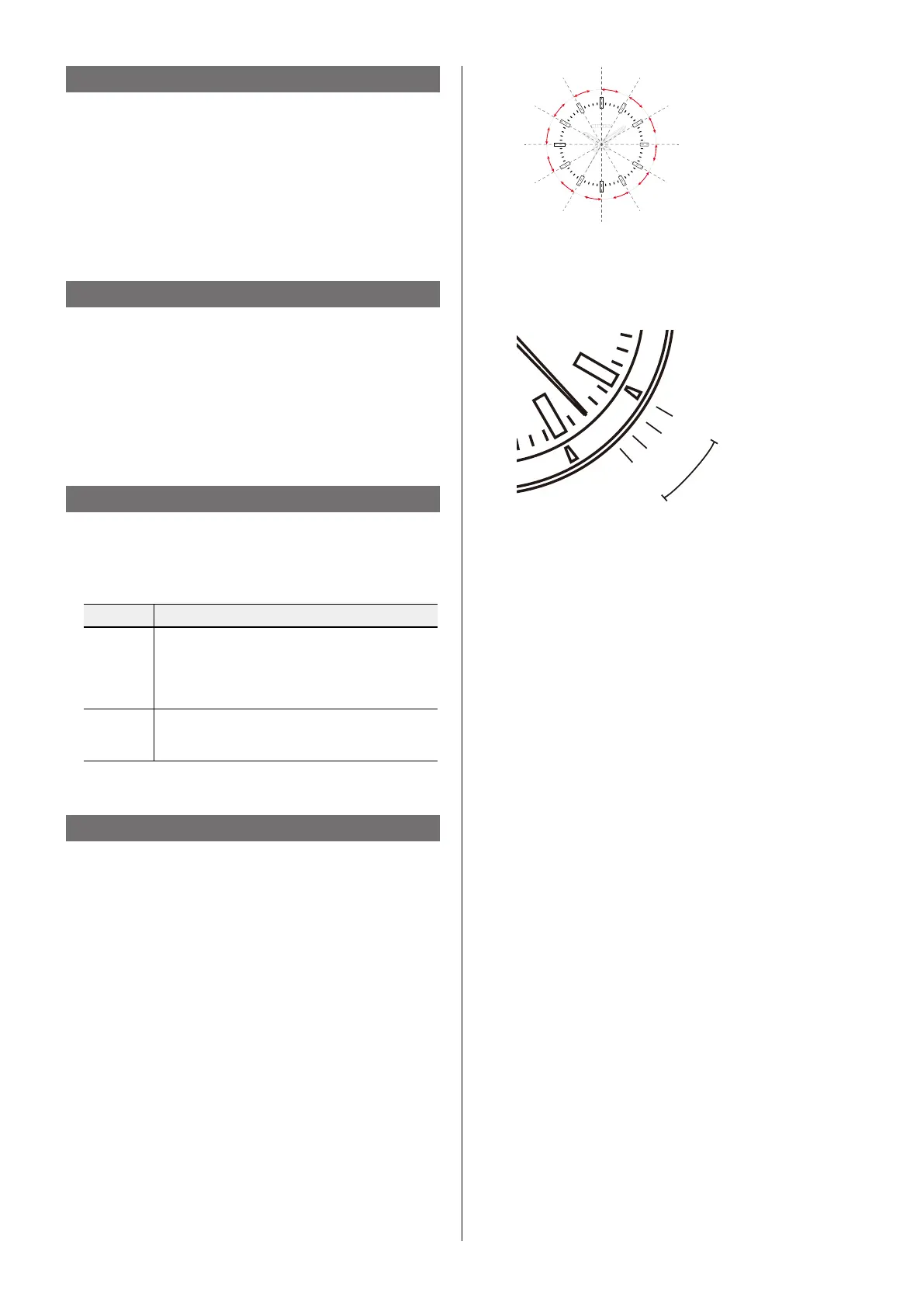
e second hand indicates the year and month currently set.
7. Rotate the crown to adjust the year and month.
e month is indicated by the hour area.
• The year corresponds to the years since leap year and
is indicated with the position of the second hand.
EX.: to set to April 2015
April → 4 o’clock area
2015 → 3rd year since leap year
8. Push the crown in to position
0
in accordance with a
reliable time source.


 To Next Page
 Loading...