EasyManua.ls Logo

Citizen H41 Series - User Manual

Citizen H41 Series
2 pages
Print Icon
To Next Page IconTo Next Page
Loading...
1/2
H41*
Abbreviated instruction
This watch is solar-powered. Expose the dial to light and use it sufficiently charged.
To see details of charging time, specifications and operations, refer to the instruction manual.
English
Reception-in-progress
indication (RX)
Reception result
indication (NO)
Reception result
indication (H/M/L)
Button
B
Date indication
Crown
Button
A
Minute hand
Hour hand
Second hand
Actual appearance may differ from the illustration.
The crown has two positions when pulling it out.
Checking the signal reception result
This watch receives the time signal from the Japan station every day to adjust
time automatically.
1.
Push the crown in to position
0
.
2.
Press and release the lower right button
A
.
The second hand moves to indicate the result of the last reception.
Indication Reception result
H
The reception was successful in a very good condition.
M
The reception was successful in a good condition.
L
The reception was successful in a not-good condition.
NO
The reception failed.
Try signal reception following the steps in
Receiving the signal manually
(on-demand reception)
if the last reception failed.
3.
Press and release the lower right button
A
to finish the
procedure.
The indication returns to current time.
It returns to current time indication automatically in about 10 seconds
without pressing the button.
Receiving the signal manually (on-demand reception)
It takes 2-15 minutes to finish reception.
1.
Push the crown in to position
0
.
2.
Press and hold the lower right button
A
for 2 seconds or more.
The second hand points “RX” and signal reception starts. The second hand
returns to normal movement after finishing reception.
Reception was successful
The time will be updated.
Reception failed
The time is not corrected and the previously set time
resumes.
Press and hold button
A
for 2 seconds or more to cancel reception.
Component identification
Crown's position
0 1 2
Adjusting the time and calendar manually
Setting the time and date
1.
Pull the crown out to position
2
.
The second hand points 0 second.
2.
Rotate the crown to adjust time and date.
When you rotate the crown quickly a few times, the hand will move
continuously. To stop the rapid movement, rotate the crown in either
direction.
The hour and minute hands move synchronously.
Change of date indication shows it just became AM. Take care the time set
is AM or PM.
To adjust the hour and date faster, see
Adjusting the hour and date
easily
.
3.
Push the crown in to position
0
in accordance with a reliable
time source to finish the procedure.
Setting the year and month
1.
Pull the crown out to position
1
.
The second hand indicates year and month currently set.
2.
Rotate the crown to adjust year and month.
Year and month are indicated with the second hand.
12
1
2
3
4
5
6
7
8
9
10
11
“Month” corresponds to one of
the 12 zones shown in the figure
below.
Each number means month.
“Year” corresponds to the years
since leap year and is indicated
with markers in the zone of each
month.
Years since leap year:
0
(Leap
year)
0
Years since leap year:
1
1
Years since leap year:
2
2
3
Years since leap year:
3
3.
Push the crown in to position
0
to finish the procedure.
Question and Answer IconNeed help?

Do you have a question about the Citizen H41 Series and is the answer not in the manual?

Summary

Component Identification

Checking Signal Reception Result

Receiving Signal Manually

Adjusting Hour and Date Easily

Checking Reference Position

Correcting Reference Position

Overview

This document outlines the operation and features of the H41* Abbreviated Instruction watch, a solar-powered timepiece designed for precision and ease of use. The watch incorporates radio-controlled timekeeping, manual adjustment capabilities, and a system for checking and correcting its reference position.

Function Description

The H41* watch is primarily a timekeeping device that displays hours, minutes, seconds, and the date. Its core functionality revolves around solar power, meaning it charges when exposed to light, eliminating the need for battery replacements under normal use. A key feature is its radio-controlled timekeeping, which allows the watch to automatically receive time signals from the Japan station daily, ensuring accurate time synchronization.

The watch provides clear indications for its operational status. The "Reception result indication (NO)" signifies that no signal reception has occurred or that the reception failed. The "Reception-in-progress indication (RX)" lights up when the watch is actively attempting to receive a time signal. The "Reception result indication (H/M/L)" provides feedback on the quality of the last successful reception: 'H' for very good, 'M' for good, and 'L' for not-good.

Beyond automatic time synchronization, the watch offers comprehensive manual adjustment capabilities. Users can manually set the time, date, year, and month, providing flexibility for various scenarios, such as travel across time zones or when the watch has been in an environment where signal reception is difficult. The watch also features a "reference position" system, which is the internal alignment of the hands and date indication. This system ensures that the watch's internal mechanism is correctly calibrated, which is crucial for accurate time display.

Usage Features

The H41* watch is designed for intuitive operation, with several features enhancing its usability.

Solar Power and Charging: The watch is solar-powered, requiring exposure to light for charging. Users are advised to expose the dial to light to ensure it is sufficiently charged for optimal performance. This feature contributes to the watch's low maintenance and environmental friendliness.

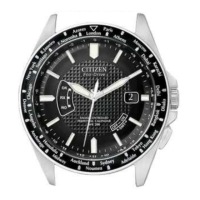
Component Identification: The watch's components are clearly labeled for easy identification:

  • Crown: A multi-functional control element with two distinct pull-out positions (0, 1, and 2) for different adjustment modes.
  • Button A (Lower right button): Primarily used for checking signal reception results and initiating manual signal reception.
  • Button B (Upper right button): Used for adjusting the hour and date easily, and for checking and correcting the reference position.
  • Hour, Minute, and Second hands: Standard time-telling components.
  • Date indication: Displays the current date.
  • Reception result indications (NO, RX, H/M/L): Visual cues for signal reception status and quality.

Adjusting the Time and Calendar Manually:

  • Setting Time and Date:
    1. Pull the crown out to position 2. The second hand will point to 0 seconds.
    2. Rotate the crown to adjust the time and date. Rotating the crown quickly will cause the hands to move continuously; rotating it in either direction will stop the rapid movement. The change in date indication signifies the transition to AM. Users must ensure the correct AM/PM is set.
    3. Push the crown in to position 0 to finalize the setting.
  • Setting Year and Month:
    1. Pull the crown out to position 1. The second hand will indicate the currently set year and month.
    2. Rotate the crown to adjust the year and month. The "Month" corresponds to one of 12 zones on the dial, and "Year" corresponds to years since a leap year (0 for leap year, 1, 2, or 3).
    3. Push the crown in to position 0 to finalize the setting.

Checking Signal Reception Result:

  1. Push the crown in to position 0.
  2. Press and release the lower right button A. The second hand will move to indicate the result of the last reception (H, M, L, or NO).
  3. Press and release the lower right button A again to return to current time indication. The watch will also automatically return to current time after about 10 seconds without pressing the button.

Receiving Signal Manually (On-demand Reception): This process takes 2-15 minutes.

  1. Push the crown in to position 0.
  2. Press and hold the lower right button A for 2 seconds or more. The second hand will point to "RX," indicating signal reception has started. Upon completion, the second hand returns to normal movement. If reception is successful, the time is updated. If reception fails, the time is not corrected, and the previously set time resumes.
  3. To cancel reception, press and hold button A for 2 seconds or more.

Adjusting the Hour and Date Easily: This feature is useful for quick adjustments, such as when traveling.

  1. Push the crown in to position 0.
  2. Press and release the upper right button B. The hour hand will move back and forth to indicate that the hour and date are adjustable. It will return to normal automatically after about 10 seconds if no operation is performed.
  3. Rotate the crown to set the hour and date. Rapid rotation allows continuous movement of the hour hand. The date indication changes when AM is reached.
  4. Press and release the upper right button B to finish the procedure. It will return to current time automatically after about 10 seconds without pressing the button.

Maintenance Features

The H41* watch incorporates features that aid in maintaining its accuracy and proper functioning over time.

Checking the Reference Position: The reference position is the internal alignment of the watch's hands and date. Checking this ensures the watch's internal calibration is correct.

  1. Push the crown in to position 0.
  2. Press and hold the upper right button B for 10 seconds or more. The hands and date indication will move to their stored reference positions.
  3. Check the reference position:
    • Hour, minute, and second hands should point to 0 hour, 00 minute, and 0 second.
    • Date indication should be midway between "31" and "1". If the reference position is incorrect, it must be corrected.
  4. Press and release the upper right button B to finish the procedure. It will return to current time automatically after about 30 seconds.

Correcting the Reference Position: If the reference position is found to be incorrect, follow these steps:

  1. Push the crown in to position 0.
  2. Press and hold the upper right button B for 10 seconds or more. Release the button as the second hand starts to move. Wait until all hands and the date indication stop.
  3. Pull the crown out to position 1.
  4. Rotate the crown to adjust the hour hand and date indication. Rapid rotation allows continuous movement. The hour hand and date indication move synchronously.
  5. Pull the crown out to position 2.
  6. Rotate the crown to adjust the minute and second hands. Rapid rotation allows continuous movement. The minute and second hands move synchronously.
  7. Push the crown in to position 0.
  8. Press and release the upper right button B to finish the procedure.

After correcting the reference position, it is recommended to adjust the time and calendar manually or by performing a manual signal reception (on-demand reception) to ensure complete accuracy.

The solar-powered nature of the watch means that regular exposure to light is the primary "maintenance" required to keep it running. The radio-controlled feature minimizes the need for manual time adjustments, contributing to its overall low-maintenance design. The detailed instructions for checking and correcting the reference position empower users to ensure the watch's internal mechanisms remain precisely aligned, which is fundamental for accurate timekeeping.

Citizen H41 Series Specifications

General IconGeneral
Case MaterialStainless Steel
Water Resistance100 meters
CrystalMineral Crystal
Dial ColorBlack
MovementEco-Drive
FunctionsChronograph, Alarm, Date
Band MaterialStainless Steel

Related product manuals