EasyManua.ls Logo

Citizen HYPER AQUALAND - Setting the Time and Calendar

Citizen HYPER AQUALAND
61 pages
Print Icon
To Next Page IconTo Next Page
To Previous Page IconTo Previous Page
Loading...
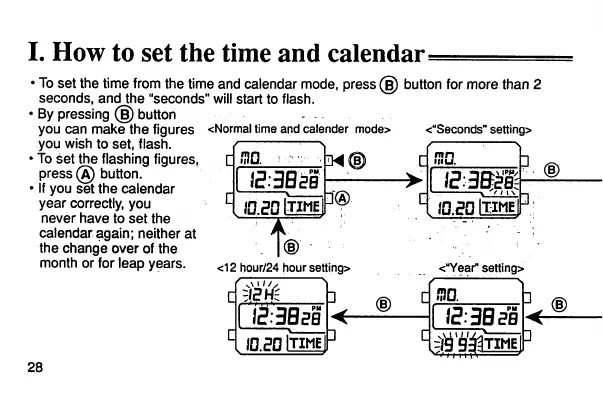
I.
How
to
set
the
time
and
calendar=
To
setthe
time
from
the
time
and
calendar
mode,
press
(§)
button
for
more
than
2
seconds,
and
the
"seconds"
will
start
to
flash.
By
pressing
(§)
button
you can
make
the
figures
<Normaltime
andcalender
mode>
<"Seconds"
setting>
you
wish
to
set,
flash.
To
set
the flashing figures,
press(A) button.
If you
set
the
calendar
year
correctly, you
never
have
to
set
the
calendar again; neither at
the
change
over
of
the
month or for leap years.
28
£:3B*'i
®
A
ma
'
••
IN®
C
i5'3BsB
r
10.20
ITIMEJ
m c
J
hn.ail-nrat
r,3.
<12 hour/24 hour setting> <BYear"setting>
r^1"/
"i
3
4
®
C
no.
iS:3BsB
1 IS3B3B
3
C
<<
L
IDPOlTIMEl
^e^TIMEl
3

Related product manuals