EasyManua.ls Logo

Citizen HYPER AQUALAND - Using the Watch Alarm Function; Setting and Managing Alarms

Citizen HYPER AQUALAND
61 pages
Print Icon
To Next Page IconTo Next Page
To Previous Page IconTo Previous Page
Loading...
J.
The
alarm
mode
=======
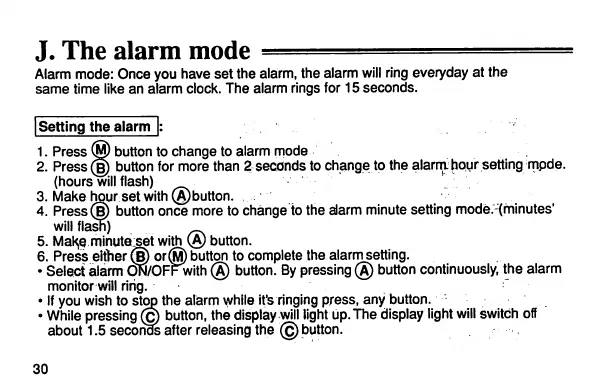
Alarmmode: Once you have set the alarm, the alarm
will
ringeveryday at the
same
time like an alarm clock. The alarm rings for 15
seconds.
[Setting the alarm |:
1.
Press
®
button
to
change
to
alarm
mode
2.Press®
button
for
more
than
2
seconds
to
change
to
the
alarrahour
setting
mpde.
(hours
will
flash) [:.'..-
3. Makehourset with(A)button.
4.
Press®
button
once
more
to
change
tothe
alarm
minute
setting
mode-Xminutes'
willflash)
5.
Mal^e
minute^set
with
(A)
button.
6.
Press
either
(§)or@
button
to
complete
the
alarm
setting.
Selectalarm
ON/OFFwith
(A)
button.
By
pressing
(A)
button
continuously,
the alarm
monitor
will
ring. '
Ifyou wish to stop the alarm whileit's
ringing
press, any button.
While
pressing
@
button,
the
display
will
light
up.The
display
light
will
switch
off
about
1.5
seconds
after
releasing
the
©
button.
30

Related product manuals