MCX 3..7 SMARTRONIC
®
26
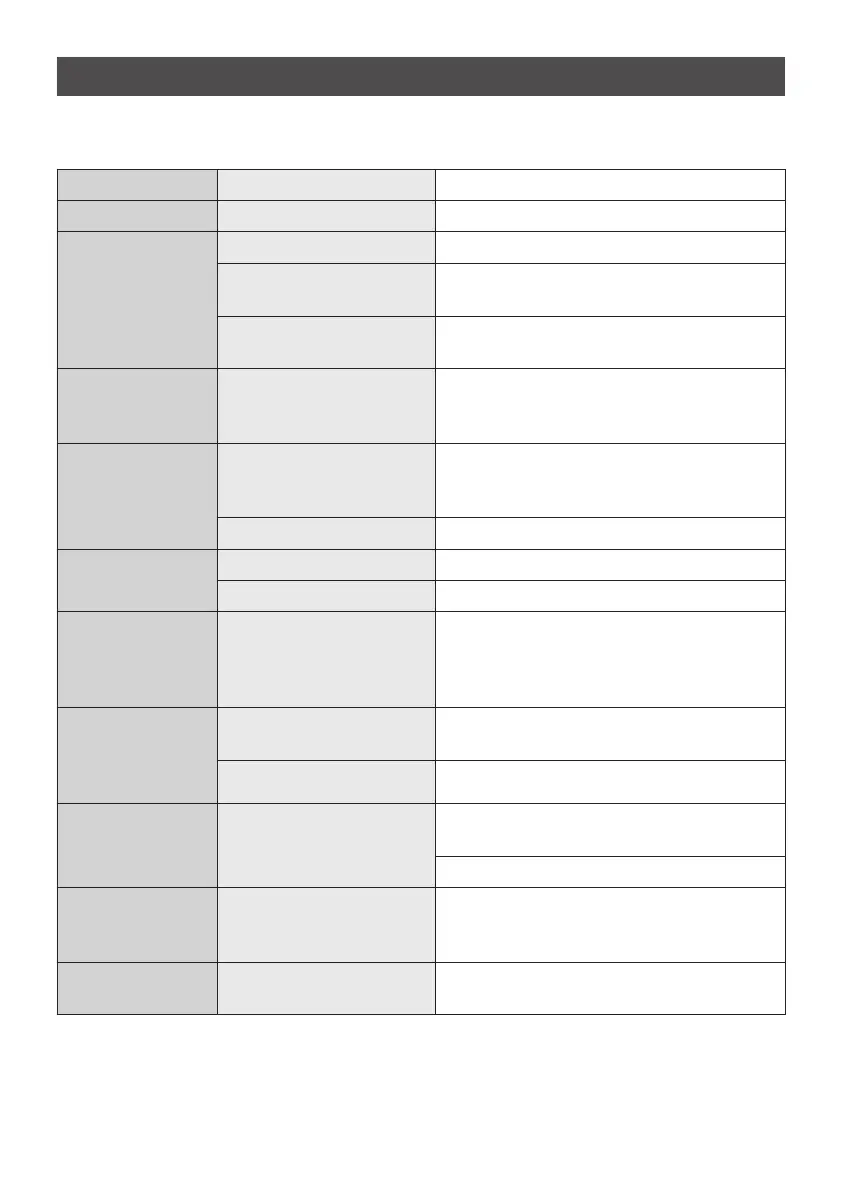
The following table will help you to determine and rectify the reasons for possible problems.
Fault Cause Action
No water flows Water supply is turned off Open the main water valve and the shut-off valve
Water flows more
slowly than expected
The jet regulator is not fitted Fit the special CLAGE jet regulator
Water pressure is not suf-
ficient
Check the water flow pressure,
check the water flow adjustment
Dirt in the pipes
Remove any dirt from the filter, valves and taps /
check the technical data
The heater switches
itself on and off
Water pressure is varying,
flow rate is too low
Remove any dirt / increase the flow water pres-
sure, close other taps, open the shut-off valve
further
Water remains cold
Water pressure is not suf-
ficient
Adjust the water flow, open the shut-off valve,
fit the special CLAGE jet regulator, check water
pressure
Dirt Remove dirt from the inlet and outlet
Hot water tempera-
ture varies
Supply voltage varies Check the supply voltage
Water connections mixed up Check installation
Hot water tempe-
rature too low and
one LED flashes
slowly
Flow rate is too high or inlet
temperature is too low
Adjust the flow either at the tap, the valve or the
flow adjustment screw (Adjusting the water flow,
22).
One LED flashes fast
and water remains
cold
Temperature sensor defective
Replace temperature sensor (authorized techni-
cian)
Heating element defective
Replace heating element (authorized technician)
All LEDs flash fast
and water gets warm
(Cable of) control panel
defectice
Reposition connector of control panel (authorized
technician)
Replace control panel (authorized technician)
All LEDs flash fast
and water remains
cold
Power unit defective Call service
LED turns off shortly
after keypress
Keylock is active Deactivate keylock (How to use, 23)
17. Trouble -shooting and service


 To Next Page