Need help?
Do you have a question about the Clarity D703HS and is the answer not in the manual?
Follow all instructions, avoid liquids, storms, gas leaks, and improper cleaning or placement.
Avoid disassembly, use correct power sources, handle cords carefully, and protect hearing from loud volumes.
Dispose of batteries properly, avoid fire, mutilation, short circuits, and charging non-rechargeable types.
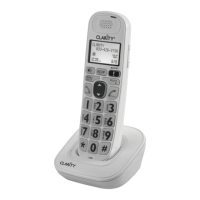
Lists items included: Handset, charger base, power adapter, belt clip, batteries, and user guide.
Place base centrally, away from interference sources like electronics and RF transmitters.
Locate the charger base and plug the power adapter into a wall socket.
Slide out cover, insert two NiMH batteries following polarity, replace cover, and place handset on base.
Charge the handset on the base for 16 hours for the first time; a beep confirms placement.
Register additional handsets to the base unit by following on-screen prompts and pressing keys.
Register expansion handsets to the main unit by accessing the 'Registration' menu on the handset.
Deregister all handsets by holding FIND on the base, then pressing FIND again.
After deregistration, re-register handsets using the 'add handset' procedure.
Refer to the main unit's user guide for additional information on expanded handset functions.
Contact customer service for questions regarding telephone operation via phone, fax, or email.
Specifies the amplified sound level of the telephone.
Provides physical dimensions and weight for the handset and base unit.
Details talk time, standby time, and indoor/outdoor range.
Lists AC adapter input/output and battery type (NiMH AAA), emphasizing proper battery usage.
 General
| Hearing Aid Compatibility | Yes |
|---|---|
| Speakerphone | Yes |
| Caller ID | Yes |
| DECT 6.0 Technology | Yes |
| Adjustable Tone Control | Yes |
| Extra Loud Ringer | Yes |

 To Next Page