3-16 Display
Weight Indicator (optional)
Weight of load is measured and indicated on the
display.
The default unit of weight on the service menu mode
is "kg." You can set the unit to pound (lb) on the
menu when measuring load weight. A password is
required, contact your dealer.
• Setup path: Service Menu Mode, SETUP → LOAD WEIGHT
The weight displayed is not valid for legal trade. See page 3-19 (3)
for further information of setup.
4. Display Monitoring
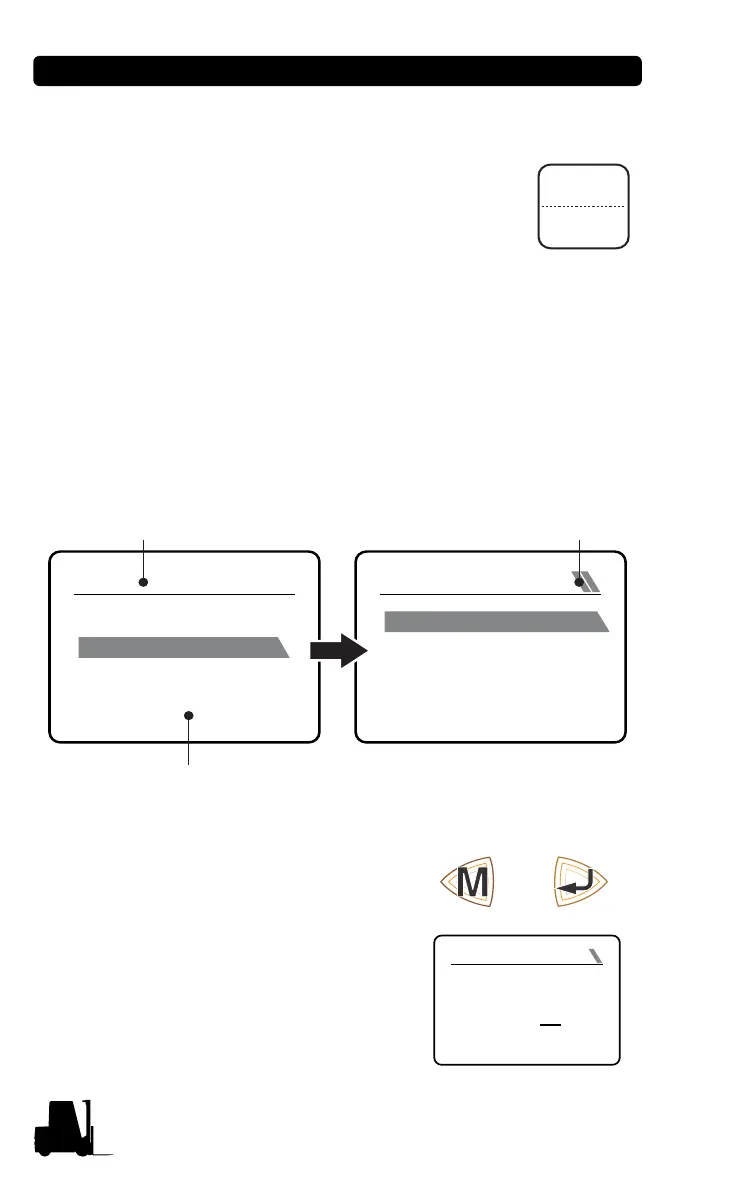
Menu Mode - Monitor Description
(1) How to display Driver menu mode, and Service menu mode
1. Pressing the Mode button displays
the Menu mode without entering
the password.
2. Pressing the Enter button opens
the password window, and the Ser-
vice Menu mode is displayed when
the correct password is entered.
MENU
SETUP
MONITOR
ALARM LOGBOOK
DEVICE INFORMATION
INPUTS
SEAT SWITCH
T/M OIL TEMP SW
ENG OIL PRESS SW
LPG PRESS SW
ENGINE SERVICE
CLOSE
OPEN
CLOSE
OPEN
CLOSE
Title
Sub Ɵtle or Contents
Title Level
INPUT PASSWORD
YES:ENTER
****
0
Mode button Enter button


 To Next Page