3-18 Display
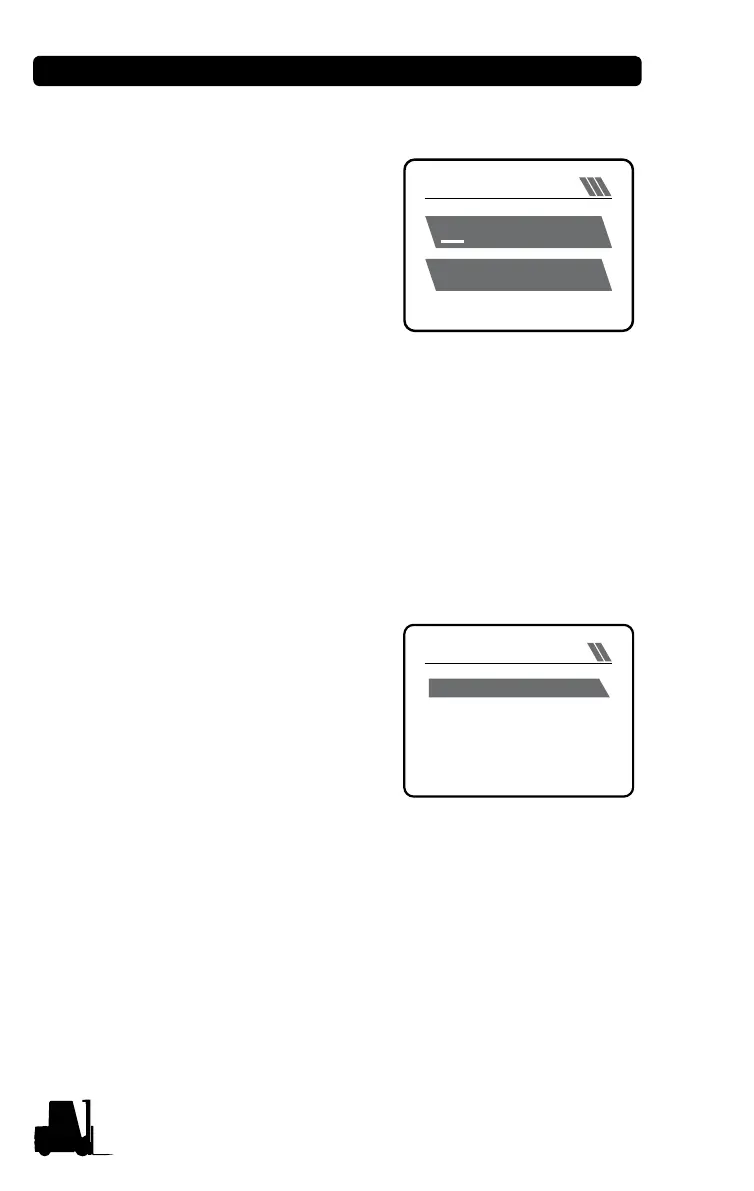
(1) Date and Time Setting menu
Current date and time are set.
Switching between 12- and 24-hour
systems and between AM and PM is
allowed.
• Make use of Plus (+) and Minus (-)
buttons to change the current val-
ues.
• Make use of the down arrow button
to move to the next value, and the up arrow button to move to the
previous value.
• Pressing Enter button saves the value and moves to the previous
menu.
• Pressing Mode button does not save the value, and moves to the
previous menu.
• Setup path: Driver Menu Mode, SETUP CLOCK SETUP
(2) Reset Menu of Trip Hour Meter or Trip Distance
When the forklift truck operates at
speed higher than 0.5 km/h, 'Trip
Hour Meter or Trip Distance' is
displayed; when the truck operates at
speed of 0.5 km/h or lower or stops,
'Whole Hour Meter or Trip Distance'
is displayed.
The current hour meter or trip
distance can be reset to "0" on the
menu.
• Move to "SETUP" menu on the menu mode.
• Move to "TRIP RESET" menu on "SETUP" menu.
• Pressing Enter button on "Trip Reset" parameters in "TRIP
RESET" menu resets the values.
• Pressing Mode button returns to the previous menu without saving
value.
• Setup path: Driver Menu Mode, SETUP TRIP RESET
CLOCK SETUP
30 MAR 2017 MON
SAVE: ENTER
AM 09 : 27
TRIP REST
TRIP RESETTRIP RESET


 To Next Page