Display 3-19
Section 3. Operator Compartment and Controls
The whole hour and Trip distance can increase but not
decrease in the Service menu. Neither is changing
99999.9 to 00000.0 allowed.
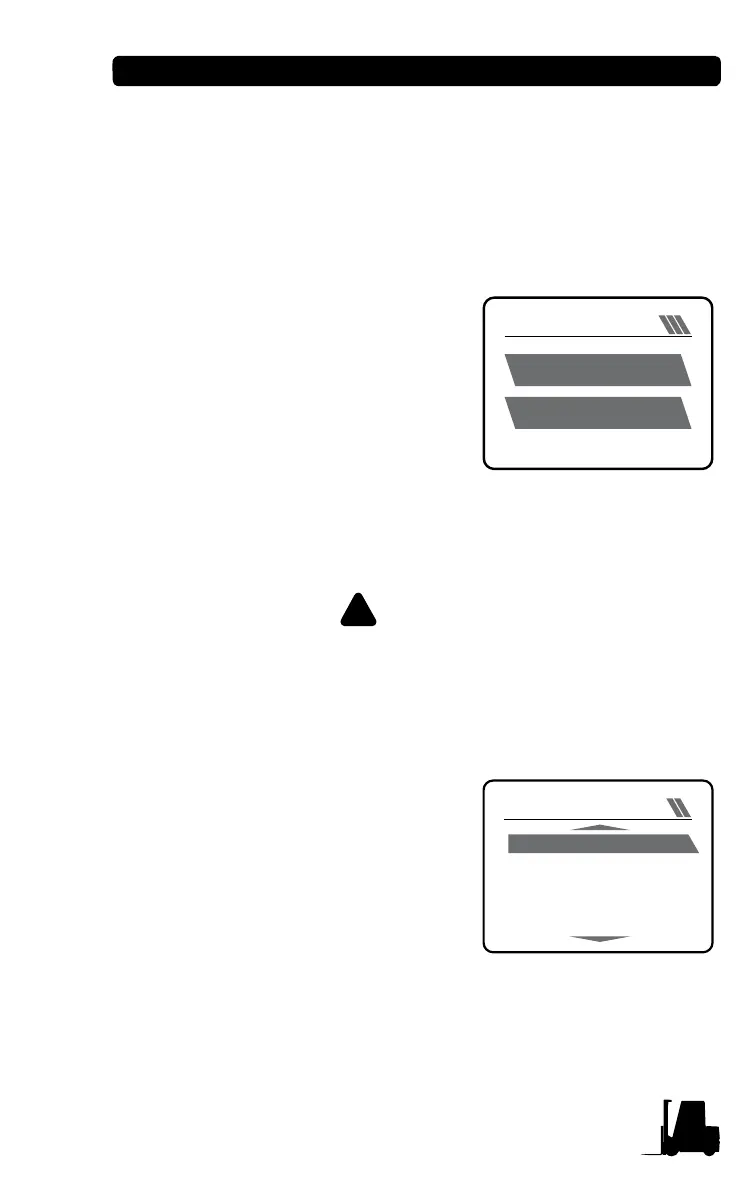
(3) Menu for Resetting Load Weight to '0'
Operator can reset the default of the
load weight gauge to "0" when
operator directly changes attachment.
• Move to "Setup" menu on the
menu mode.
• Pressing Enter button on "Weight
Set to Zero" menu on "Setup"
menu resets the value to "0."
• Pressing Mode button returns to
the previous menu without saving value.
• Setup path: Driver Menu Mode, SETUP WEIGHT SET to ZERO
WARNING
When the default is not reset to zero after changing the
attachment, actual value of load weight may be different
from measurement value.
(4) Monitor, Alarm Logbook Menu
When setting Monitor menu and
Alarm Logbook Menu to "ON" in
service menu mode, the menus can
be viewed in driver menu mode. If
setting those menus to "OFF," they
are not viewed in driver menu mode.
A password is required, contact your
dealer.
Each parameter displays five state
values. Pressing Up/Down buttons, the values are displayed upward
and downward.
• Setup path: Service Menu Mode, MONITOR INPUTS
WEIGHT SET to ZERO
1234
kg
SAVE: ENTER1b = 0.4536kg
1.23
v
INPUTS
SEAT SWITCH
T/M OIL TEMP SW
ENG OIL PRESS SW
LPG PRESS SW
ENGINE SERVICE
CLOSE
OPEN
CLOSE
OPEN
CLOSE


 To Next Page