17
Parts & Service: 020 8988 7400 / E-mail: Parts@clarkeinternational.com or Service@clarkeinternational.com
SETTING THE DRIVE ROLLER SIZE
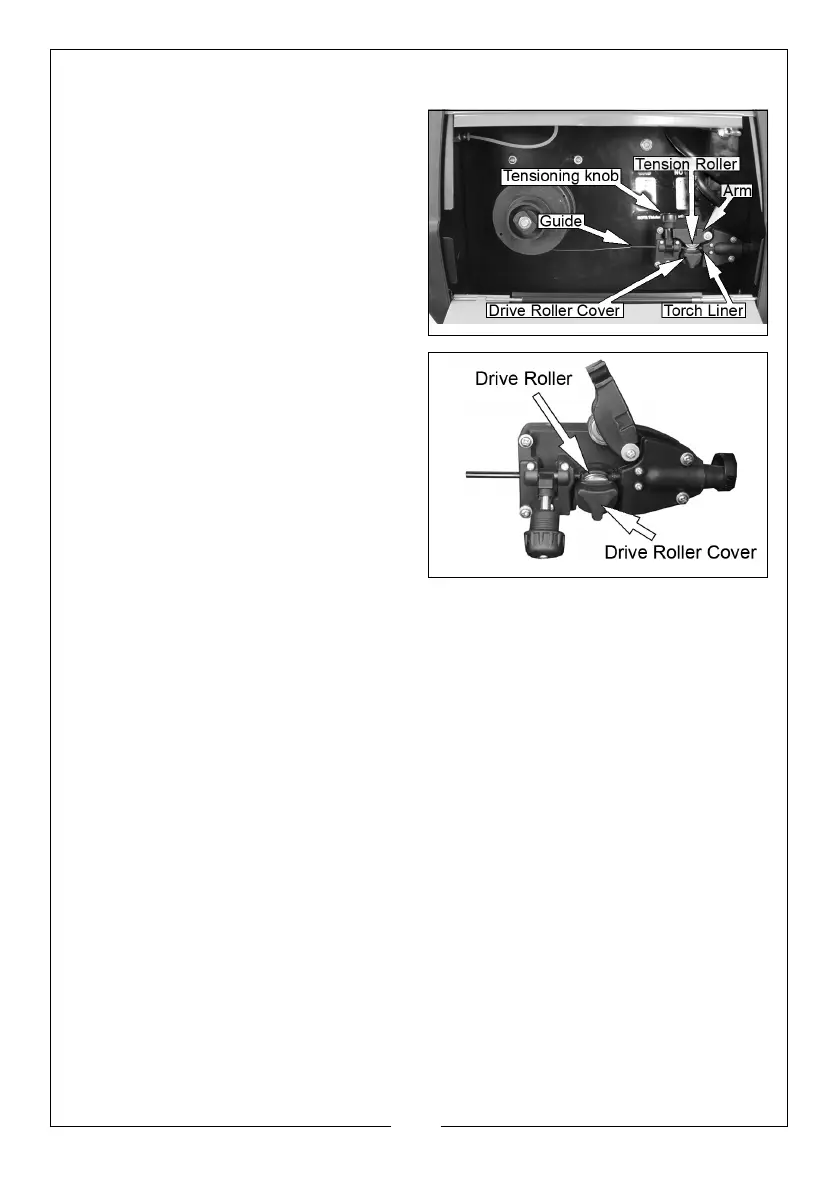
1. Loosen the tensioning knob and
pivot it towards you.
2. Lift up the arm.
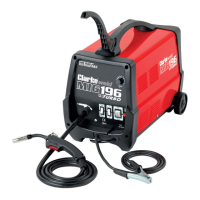
3. Take hold of the triangular knob
on the drive roller cover and
rotate it 90°anticlockwise to
release it.
4. Pull the roller retainer off the drive
spindle to reveal the roller.
5. Pull the roller off the drive spindle.
• The groove size is stamped on
the corresponding side of the
roller. Select the groove size
according to the size of the
wire you are using and put the
roller back on the spindle with
your chosen side facing you.
6. Replace the drive roller cover
back onto the drive spindle with
the opening facing right.
7. Ensure that the flanges at the base of the drive roller cover, seat fully into
the circular recess in the main moulding and then rotate the drive roller
cover through 90° to lock it in place.
THREADING THE WIRE
IMPORTANT: Do not release the tension on the wire as it will unravel causing
feeding problems later.
1. Pull out the end of the wire from the spool, taking care not to release the
tension.
• We recommend you cut off and discard the first 10 cm of wire from
the spool to avoid burrs and then straighten the next 15 cm of wire
to help with feeding.
2. Loosen the tensioning knob and pivot it towards you.
3. Lift up the arm.


 To Next Page