4
English
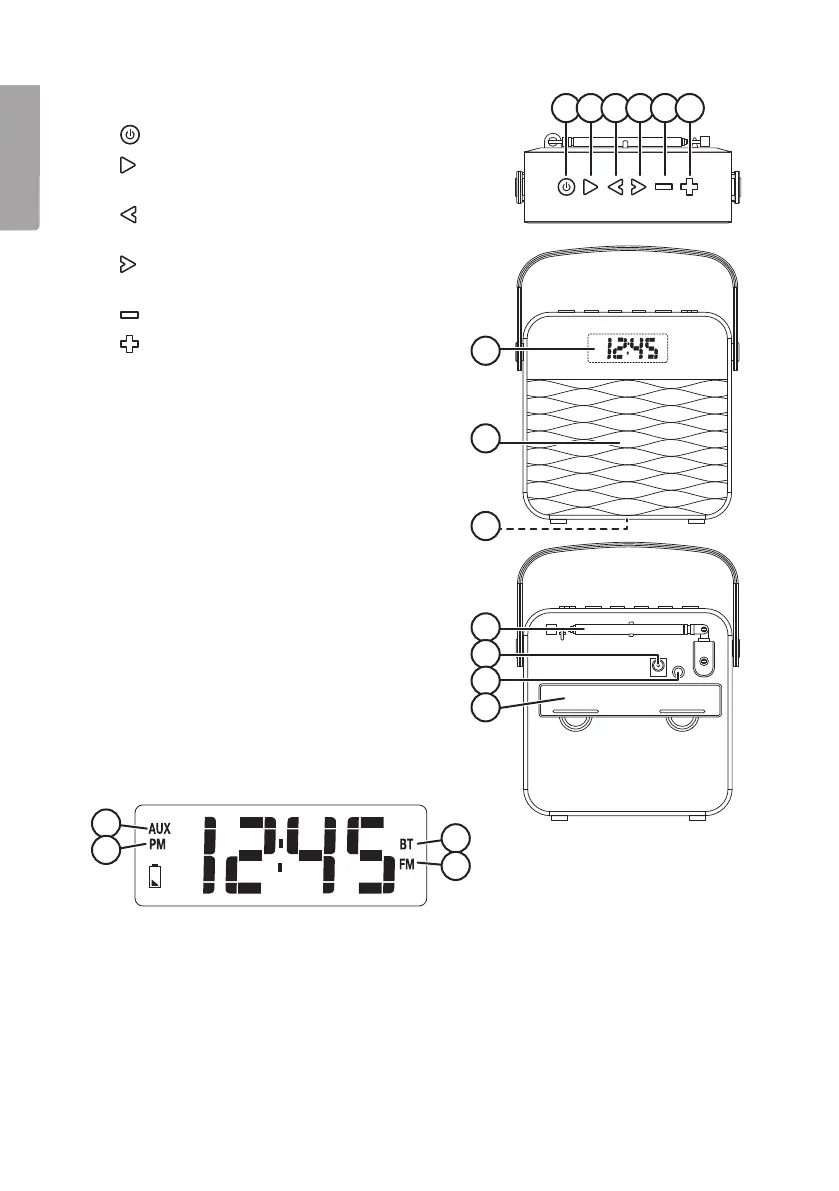
1 2 3 4 5 6
7
9
8
10
11
12
13
14
15
16
17
Buttons and functions
1. [ SOURCE ] On/off, function selector
2. [
SET/MEM/M+ ] Settings, play/pause,
Bluetooth connection
3. [
] Go down in frequency band, go back
in theplaylist
4. [
] Go up in thefrequency band, go
forwards in theplaylist
5. [
] Lower thevolume
6. [
] Raise thevolume
7. Display
8. Speaker
9. LED indicator for Bluetooth connection
10. Aerial
11. Mains adaptor socket
12. AUX IN socket (3.5 mm)
13. Battery cover
LCD display
14. “AUX” indicates that anexternal device is selected as theplayback source
15. “PM” indicates that the12-hour time display has been selected and that it is afternoon.
16. “BT” Indicates that Bluetooth has been chosen as theplayback source
17. “FM” Indicates that FM radio has been chosen as theplayback source


 To Next Page