4
English
Inserting batteries
1. Make sure that the [ OFF/ON ] switch is set to OFF (anticlockwise).
2. Remove thebattery cover and insert new batteries (3×AAA/LR03) observing
thepolarity markings in thebattery compartment. Refit thebattery cover.
3. When thebattery power is low, anempty battery symbol will appear
in theupper left corner of thedisplay. This means that it is time to
change thebatteries.
Operating instructions
Switching thepower on/off
1. Turn the [ OFF/ON ] switch clockwise to theON setting to switch theradio on and
adjust thevolume.
2. Turn the [ OFF/ON ] switch anticlockwise to theOFF setting to switch thepower off.
Setting thetime
1. Make sure that the [ OFF/ON ] switch is set to OFF (anticlockwise).
2. Press [ ▲ ] or [ ▼ ] to select 12- or 24-hour time display.
3. Press [ MODE ] to activate thetime setting mode.
4. Thehours digits will flash, press [ ▲ ] or [ ▼ ] to set thehour.
5. Press [ MODE ] to advance to theminutes setting.
6. When thetime has been set, press [ MODE ] to confirm.
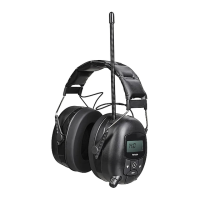
Note: If no settings have been made for 15 seconds when theear defenders are in
clock set mode, they will automatically revert to thelast clock setting.
Listening to theradio
1. Turn the [ OFF/ON ] switch clockwise to switch theradio on and set thedesired volume.
2. Press [
], to select FM.
3. Manual station search: Press [ ▲ ] or [ ▼ ] repeatedly to tune into thedesired station.
4. Auto station scan: Press and hold down [ ▲ ] or [ ▼ ] for 2 seconds and then
release thebutton to start scanning for stations. Thescan stops automatically
when astation has been found.
5. To save thetuned station: Hold down [ MODE ] for at least 2 seconds and then release it.
6. Press [ ▲ ] or [ ▼ ] to select thememory slot (1–10) which you wish to save
thestation on.
7. When theslot has been selected, press [ MODE ] to confirm.


 To Next Page