MP#XYY
32
www.tsicustomerservice.com26MMS9626REV.3
PRODUCT SPECIFICATIONS
WIRING
Adapter Input AC100-240V, 50/60Hz
Adapter Output DC15V 4.0A
Power Consumption 60 Watts
Standby Power Consumption < 1 W
Peak Music Power Output 300 W
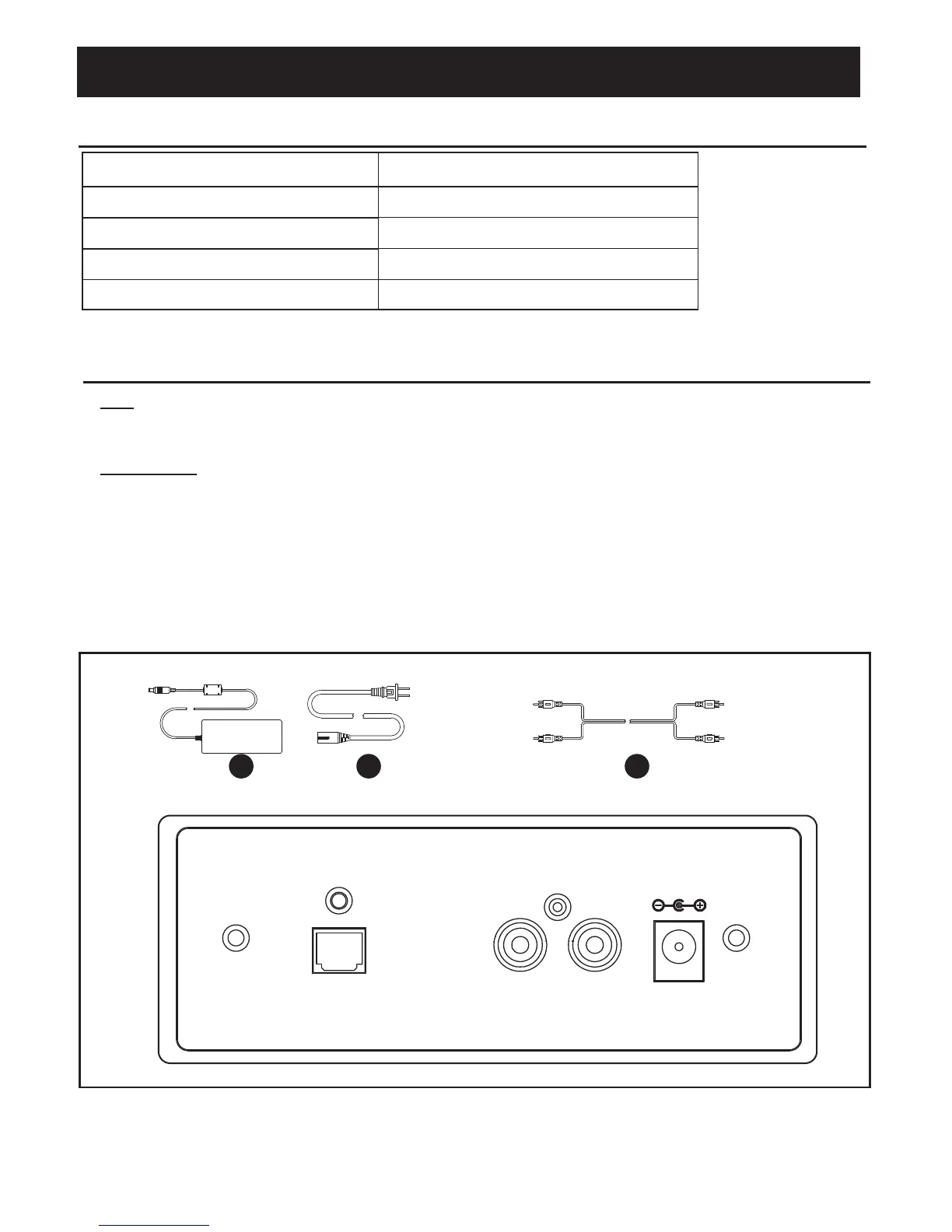
OPTICAL IN R AUX IN L DC 15V IN
1. RCA:
Your console includes RCA cables to stream audio from an external source (i.e.TV) to the sound
system.
2. Optical Cable:
You also have the additional option to stream audio using a standard Optical Cable (not included).
3. Insert the corresponding cables from your television or other source device into the back of the
sound system console.
1). RCA audio cables (part X – audio input R/L)
2). Optical cable (sold separately – optical input)
4. Plug the power cable (part V) into a standard 100-240V outlet and into the DC transformer (part W).
Plug the DC power source into the DC 15V port.
Ipod Dock: TS-ID01
J
V
W
Fig.1 Back Panel
Sound System: TS-4006-1753E0
X



 To Next Page