11
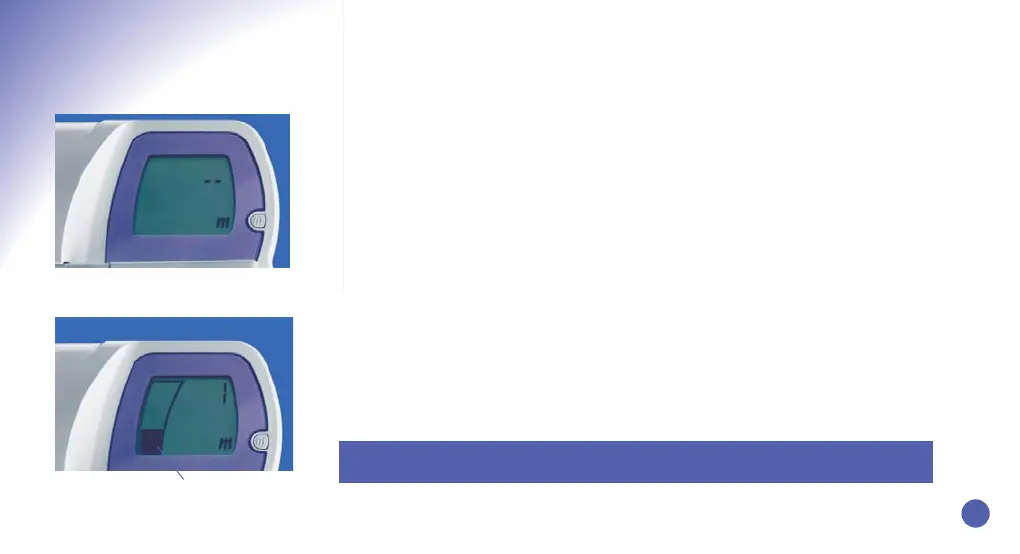
Initial Display
Display after m Button is pressed
Fertility Status Bar
Press m Button
and hold for 5
seconds until ‘1’ appears
• If your period starts in the night, or in the morning before your chosen m Button
setting time, you can press the m Butt
on when you wish that morning. If your period
starts during the day, after your chosen m Button setting time, you should WAIT until
the following morning before pressing the m Button. You should set this as day 1 of
your cycle.
• Press the m Butt
on firmly for 5 seconds. Release it when an ‘m’ and the day number ‘1’
appear on the Display Screen. Both will flash when they first appear but will stop
flashing and sta
y on the Screen when you release the m Button. Please Note: DO NOT
do a test yet.You only need to perform a test when the Monitor requests one.
• When you have set the m Butt
on correctly, the day number ‘1’ and an ‘m’ will appear,
indicating it is the first day of your cycle. A Fertility Status bar will also appear on the
scr
een to indicate that your fertility is presently at a Low level, which is normal at the
start of a cycle.
• If you press the m Button for too long, day number ‘2’ will appear. Don’t worry, you can
cancel it. If you have set your m Button on the wrong day, you MUST cancel it. To
cancel, press the m Button for 5 seconds until the ‘m’ Symbol disappears.The Display
Screen will then return to its original state (as if you had not yet set your m Button).
Setting the m Button
Please Note: The m Button can be set from day 1 to day 5 of your cycle. For further
information refer to questions 6 and 7 on page 23.
b09401_CB_FAM_Booklet.qxd 8/20/08 11:18 AM Page 13


 To Next Page