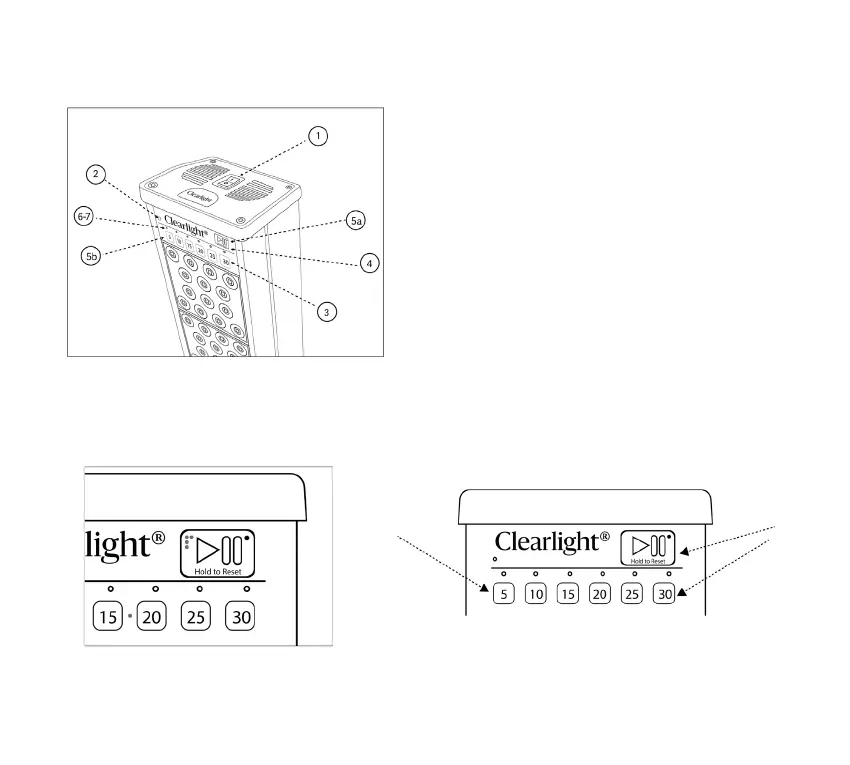
5. Operating
For Visually Impaired:
Tactile switches and Braille on controls.
10
1. Turn on the main power switch on the top.
2. Front panel lights up with a small red light when
powered on.
3. Choose session duration with one touch from
5 to 30 minutes.
4. Pause by pressing the Play-Pause buon, resume
by pressing again.
5. To reset timer:
A. Hold the Play/Pause buon for 2-3 seconds
for standby.
B. Press the desired time buon for a specific reset.
6. LED countdown shows therapy time in 5-minute
increments.
7. Last 4 minutes, LED flashes for the remaining time.
Automated Home System Integration:
Hold 5 and 30 buons, press Play/Pause
for timer override.
Fan Operation:
Aer turning o, the fan may run up to 5 minutes for cooling.



 To Next Page