11
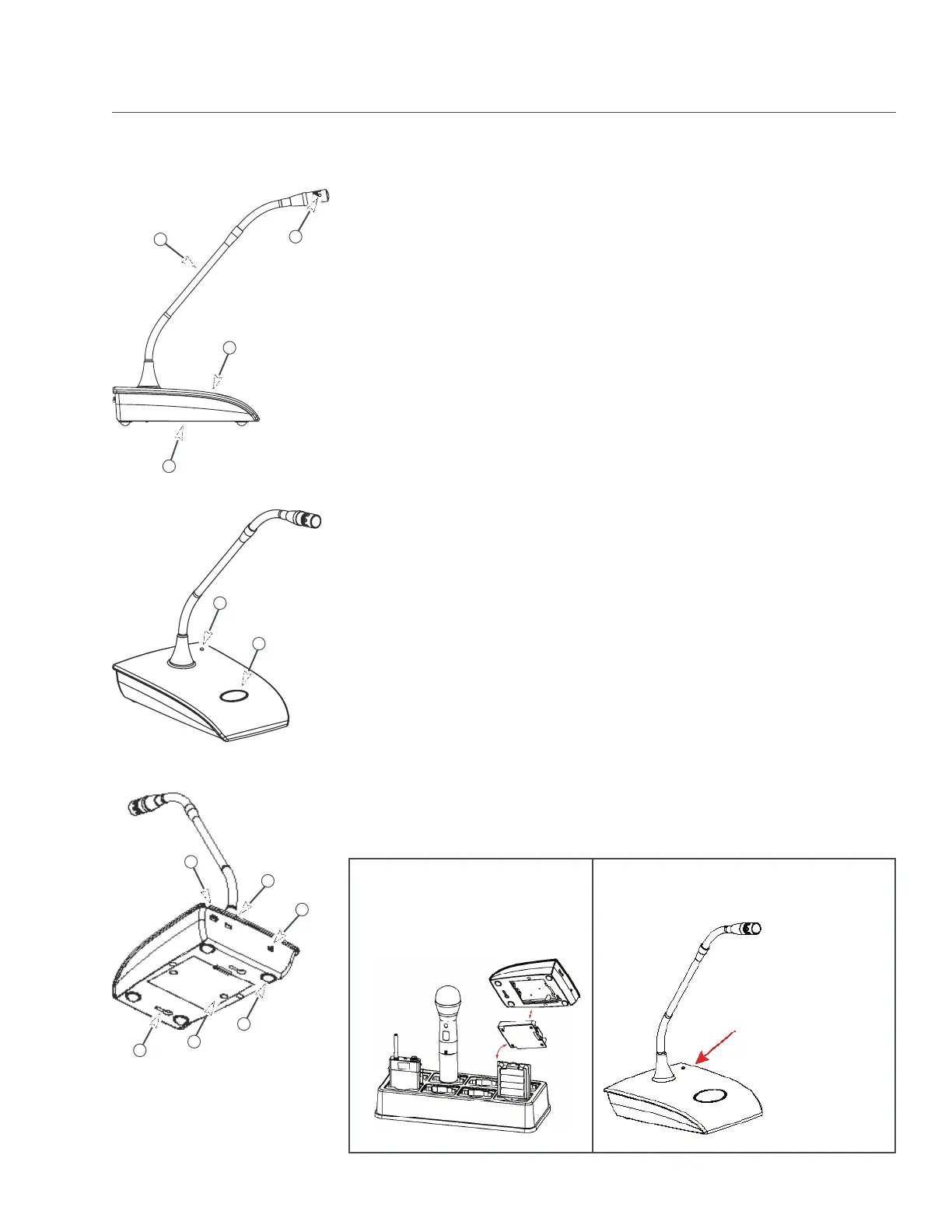
1. ClearOne Capsules: Cardioid polar pattern.
2. Goosenecks: Two flexible sections to extend over a laptop or briefcase. Available
in 6, 12, and, 18 inch lengths.
3. Radio-transparent ABS Top: Stylish design that hides and protects the antenna.
4. Cast Metal Bottom: Zinc base bottom adds stability and absorbs desk noise.
5. Power LED: (see fig. 2 below)
6. Button Programming Options:
1) press to talk.
2) press to mute.
3) toggle on or off.
7. Power Switch Programming Options:
1) On / Off.
2) On / Mute.
3) On / On.
8. I/R Sensor: Inputs programming instructions and encryption key from the
receiver.
9. USB Port: Doubles as the USB recharger connection and computer programming
port. The transmitter operates normally under USB power, with dead or no
batteries for permanent installations. When charging using the USB Port,
when the LED signals: RED = Charging / OFF = finished charging.
10. Battery Cassette: Pull tab to remove the battery cassette. Recharge the batteries
by inserting the cassette into the ClearOne Charging Dock. (See figure 1 below)
The battery cassette holds four, off-the-shelf, AA, NiMH batteries for up to 9.5 hours
continuous usage per charge.
11. Keyholes: For permanent mounting
12. Rubber Feet: Absorb desk noise and provide a stable, non-skid base.
(Figure 1) (Figure 2)
Recharge the batteries by
inserting the cassette into the
ClearOne Charging Dock.
RED = Audio Mute
GREEN = Audio Passes
BLINKING RED = Battery Low
BLINKING GREEN = Sync
Successful
When the Gooseneck Mic is in use, the
LED signals:
PODIUM GOOSENECK:
The ClearOne Podium microphone combines the professional audio specs
and security of a wired mic with wireless convenience. For use with battery
power or permanently install the microphone using USB power.
Transmitters:
5
6
2
3
4
1
8
7
9
11
10
12


 To Next Page