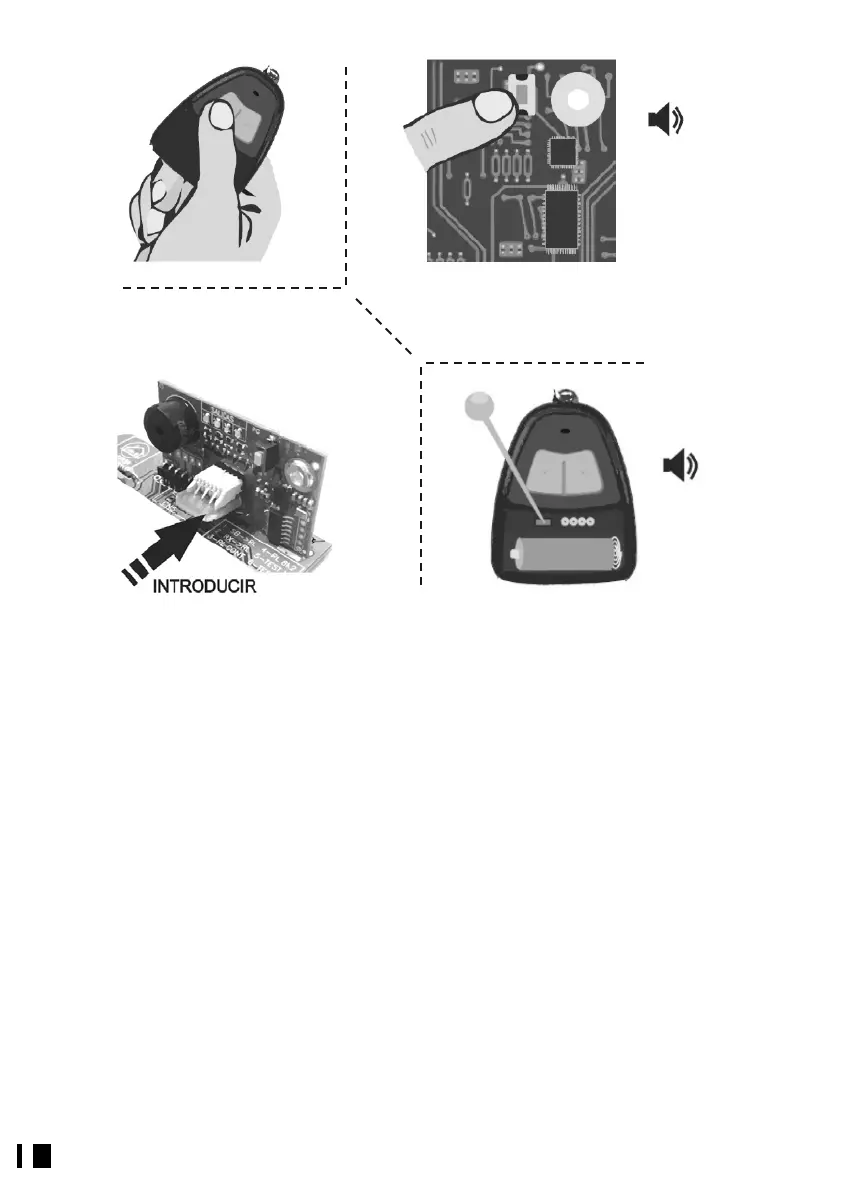
Fig. 7
Fig. 9
5.3.
ENABLE RADIO-SUPERVISED AUTHORIZATION
Standard the receivers only have the button authorization option; if you want to change
the type of authorization to Supervised or Direct, you can use the Programmer or
manually enable the Supervised Authorization mode in the following manner:
With the receiver connected and working, extract the TM 400 memory card (Fig. 5) and
press the receiver program button (Fig. 6). 3 beeps will sound and the LED
corresponding to output 1 will light up (Fig. 6). Now press the program button on a
transmitter already authorized by the receiver; one short beep and one long one will
sound (Fig. 10), indicating that Supervised Authorization mode has been activated. Press
the receiver program button repeatedly until it leaves this mode (Fig. 8) and insert the
TM 400 card again (Fig. 9).
To disable Supervised Authorization mode, proceed in the same manner, in this case
two short and one long beep will sound.


 To Next Page