5.
USE
Once the transmitters are programmed in the Receiver, pressing a channel will activate
the corresponding Receiver outputs.
WARNING, once working, with the Installation Key, the Memory Card will be linked to the
receiver and can only be reused in a new Receiver through the use of the programmer. See
its instructions.
5.1.
TRANSMITTER REPLACEMENT
With a replacement transmitter previously recorded with a programmer, the user can
automatically authorize the new transmitter by pressing it a couple of times in the vicinity
of the receiver, the old transmitter becoming deauthorized.
5.2.
RECEIVER OUTPUT CONFIGURATION
Be default, the Receivers come configured such that output 1 is activated when it
receives channel 1, and output 2 when it receives channel 2, but there are certain
circumstances in which it is necessary to change this configuration.
We can change the configuration using a compatible Programmer or manually, so let’s
proceed to the next form:
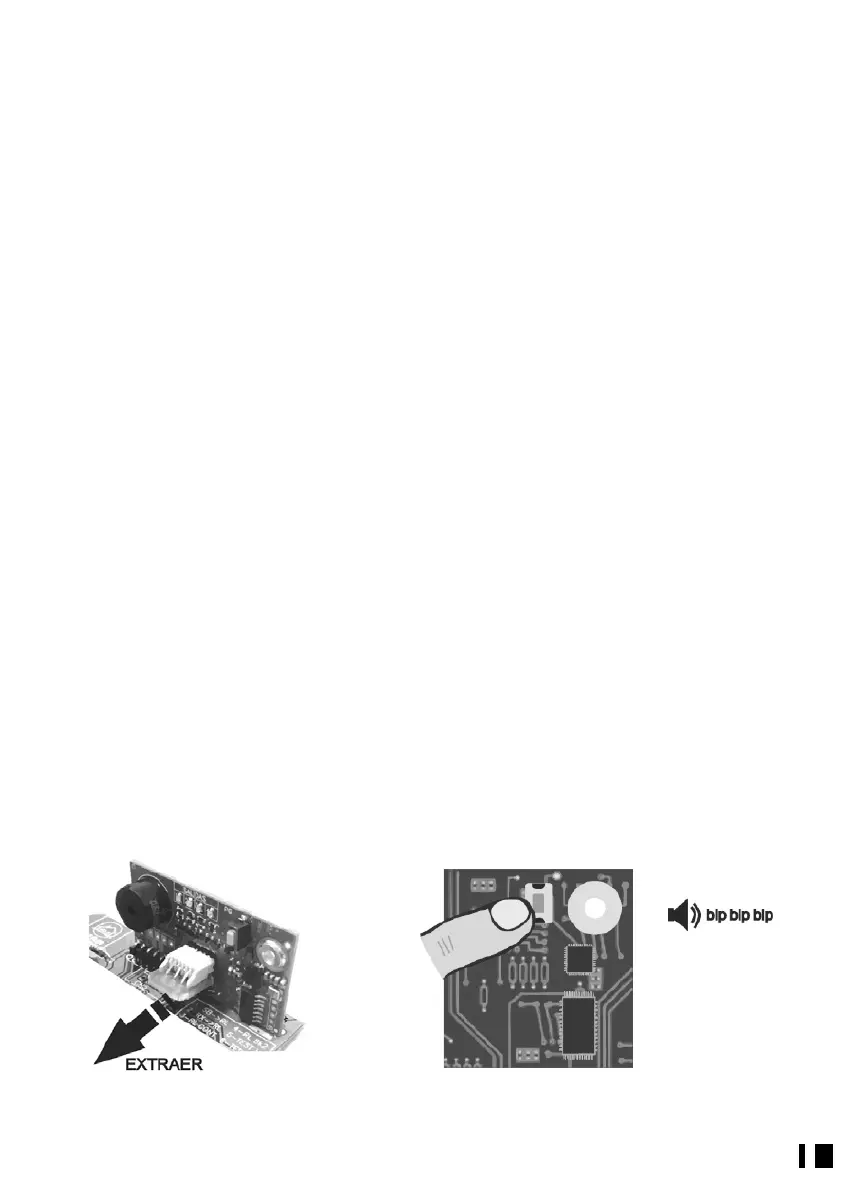
With the receiver connected and working, extract the TM 400 memory card (Fig. 5) and
press the receiver program button (Fig. 6). 3 beeps will sound and the LED
corresponding to output 1 will light up. If you wish to change the channel associated to
this output, press the desired channel on a transmitter in the system (Fig. 7) (the receiver
will emit a beep upon accepting the new channel), if you do not wish to change the
output simply press the receiver program button and go on to output 2 of the receiver,
and so on. After configuring output 4 and pressing the receiver program button (Fig. 8),
it will leave channel programming mode, three long beeps will sound and it will
continue beeping until the TM 400 card is inserted again (Fig. 9). The outputs are now
configured, you can change this configuration at any time.
Fig. 5


 To Next Page