3.
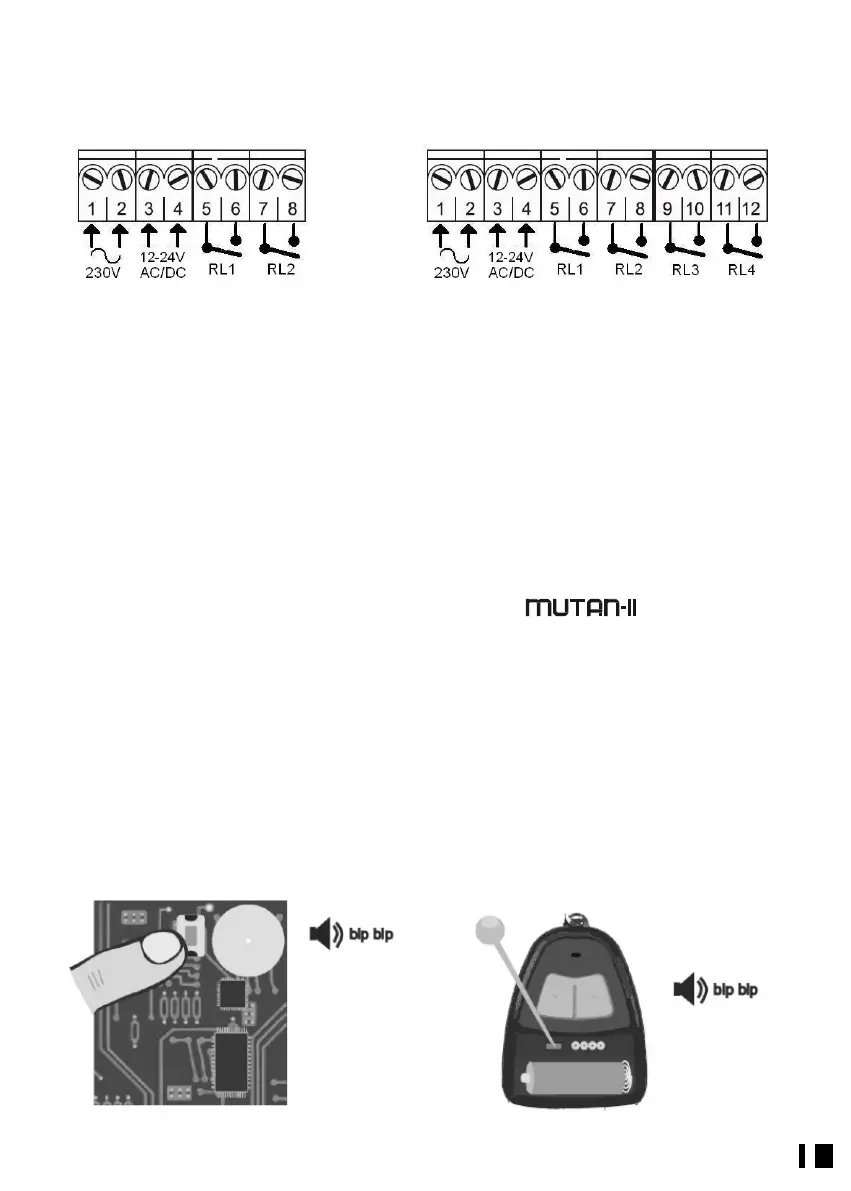
CONNECTION
RN 42 RN 44
1-2: 230Vac Power
3-4: 12 to 24V ac/dc power according to switch setting.
5-6: NO Contact, receiver port 1
7-8: NO Contact, receiver port 1
9-10: NO Contact, receiver port 1
11-12: NO Contact, receiver port 1
4.
PROGRAMMING
The Receiver features 3 transmitter programming modes.
• a) By the program key.
• b) Radio supervised authorization (if enabled).
• c) Direct Authorization (if available. Only applies to MUTAN II).
Modes a and b:
1. Mode a. Press the program button. You will hear 2 short beeps. It is now in
programming or learning mode. (Fig. 1).
Mode b. If radio programming is enabled (see section 5.3), you can access programming
mode in the Receiver with a “working” transmitter.
Press the button hidden under the battery cover of a working transmitter, and the
Receiver will enter programming or learning mode, as indicated by 2 short beeps. (Fig.
2).


 To Next Page