Call: +44 (0)20 8319 7777 | Email: info@clevertouch.co.uk | or visit: clevertouch.co.uk
• The Android system works without a computer connected.
• Start by pressing the on button (on the 55” power this is at the side)
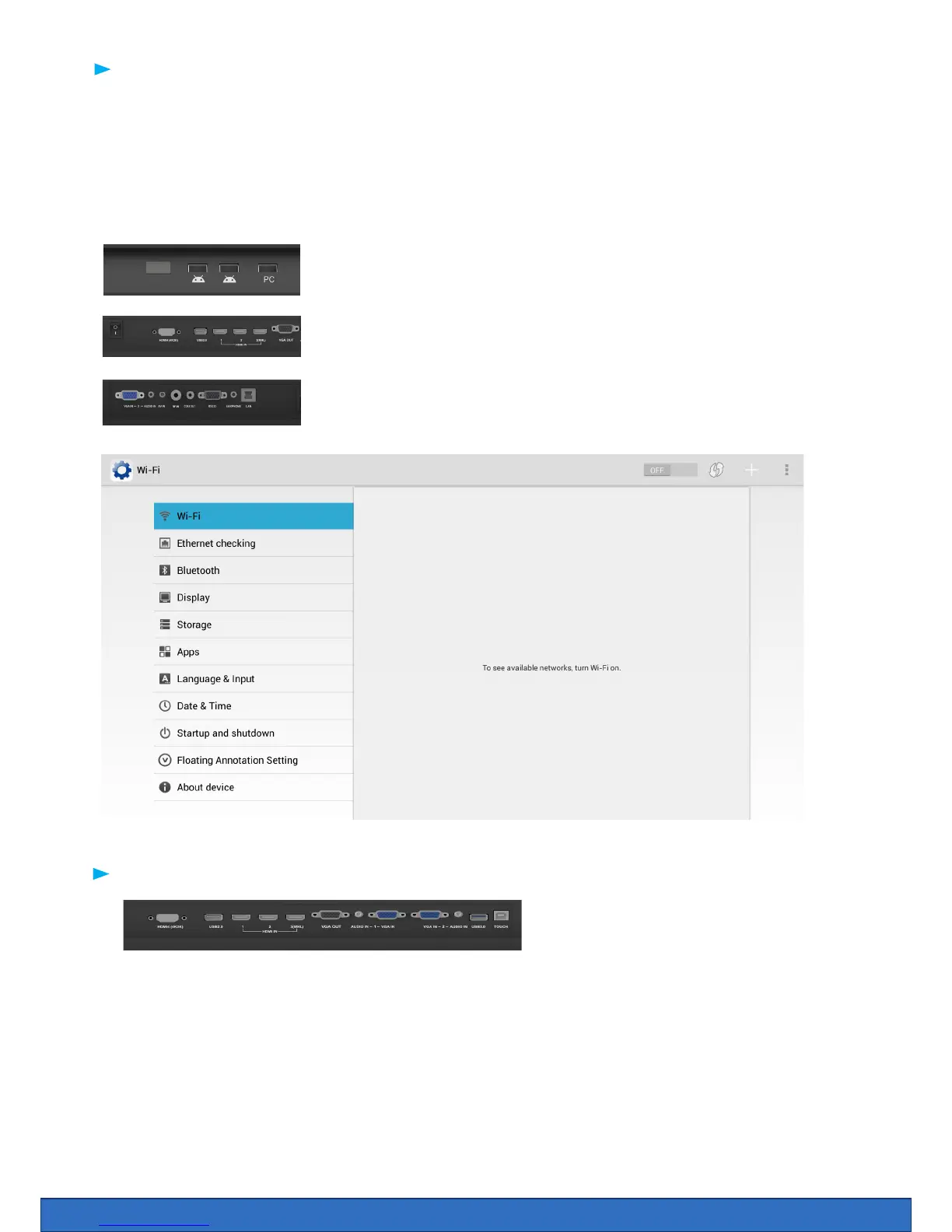
• To access the internet or Wi-Fi, you must either have an internet cable plugged into the port WAN or
install the provided Wi-Fi dongle into one of the USB ports.
• Click Home > Apps > Settings > WiFi > there is an on / o switch at the top of the page
Using Clevertouch with computer
To connect a computer we have to connect:
• Monitor cable (VGA or HDMI) from PC to screen
• Audio cable (only required with VGA)
• Touch Cable (USB cable) to screen and PC
Using your Clevertouch without a PC
Using your Clevertouch with an external PC
Wi dongle can be inserted in the front USB
slots as shown
Wi dongle can also be inserted in the side
USB2.0 slot as shown
Lan Port for network connectivity


 To Next Page