2
© 2016 Directed. All rights reserved.
Using Your System
Commands At a Glance
System State Press/Release Press/Hold for 3 sec.
ENGINE OFF START ENGINE CAR FINDER
ENGINE ON UNLOCK DOORS STOP ENGINE
Start Engine
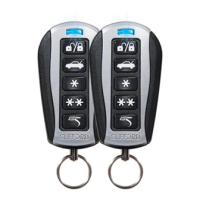
When the engine is OFF, press and release the remote control button
to start the engine.
See"Using Remote Start" on page 3 for more feature details.
Unlock Doors
When the engine is ON, press and release the remote control but-
ton. The doors unlock, the parking lights flash, the horn sounds (if con-
nected) as confirmation.
Note: Horn honk may be an optional feature that requires additional
parts and labor.
Stop Engine
When the engine is ON, press and hold the remote control button for
three seconds. The engine stops running and the parking lights turn off.
Car Finder
When the engine is OFF, press and hold the remote control button for
three seconds. The parking lights flash slowly several times allowing
you to locate your vehicle.



 To Next Page