
 Need help?
Do you have a question about the Clifford CONCEPT 470 and is the answer not in the manual?
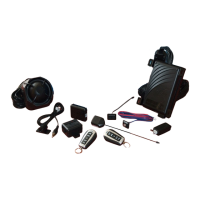
Lists main system components including control unit, transmitters, sensors, and accessories.
Emphasizes that professional installation by an authorized dealer is mandatory for warranty.
Recommends careful reading of the guide for optimal system usage and understanding.
Details the transmitter power source and low battery warning indication.
Instructions for completing warranty card and keeping proof of purchase.
Outlines the conditions for FCC compliance and user operation authority.
Information on how to buy new or replacement remote controls.
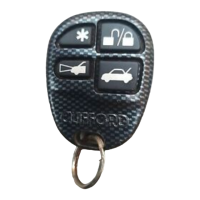
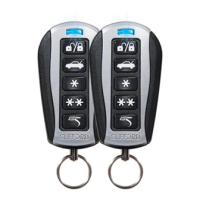
Identifies the function of each numbered button on the transmitter.
Explains the system's ability to learn transmitter buttons and customization options.
Details the default functions assigned to each transmitter button.
Describes manual arming and the automatic passive arming feature.
Details manual disarming and identifies Tamper Alert indications.
Explains how to disarm the system using the Valet switch and PIN.
How to silence an active alarm without disarming the system.
How to temporarily disable confirmation chirps for arming/disarming.
Procedure to temporarily disable specific sensor inputs.
How sensor zones are bypassed during Intellistart or SmartWindows commands.
Explanation of sensor zone bypass when an auxiliary output is active.
How to use the transmitter to attract attention in emergency situations.
Procedure to disarm the system or enter valet mode via the Valet switch.
Steps to put the system into and take it out of Valet Mode using the Valet switch.
How to activate Valet Mode using specific transmitter button combinations.
Procedure to bypass the auto-arming feature for a single cycle.
How to review the last eight system trigger events using the Valet switch.
How the system identifies and bypasses false alarms caused by repeated triggers.
Process for customizing or deleting siren sounds using the transmitter and Valet switch.
Overview of how the microprocessor monitors sensors and reports triggers.
Describes the chirps indicating bypassed inputs during arming.
Explains the meaning of extra chirps upon disarming, indicating a trigger event.
A table correlating system actions, chirps, and light flashes.
Lists zone numbers and their corresponding sensor inputs or triggers.
Details the system's use of Random Code Encryption for security.
How the system stores its current state (Valet, armed, etc.) in memory.
Explains when the system enters Power Saver Mode to conserve battery.
Options for active/passive arming, auto-lock, auto-unlock, and passive door locking.
Settings for chirps, siren duration, entry delay, and panic mode.
Options for FACT II, remote valet, and auto-lock RPM.
Introduction to the Cliffnet Wizard software for system configuration.
Step-by-step guide to access and navigate the system's programmable features.
A table outlining programmable features and their settings.
Process for programming additional remote controls to the system.
Detailed descriptions for auto-arm, auto-lock, and auto-unlock settings.
Configuration options for audible chirps and secondary unlock outputs.
Configures PIN, siren sounds, and FACT II settings.
Options for remote valet, entry delay, and panic feature activation.
How passive arming integrates with automatic door locking.
Settings for siren alarm length and secondary unlock functionality.
Configures auto start settings and assigns arm/disarm transmitter channel.
Configures transmitter channels for accessory outputs and window control.
Assigns channels for silent mode, remote valet, and window control.
Configures remote start and the function to clear all remotes.
Specifies the allowed digits and rules for creating a PIN code.
Step-by-step guide for setting or changing the system's PIN code.
Steps to verify that the newly programmed PIN code has been accepted.
Details the steps involved in the automatic immobilization process.
Methods to disarm the auto-immobilization feature when active.
Configures valet mode to last until ignition off or only until next ignition cycle.
Description of the audio sensor's function for detecting breaking glass.
Description of the dual-zone shock sensor's impact detection capabilities.
Advises periodic system checks by an authorized dealer for optimal operation.
Defines the central processing unit of the security system.
Explains physical connections providing data to the system.
Describes the function of the system's status indicator light.
Explains the engine immobilization feature for security.
Defines the function of the Valet switch.
Describes the device responsible for audible alerts.
Defines the handheld remote control unit.
Explains what happens during an alarm event.
How the backup battery maintains system operation during power loss.
How to operate the vehicle's power trunk release.
Automatic power window control using the SmartWindows system.
Details the IntelliStart remote start system capabilities.


 To Next Page
 General