Touch Pad Control
Setup & Commissioning
TEK600 Series Control Page 23
Setting the Fan Speed
To enter into the installer maintenance to adjust minimum and
maximum fan speeds; the following steps must be followed.
STEP 1 Ensure the control is in the OFF mode.
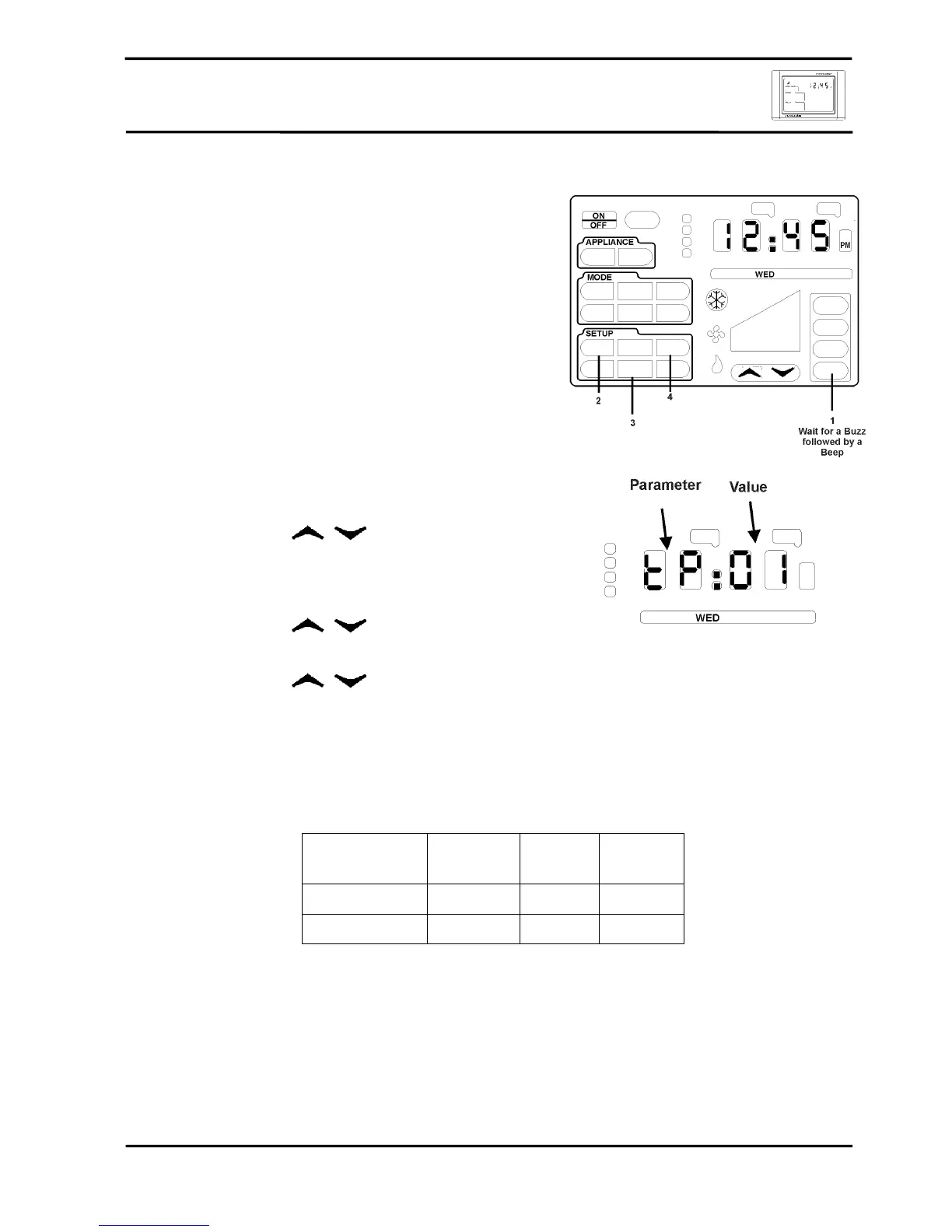
STEP 2 A series of unseen icons must be pressed
1. Press and hold the ZONE 4 icon allowing for a
BUZZ followed by a BEEP.
2. In quick succession press the unseen SETUP
icons ENTER, REVIEW & CLOCK.
3. If successfully executed the clock LEDs will
display tP:01.
4. If unsuccessful repeat 1 and 2 of STEP 2.
STEP 3 Using the
select the LED display changed
to E:_ _.
STEP 4 Press ENTER. The display will now change to 1:01.
STEP 5 Using the
select the parameter to be
changed. Press ENTER.
STEP 6 Using the
change the value as per table
below. Press ENTER to check the revised setting.
STEP 7 To change the other fan speed parameter repeat Step 4 – 7.
STEP 8 Press FINISH to exit.
Fan Speed
Installer
Maintenance
Parameter Default Value
Range
Low Fan Speed 1 92 40 – FF
High Fan Speed 2 FF FF – 9b


 To Next Page