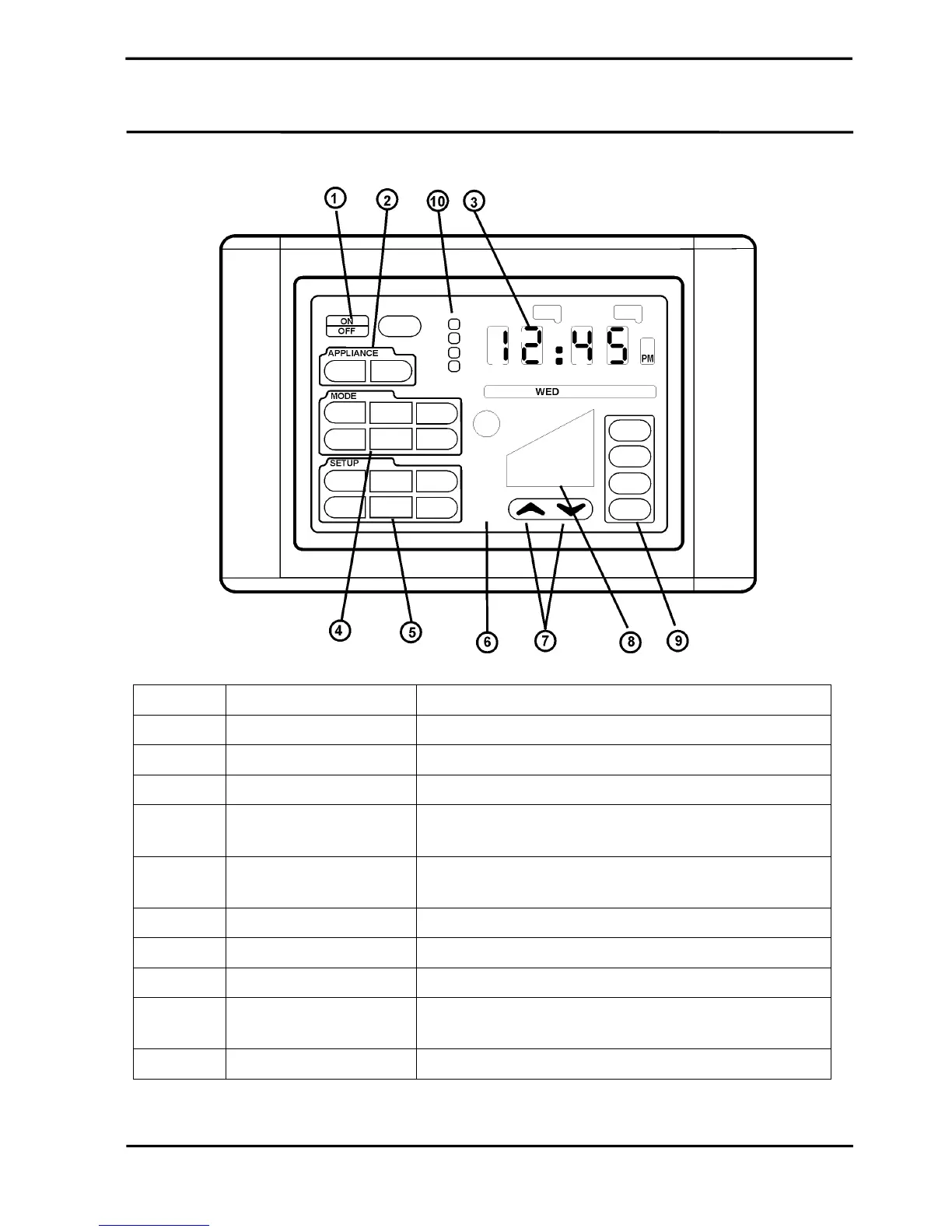
Touch Pad Control
Navigating the Controls
TEK600 Series Control Page 6
Number Description Function
1 ON / OFF Turns the unit ON or OFF
2 APPLIANCE Touch any area with the APPLIANCE outline to select product.
3 CLOCK 12 hour clock denoting AM / PM and the day.
4 MODE Touch any area within the MODE outline and the available
operating modes will be displayed.
5 SETUP Touch any area within the SETUP outline and the available
operating modes will be displayed.
6 FUNCTION SYMBOLS Symbols indicate the unit components functioning.
7 UP / DOWN ARROWS Arrows will adjust the output of the unit.
8 FUNCTION LEVEL Function level displays the output level settings with graphic bars
9 ZONES Where there is more the one unit fitted the zones buttons can
control the ON / OFF function of one or more air conditioners.
10 Periods This identifies which time period program is operating.


 To Next Page